MCP server · GitHub
GitHub Organization Signal Scanner MCP server
by mambalabsdev
Look up a company's GitHub organization and get its repos, languages, stars and activity.
This is a small helper that lets your AI look up a company's GitHub organization starting from just a web address. You give it a domain like stripe.com, and it comes back with the company's GitHub page, how many repositories they have, what languages they use, how many stars they have, and when they last pushed code. It is handy for sales, research and recruiting people who want a quick read on how active a company is on GitHub without clicking around themselves.
What is an MCP server? The 30-second version
On its own, your AI can only chat with you. It cannot go and check a website or an app unless you give it a helper. An MCP server is exactly that helper: a small program that gives your AI one new skill. This one gives your AI the skill of looking up a company's GitHub organization, so when you ask about a company, the AI can go and fetch the real numbers for you.
What this MCP server does
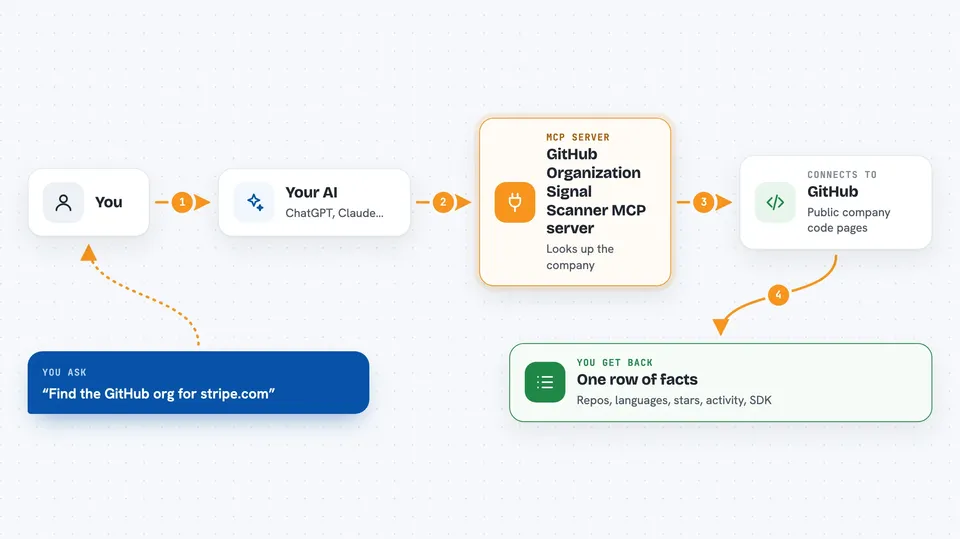
You ask your AI something like find the GitHub organization for stripe.com. The AI passes that request to this helper. The helper talks to GitHub's public API through an Apify service, finds the matching organization, and reads its public information. Then it hands back one flat row of facts about that company, and your AI shows it to you in the chat.
 Click to zoom
What you can do with it
- Find the GitHub organization behind a company domain
- Count how many public repositories a company has
- List the top programming languages used across their repos
- Show total stars and the most starred repository
- Tell you when they last pushed code and how many repos are active
- Check whether the company ships a public SDK
- Skip discovery if you already know the GitHub organization name
Try asking your AI
- “Find the GitHub organization for stripe.com and summarize its activity.”
- “Scan the GitHub org vercel and tell me its top languages and total stars.”
- “Does figma.com ship a public SDK? Check its GitHub organization.”
- “Scan notion.so's GitHub org, counting a repo as active if it was pushed in the last 30 days.”
What it gives back to you
You get back one flat row of facts about the company, shown as a short list or a small table in your chat. It includes the GitHub organization name and link, repository count, followers, top languages, total stars, the most recent push date, how many repos are active, and whether they ship a public SDK. If GitHub was busy or rate limited, the row says so instead of showing a fake zero.
Before you start
What you need
- Node.js 18 or newer on your computer
- A free Apify account with an API token (a kind of password for apps; you get it from the Apify website)
- Optional: your own GitHub personal access token, free to create, if you want to scan more than a handful of companies
Good to know
It reads public GitHub information only, but if you give it your own GitHub token, that token is used for the lookups, so keep it private.
Install it with your AI
Add GitHub Organization Signal Scanner MCP server to your AI, no technical skills needed
You don't install anything by hand. You copy one prompt, paste it into an AI that can work on your computer, and it checks, installs and connects the server for you, asking you when it needs something.
Sign in to get the install prompt
Members get a ready-made prompt that lets the Claude desktop app check GitHub Organization Signal Scanner MCP server, install it and connect it for them, step by step. You don't need any technical skills: you copy, paste and answer a few questions. Your connected AI can also find and install any of the 4,609 MCP servers here for you.
Who it's for
Sales, research and recruiting people who want a fast, factual read on how active a company is on GitHub.