MCP server · Research
WP Goldmine MCP server
by Bishop81
Find WordPress and WooCommerce plugin ideas worth building, based on weak spots like abandonment or bad ratings.
This is a helper that lets your AI look through the WordPress plugin directory and point out plugins that look shaky. It is handy if you build or sell plugins and want to know where there might be room for something better. You do not need to install WordPress or scrape anything yourself.
What is an MCP server? The 30-second version
On its own, your AI can only chat with you. An MCP server is a small helper program that gives your AI a new skill or a connection to an app or service. This one connects your AI to wpgoldmine.io, which keeps a live view of the WordPress plugin directory. Once it is connected, you can ask your AI questions about plugin opportunities and it will go look them up for you.
What this MCP server does
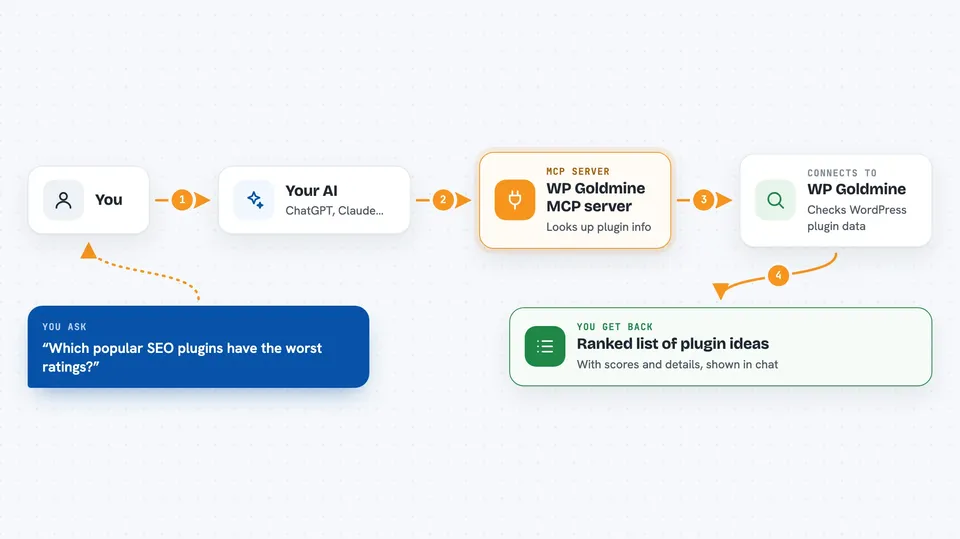
You ask your AI something like which popular SEO plugins have the worst ratings. Your AI passes that question to this helper. The helper talks to wpgoldmine.io, which checks the WordPress.org plugin directory and scores each plugin. You get back a ranked list or a short snapshot, right in the chat.
 Click to zoom
What you can do with it
- List the ready-made opportunity angles you can pick from
- Find plugins that look abandoned in a niche like forms or backup
- Spot popular plugins with low ratings
- Filter by number of active installs
- Look at WooCommerce plugins instead of WordPress ones
- Get a one-plugin snapshot with scores for a specific plugin
Try asking your AI
- “Find abandoned WordPress plugins in the forms niche I could rebuild”
- “Which popular SEO plugins have the worst ratings?”
- “Give me the opportunity score for wp-super-cache”
- “Show me WooCommerce plugins with lots of installs but weak support”
What it gives back to you
You get a ranked list of plugins with details like installs, rating, when it was last updated, and opportunity scores. For a single plugin, you get a short snapshot with the same kind of numbers. It all shows up as text in your chat, so you can read it and ask follow-up questions.
Before you start
What you need
- The Claude desktop app or another MCP client like Cursor or Windsurf
- Node.js installed on your computer (the helper runs through npx)
- Optional: a WP Goldmine account token if you want more results and extra fields
Good to know
The scores and lists are suggestions based on public directory data, not guarantees, so check a plugin yourself before you decide to build a replacement.
Install it with your AI
Add WP Goldmine MCP server to your AI, no technical skills needed
You don't install anything by hand. You copy one prompt, paste it into an AI that can work on your computer, and it checks, installs and connects the server for you, asking you when it needs something.
Sign in to get the install prompt
Members get a ready-made prompt that lets the Claude desktop app check WP Goldmine MCP server, install it and connect it for them, step by step. You don't need any technical skills: you copy, paste and answer a few questions. Your connected AI can also find and install any of the 4,609 MCP servers here for you.
Who it's for
Plugin developers, WordPress agencies, and product people looking for a niche to build in.