MCP server · Research · official
Tracetify MCP server
by tracetify · official
Ask your AI how a product grew, check your own Search Console, and audit a site, all in one chat.
Tracetify is a service that rebuilds how a product grew over time, using public sources with dates and links. This MCP server connects Tracetify to your AI assistant, so you can ask questions about competitors, your own search traffic, or your site's health without leaving the chat. It is handy for marketers, founders, and SEO folks who want answers with sources instead of guesses.
What is an MCP server? The 30-second version
On its own, your AI can only chat with you. An MCP server is a small helper program that gives your AI a new skill or a connection to an app or service. This one connects your AI to Tracetify, so when you ask about a competitor's growth or your Search Console numbers, the AI can go look things up there and bring the results back to you.
What this MCP server does
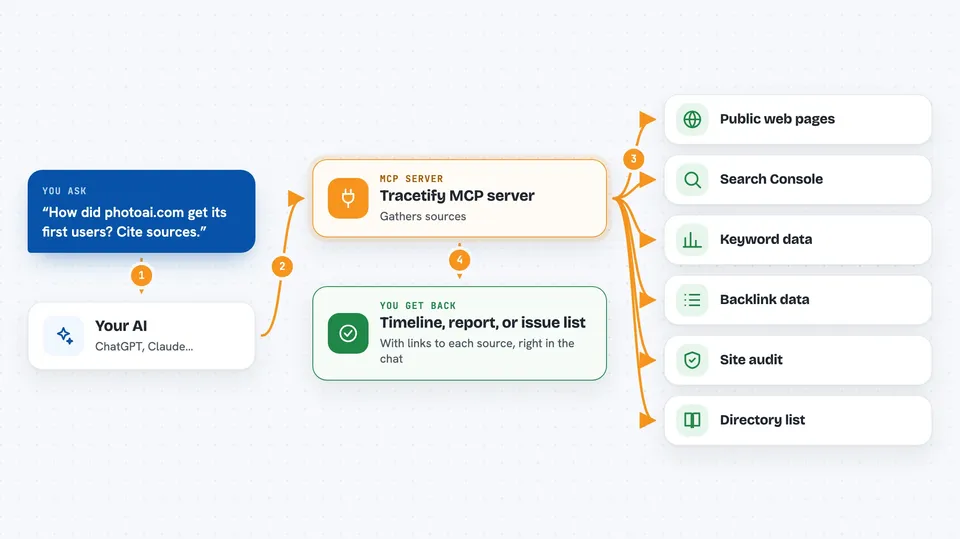
You ask your AI a question, like how a competitor got its first users. The AI uses this helper to talk to Tracetify. Tracetify gathers public sources, dates them, and links each claim to the page it came from. Then the AI shows you a timeline, a report, or a list of issues, right in the chat. Some actions cost credits from your Tracetify balance, and the AI tells you the price before it runs them.
 Click to zoom
What you can do with it
- Trace how a competitor grew, with dated and linked sources
- Read your own Search Console clicks, impressions, and ranking keywords
- Audit a site for broken links, missing titles, and thin content
- Find who competes with a domain for the same keywords
- Check search volume, CPC, and difficulty for keywords
- See referring domains and anchor texts for backlinks
- Get a hand-verified list of directories that give dofollow links
Try asking your AI
- “How did photoai.com get its first users? Cite the sources.”
- “My page ranks #12 for ai headshot generator. What should I change to reach page one?”
- “We just deployed. Audit example.com and fix what you find.”
- “Where can I get my new SaaS listed for real dofollow links?”
What it gives back to you
You get answers in the chat: a growth timeline with links, a report summary, a list of site issues grouped by severity, or numbers like clicks, impressions, and keyword positions. Some tools return tables or bullet lists you can read and act on. If a tool costs credits, it tells you the price first and waits for your yes.
Before you start
What you need
- A Tracetify account
- An API key from your Tracetify dashboard (a kind of password for apps)
- Credits on your Tracetify balance for paid tools
- Claude Code, Claude Desktop, Cursor, or Codex
Good to know
Some tools spend credits from your Tracetify balance, so the AI will quote the price and wait for your yes before running them.
Install it with your AI
Add Tracetify MCP server to your AI, no technical skills needed
You don't install anything by hand. You copy one prompt, paste it into an AI that can work on your computer, and it checks, installs and connects the server for you, asking you when it needs something.
Sign in to get the install prompt
Members get a ready-made prompt that lets the Claude desktop app check Tracetify MCP server, install it and connect it for them, step by step. You don't need any technical skills: you copy, paste and answer a few questions. Your connected AI can also find and install any of the 4,609 MCP servers here for you.
Who it's for
Marketers, founders, and SEO specialists who want sourced answers about competitor growth, their own search traffic, and site health.