MCP server · Research · official
Revnuvo MCP server
by hardeyhemy · official
Ask your AI what changed at a company and get answers backed by evidence.
Revnuvo is a service that watches company websites, the tools they use, and their internet setup over time. It notices when something changes, like a new technology appearing on their site. This MCP server lets your AI ask Revnuvo those questions for you, which is handy if you research companies for sales, marketing, or partnerships.
What is an MCP server? The 30-second version
On its own, your AI can only chat with you using what it already learned. An MCP server is a small helper that gives your AI a new skill or a connection to another service. This one connects your AI to Revnuvo, a company intelligence service. So when you ask about a company, your AI can look it up through Revnuvo and bring back real, dated facts instead of guessing.
What this MCP server does
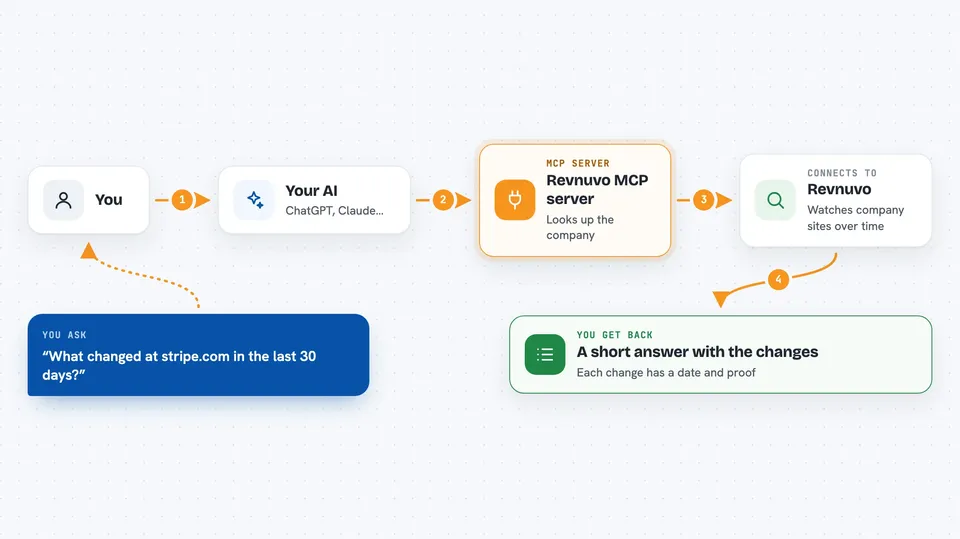
You ask your AI something like what changed at a company's website. Your AI sends that question to the Revnuvo helper. The helper talks to Revnuvo's service, which has been watching that company's site, technologies, and internet records over time. Revnuvo sends back the changes it found, along with the evidence behind each one. Your AI then shows you a clear answer in the chat.
 Click to zoom
What you can do with it
- Look up a company and see basic facts about it
- See what technologies a company uses on its website
- Find out what changed at a company recently
- Get a timeline of changes for a company over time
- Search for companies showing a certain signal, like adopting a new tool
- Set up monitoring for a company you care about
- Verify details about a company before you trust them
Try asking your AI
- “What changed at stripe.com in the last 30 days?”
- “Which technologies does shopify.com use on its site?”
- “Show me the timeline of changes for notion.so”
- “Find companies that recently started using a new payment tool”
What it gives back to you
You get back a clear answer in the chat, usually a short summary plus a list of changes or facts. Each item comes with a date and the evidence behind it, so you can see why Revnuvo says something changed. Some answers include a timeline or a list of technologies. If you set up monitoring, you can check back later for new signals.
Before you start
What you need
- A free Revnuvo API key from app.revnuvo.site (100 calls per month, no credit card)
- An AI app that can connect to MCP servers, like Claude Desktop
- Node.js installed if you use the npx setup command
Good to know
The free plan allows 100 calls per month and 3 monitored companies, and paid plans cost money, so keep an eye on how often your AI uses it.
Install it with your AI
Add Revnuvo MCP server to your AI, no technical skills needed
You don't install anything by hand. You copy one prompt, paste it into an AI that can work on your computer, and it checks, installs and connects the server for you, asking you when it needs something.
Sign in to get the install prompt
Members get a ready-made prompt that lets the Claude desktop app check Revnuvo MCP server, install it and connect it for them, step by step. You don't need any technical skills: you copy, paste and answer a few questions. Your connected AI can also find and install any of the 4,361 MCP servers here for you.
Who it's for
Sales, marketing, and partnership teams who research companies, plus anyone who wants to keep an eye on what a company is doing online.