MCP server · Research
AI SEO MCP server
Check why AI chatbots do or do not mention your web pages, and get plain fixes.
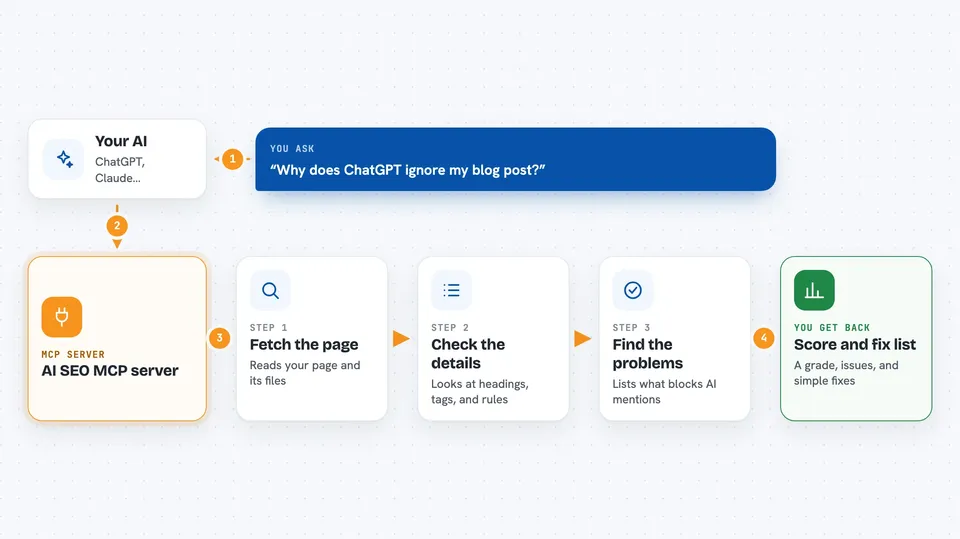
This is a small helper that lets your AI look at a web page and tell you why AI tools like ChatGPT or Perplexity might skip it when answering questions. It checks things like your robots.txt file, your page structure, and your schema markup, then hands back a score and a list of fixes. It is handy if you write or manage web pages and want them to show up in AI answers.
What is an MCP server? The 30-second version
On its own, your AI can only chat with you. An MCP server is a small helper program that gives your AI a new skill or a connection to a service. This one connects your AI to a web page audit tool, so it can go look at a URL, read the page, and check whether AI crawlers are allowed in. You just ask in normal words, and the helper does the technical reading for you.
What this MCP server does
You give your AI a web address, like a blog post or a pricing page. Your AI passes that address to this helper. The helper fetches the page and looks at things like the robots.txt file, the page headings, the schema markup, and the sitemap. Then it hands back a score, a letter grade, and a ranked list of problems with a suggested fix for each one.
 Click to zoom
What you can do with it
- Audit a single page and get a score plus a list of citation blockers
- Check whether AI crawlers like GPTBot and ClaudeBot are allowed in your robots.txt
- Validate your schema markup and flag outdated patterns
- Check your canonical links, OpenGraph tags, and hreflang setup
- Generate an llms.txt file from your sitemap
- Rewrite a section of content so AI engines can lift a clean answer from it
- Compare two pages side by side to see which one is more citable
Try asking your AI
- “Run an AI-SEO audit on https://example.com/blog/my-post”
- “Check if GPTBot is blocked in my robots.txt at example.com”
- “Generate an llms.txt file for example.com from its sitemap”
- “Rewrite the intro of this page so AI engines can quote it”
What it gives back to you
You get back a score out of 100, a letter grade, and a breakdown by area like schema, structure, and freshness. Below that is a list of findings, each one marked critical or warning, with a short message and a suggested fix. Some tools also return rewritten text or a Markdown report you can save.
Before you start
What you need
- Node.js 20 or newer installed on your computer
- The Claude desktop app or another MCP client that supports stdio
- No API keys needed
Good to know
It only reads public pages, so do not point it at private or internal URLs unless you are sure they are safe to fetch.
Install it with your AI
Add AI SEO MCP server to your AI, no technical skills needed
You don't install anything by hand. You copy one prompt, paste it into an AI that can work on your computer, and it checks, installs and connects the server for you, asking you when it needs something.
Sign in to get the install prompt
Members get a ready-made prompt that lets the Claude desktop app check AI SEO MCP server, install it and connect it for them, step by step. You don't need any technical skills: you copy, paste and answer a few questions. Your connected AI can also find and install any of the 4,361 MCP servers here for you.
Who it's for
Content writers, SEO folks, and marketing people who want their pages to show up in AI answers.