
MCP server · Finance and crypto
evmscope MCP server
by calintzy
Lets your AI look up crypto prices, gas fees, wallet balances, and check tokens for scams.
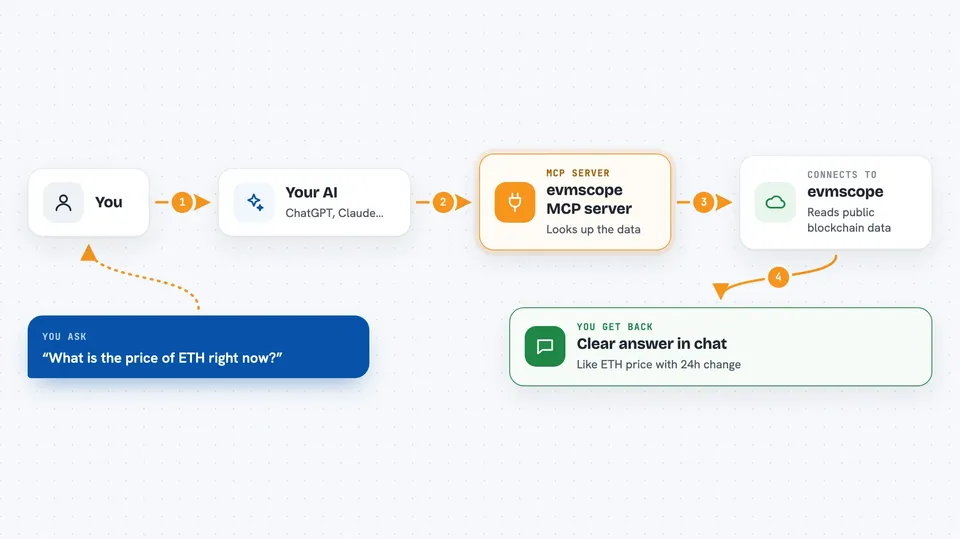
evmscope is a helper that connects your AI to live blockchain information. It covers Ethereum and six other crypto networks, so your AI can answer questions about prices, wallets, and fees instead of saying it cannot see real-time data. It is handy if you follow crypto, trade a little, or just want to check a token before touching it.
What is an MCP server? The 30-second version
On its own, your AI can only chat with you using what it already learned. An MCP server is a small helper program that gives your AI a new skill or a connection to an outside service. This one connects your AI to public blockchain data across Ethereum, Polygon, Arbitrum, Base, Optimism, Avalanche, and BSC. Once it is set up, you just ask a normal question and the AI quietly uses this helper to fetch the answer for you.
What this MCP server does
You ask your AI something like what the ETH price is or how much gas costs right now. The AI passes that request to evmscope, which talks to free public blockchain services on your behalf. evmscope gathers the numbers, such as a price, a balance, or a fee estimate, and hands them back to the AI. The AI then explains the result to you in plain language inside the chat. It only reads information, so it never moves or spends your money.
 Click to zoom
What you can do with it
- Check the current price of a token like ETH or USDC
- Compare gas fees across seven networks to find the cheapest one
- Look up a wallet's balance and total value
- Check whether a token is a scam (honeypot) before you buy
- See DeFi yield rates for lending and staking pools
- Get a swap quote showing how much you would receive
- Track large transfers from known exchange and whale wallets
Try asking your AI
- “What is the price of ETH right now?”
- “Compare gas fees across chains and tell me the cheapest one”
- “Show me the balance of this wallet: 0xd8dA6BF26964aF9D7eEd9e03E53415D37aA96045”
- “Is this token a honeypot? Here is the address”
What it gives back to you
You get clear answers in the chat, like a token price with its 24 hour change, a list of gas fees sorted from cheapest to most expensive, or a wallet summary with a total dollar value. For safety checks you get a simple risk level and any warning flags. Everything comes back as readable text, and you can ask follow-up questions on the same topic.
Before you start
What you need
- The Claude desktop app, Claude Code, or another AI tool that supports MCP servers
- Node.js installed on your computer (the free program that runs npx commands)
Good to know
It only reads blockchain data, so it cannot move your funds, but the numbers come from free public services and can sometimes be delayed or incomplete, so double-check before making any real decision.
Install it with your AI
Add evmscope MCP server to your AI, no technical skills needed
You don't install anything by hand. You copy one prompt, paste it into an AI that can work on your computer, and it checks, installs and connects the server for you, asking you when it needs something.
Sign in to get the install prompt
Members get a ready-made prompt that lets the Claude desktop app check evmscope MCP server, install it and connect it for them, step by step. You don't need any technical skills: you copy, paste and answer a few questions. Your connected AI can also find and install any of the 4,609 MCP servers here for you.
Who it's for
Crypto traders, DeFi users, and anyone curious about blockchain data who wants quick answers without opening a block explorer.



