
MCP server · Security
CallLint MCP server
by calllint
Lets your AI check an MCP or agent tool config for risky permissions before anything runs.
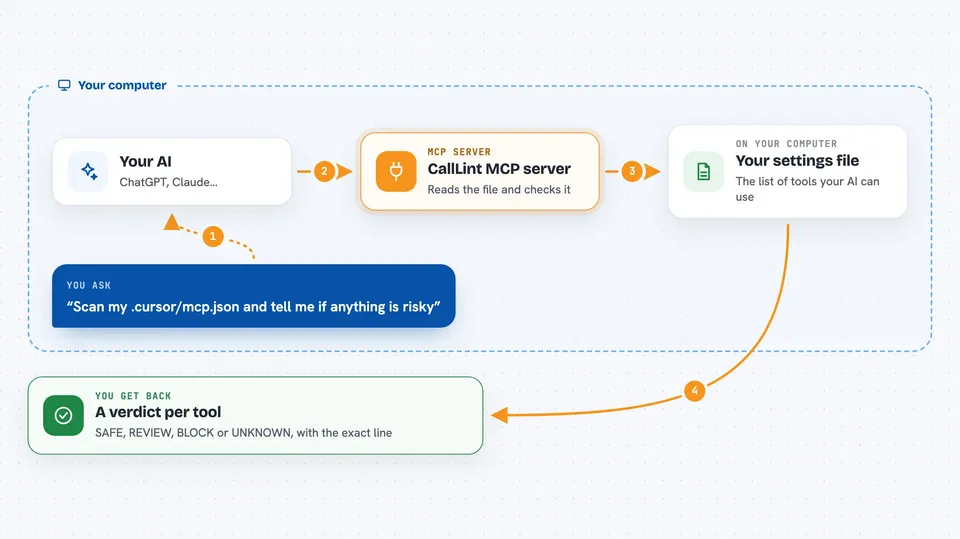
CallLint is a safety checker for the settings files that tell your AI which tools it may use. It reads those files and gives each tool a simple verdict: SAFE, REVIEW, BLOCK, or UNKNOWN. It is handy for anyone who copies MCP setups from the internet and wants to know what they are really allowing.
What is an MCP server? The 30-second version
On its own, your AI can only chat. An MCP server is a small helper program that gives your AI a new skill or a connection to another app. This one connects your AI to CallLint, a checker that looks at agent tool settings. So when you ask your AI to check a config, it can run CallLint for you and read the verdict back.
What this MCP server does
You point your AI at a settings file, like the one Cursor or Claude uses to list its tools. Your AI passes that file to CallLint through this helper. CallLint reads the file and looks for things like broad file access, shell commands, secret-shaped keys, or hidden instructions in tool descriptions. It never runs or installs the tools it checks. You then get a plain verdict per tool, with the exact line it came from.
 Click to zoom
What you can do with it
- Scan an MCP config file and get a SAFE, REVIEW, BLOCK, or UNKNOWN verdict
- See which tool caused a problem and the exact setting it came from
- Check a config for hidden instructions in tool names or descriptions
- Spot unpinned packages that could change under you later
- Compare a config against an approved baseline to catch later changes
- Get the result as plain text, JSON, or a report file
Try asking your AI
- “Scan my .cursor/mcp.json and tell me if anything is risky”
- “Why did CallLint block the helpful-notes server?”
- “Check this config file for hidden instructions in the tool descriptions”
- “Compare my current MCP config to the baseline I saved last week”
What it gives back to you
You get a short verdict line per server, such as BLOCK or REVIEW, plus a list of findings. Each finding names the tool and quotes the exact setting it came from, so you can go look at it yourself. If you ask for JSON or a report, you get a file you can save or share. Nothing is changed on your machine by a scan.
Before you start
What you need
- Node.js 20 or newer
- The path to the config file you want checked, or the CallLint MCP server added to your AI app
Good to know
A SAFE verdict is a starting point, not a guarantee, and CallLint only reads the settings file, so it cannot see what a tool actually does when it runs.
Install it with your AI
Add CallLint MCP server to your AI, no technical skills needed
You don't install anything by hand. You copy one prompt, paste it into an AI that can work on your computer, and it checks, installs and connects the server for you, asking you when it needs something.
Sign in to get the install prompt
Members get a ready-made prompt that lets the Claude desktop app check CallLint MCP server, install it and connect it for them, step by step. You don't need any technical skills: you copy, paste and answer a few questions. Your connected AI can also find and install any of the 4,609 MCP servers here for you.
Who it's for
Anyone who installs MCP servers or agent tools from the internet and wants a quick safety check before saying yes.



