
MCP server · Research
Gopher & Gemini MCP server
by cameronrye
Lets your AI browse old-school Gopher menus and Gemini pages and bring back readable text.
This is a small helper program that connects your AI assistant to two internet protocols most people have never heard of: Gopher and Gemini. They are quiet, text-only corners of the internet, still used by hobbyists and small communities. If you are curious about what lives there, or you already read Gopher and Gemini sites, this makes your AI able to look things up for you.
What is an MCP server? The 30-second version
On its own, your AI can only chat with you using what it already knows. An MCP server is a small helper program that gives it one new skill, like a pair of extra hands. This helper gives your AI the ability to open Gopher and Gemini addresses and read what is there. So when you ask about a Gopher menu or a Gemini page, your AI can actually go and fetch it instead of guessing.
What this MCP server does
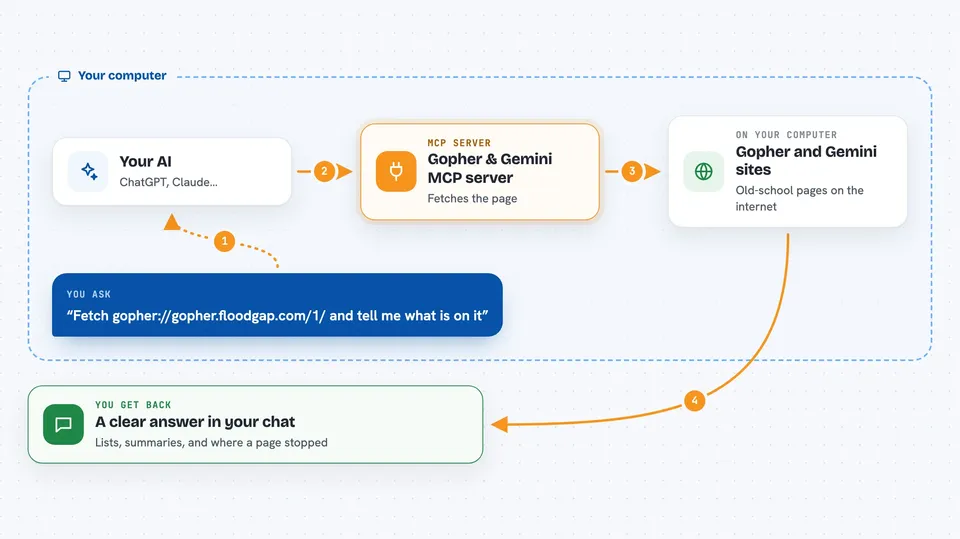
You give your AI a Gopher or Gemini address, or just describe what you want to find. Your AI passes that request to this helper program running on your computer. The helper connects to the server over the internet, using encryption for Gemini, and downloads the page or menu. It then turns that raw content into clean, structured text your AI can read. Your AI uses that to answer your question or summarize what it found.
 Click to zoom
What you can do with it
- Open a Gopher menu and list what is inside it
- Read a Gopher text file and summarize it
- Fetch a Gemini page and explain what it says
- Search a Gopher search server with your own words
- Fetch several Gopher or Gemini addresses at once
- Check which Gemini sites your AI already trusts
- Manage saved Gemini identities and certificates
Try asking your AI
- “Fetch gopher://gopher.floodgap.com/1/ and tell me what is on that menu”
- “Look up a Gemini page at gemini://geminiprotocol.net/ and summarize it”
- “Search the Gopher index for pages about old radio equipment”
- “Fetch these three Gopher addresses and give me a short summary of each”
What it gives back to you
You get back a structured answer in the chat: menus become lists of items with their types, and text pages become readable text. If a page is cut off at the size limit, it tells you where it stopped so you can ask for the rest. For binary files it only reports the details, not the file itself. Gemini pages come back as parsed text with the server's status code explained.
Before you start
What you need
- Python 3.11 or newer
- The uv package manager (a free tool that runs Python programs)
- An MCP client like Claude Desktop, Claude Code, Cursor, VS Code, Zed or Windsurf
Good to know
The certificate tools can remove saved Gemini trust and identities, so only use them when you mean to, and remember the server is read-only for content but will trust new Gemini sites the first time it meets them.
Install it with your AI
Add Gopher & Gemini MCP server to your AI, no technical skills needed
You don't install anything by hand. You copy one prompt, paste it into an AI that can work on your computer, and it checks, installs and connects the server for you, asking you when it needs something.
Sign in to get the install prompt
Members get a ready-made prompt that lets the Claude desktop app check Gopher & Gemini MCP server, install it and connect it for them, step by step. You don't need any technical skills: you copy, paste and answer a few questions. Your connected AI can also find and install any of the 4,609 MCP servers here for you.
Who it's for
People curious about Gopher and Gemini communities, plus anyone who reads or researches old-school text internet content.


