MCP server · Analytics
Aurora MCP server
Let your AI run honest statistics on your data and cite every finding, instead of guessing.
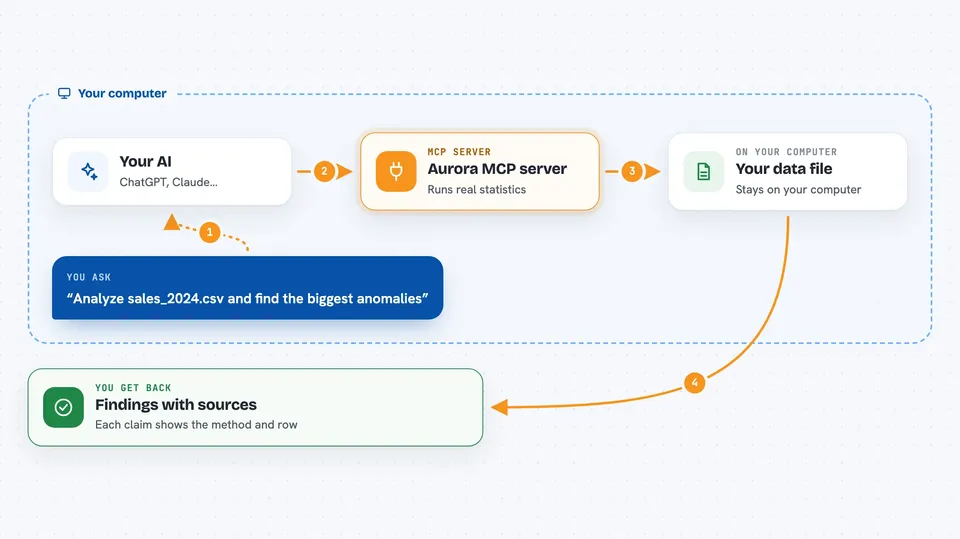
Aurora is a local analysis tool that runs real statistics on your data files and shows its work with citations. Once you connect it to your AI, the AI can ask Aurora to analyze a file and then explain the results to you in plain words. It is handy for anyone who works with data and wants answers they can trust, not made-up numbers.
What is an MCP server? The 30-second version
On its own, your AI can only chat. It cannot open your spreadsheet and run a real test on it. An MCP server is a small helper program that gives your AI a new skill. This one connects your AI to Aurora, a statistics engine that runs on your own computer, so when you ask a question about your data, the AI can hand the job to Aurora and bring back a real, checked answer.
What this MCP server does
You ask your AI something about a data file, like whether there is an odd spike in a column. Your AI passes that request to Aurora through this helper. Aurora opens the file, runs the right statistical tests, and writes up what it found with a citation for each claim. The AI then tells you the answer in normal language and shows which method and which row it came from. Nothing is invented, and your file never leaves your computer.
 Click to zoom
What you can do with it
- Run a full statistical analysis on a CSV, Excel, JSON or Parquet file
- Find unusual values and tell you exactly which row and how far off it is
- Spot shifts in a trend over time, like a sudden change in behaviour
- Detect repeating patterns and cycles in your data
- Forecast where a number is heading next
- Explain each finding with a source you can check
- Save the results as a signed file so you can prove they were not changed
Try asking your AI
- “Analyze the file sales_2024.csv and tell me the biggest anomalies”
- “Is there a regime change in the server_metrics.csv data, and when did it start?”
- “Run Aurora on this sensor file and explain the main findings in plain English”
- “Forecast the next 24 hours of the temperature column in weather.csv”
What it gives back to you
You get a written summary in the chat, plus a list of findings. Each finding names the method used, how serious it is, the exact row or value, and a citation. You may also get charts or a saved result file. Everything traces back to a real calculation, so you can check it yourself.
Before you start
What you need
- The Aurora desktop app, or Aurora running from source on your computer
- Python 3.10 or newer if you run it from source
- The mcp package installed (pip install mcp) for the MCP server part
Good to know
Aurora reads your data files, so only point it at files you are allowed to share with your AI assistant.
Install it with your AI
Add Aurora MCP server to your AI, no technical skills needed
You don't install anything by hand. You copy one prompt, paste it into an AI that can work on your computer, and it checks, installs and connects the server for you, asking you when it needs something.
Sign in to get the install prompt
Members get a ready-made prompt that lets the Claude desktop app check Aurora MCP server, install it and connect it for them, step by step. You don't need any technical skills: you copy, paste and answer a few questions. Your connected AI can also find and install any of the 4,361 MCP servers here for you.
Who it's for
Analysts, researchers, and anyone who works with data files and wants trustworthy answers instead of guesses.