
MCP server · Developer tools · official
klanex MCP server
by chrassy · official
Let your AI run tool calls to outside apps reliably, with checks, retries, and safe approvals built in.
klanex is a helper service that sits between your AI and other apps it wants to talk to. When your AI needs to send a request somewhere, klanex makes sure the request is well formed, tries again if the other side is busy, and keeps a record of what happened. It is handy for people who let their AI take real actions, like updating a record or sending a payment, and want fewer surprises.
What is an MCP server? The 30-second version
On its own, your AI can only chat with you. An MCP server is a small helper program that gives your AI a new skill or a connection to an app or service. This one connects your AI to klanex, a service that runs outside requests on its behalf. So when you ask your AI to do something in another system, it hands the job to klanex, and klanex does the actual sending and reporting back.
What this MCP server does
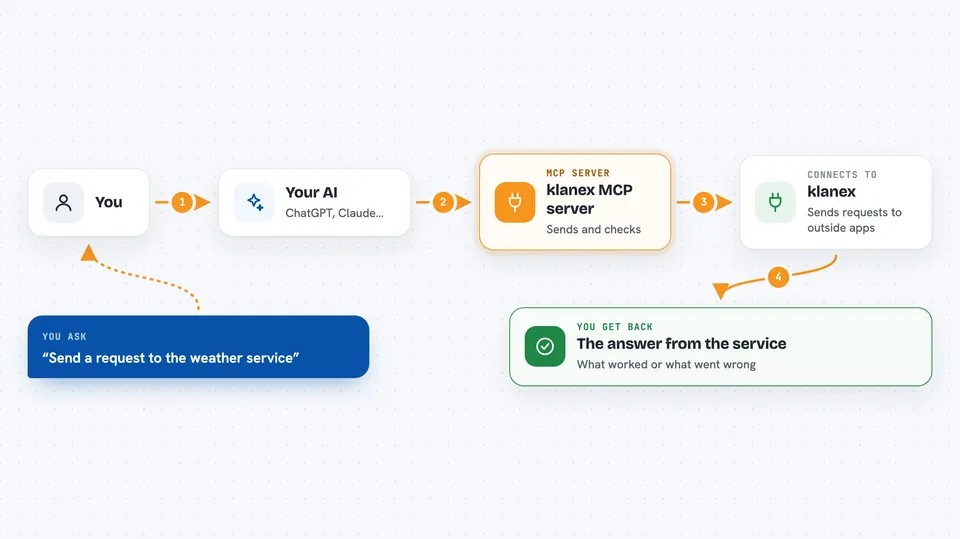
You ask your AI to do something that involves another app, like send a request to a service. Your AI passes that request to this helper, which sends it to klanex. klanex checks the details first, sends the request to the real service, and waits for an answer. If the service is slow or busy, klanex tries again on its own. Then it tells your AI what happened, and your AI tells you.
 Click to zoom
What you can do with it
- Send a request to an outside service and get the result back
- Check the status of a request you sent earlier
- List the requests your account has made, filtered by status or time
- Re-run a past request exactly as it was, without retyping anything
- See your plan and how much you have used this month
- List saved credentials you can reuse without sharing secrets with the AI
What it gives back to you
You get back a clear answer in the chat: whether the request worked, what the other service replied, or a plain explanation of what went wrong. If something failed, klanex includes a hint written for the AI about what to fix. You can also ask for lists of past requests with their status and timing. Nothing is hidden, so you can see what happened at each step.
Before you start
What you need
- An API key from klanexai.com (a kind of password for apps; sandbox keys are free)
- An AI client that supports MCP, like Claude Code, Cursor, Windsurf, VS Code, or Claude Desktop
- For Claude Desktop, Node.js installed so the small bridge program can run
Good to know
This service can send real requests to other apps and can pause them for your approval, so check what your AI is about to do before you say yes, especially for anything that moves money or deletes data.
Install it with your AI
Add klanex MCP server to your AI, no technical skills needed
You don't install anything by hand. You copy one prompt, paste it into an AI that can work on your computer, and it checks, installs and connects the server for you, asking you when it needs something.
Sign in to get the install prompt
Members get a ready-made prompt that lets the Claude desktop app check klanex MCP server, install it and connect it for them, step by step. You don't need any technical skills: you copy, paste and answer a few questions. Your connected AI can also find and install any of the 4,609 MCP servers here for you.
Who it's for
People who let their AI take real actions in other apps and want those actions to be checked, retried, and recorded.



