
MCP server · Productivity
Convertica MCP server
Convert, merge, split, compress, sign and protect PDFs and other files right from your AI chat.
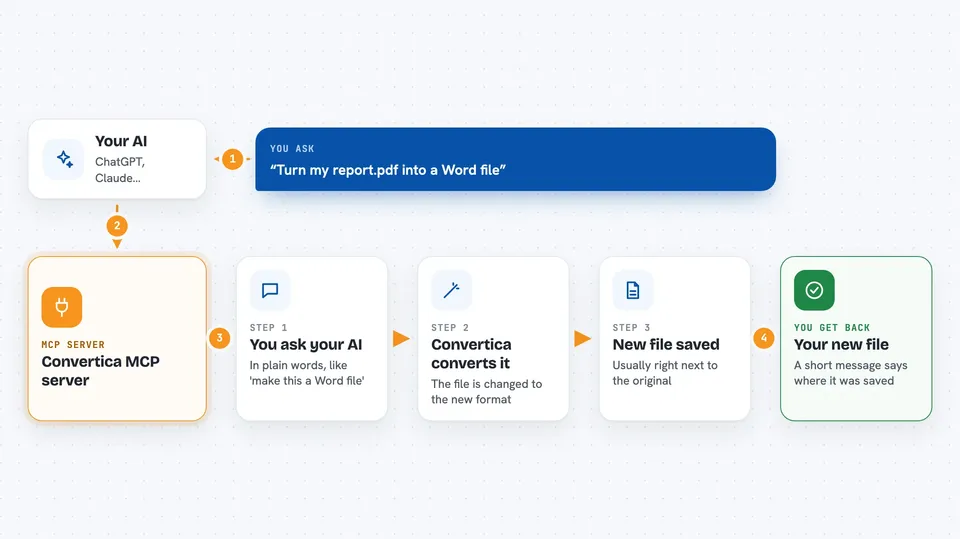
The Convertica MCP server lets your AI assistant convert and tidy up files for you, without you opening a separate website or app. It connects your AI to Convertica, a service with over 35 tools for turning PDFs into Word, Excel, PowerPoint, JPG, HTML, Markdown or EPUB, and the other way around. It is handy for anyone who deals with documents all day and just wants to say what they need in plain words.
What is an MCP server? The 30-second version
On its own, your AI can only chat. An MCP server is a small helper program that gives your AI a new skill or a connection to an app or service. This one connects your AI to Convertica, so when you ask for a file to be converted or a PDF to be merged, the AI can actually do it for you instead of just explaining how.
What this MCP server does
You ask your AI in plain words, for example to turn a PDF into a Word file. The AI uses this helper, which sends your file to Convertica over a secure connection. Convertica runs the conversion and sends the result back. The helper saves the new file on your computer, usually right next to the original, and tells you where it is.
 Click to zoom
What you can do with it
- Convert a PDF into Word, Excel, PowerPoint, JPG, HTML, Markdown, text or EPUB
- Turn Word, Excel, PowerPoint, JPG, HTML or EPUB files into PDF
- Merge several PDFs into one, or split a PDF into separate files
- Compress a PDF to make it smaller, or rotate and crop pages
- Add a watermark or a signature to a PDF, or protect it with a password
- Remove a password from a PDF you already own
- Convert a web page address into a PDF, or change HEIC photos into JPG or PNG
Try asking your AI
- “Convert my Downloads report.pdf to Word”
- “Merge these three PDFs and compress the result”
- “Turn this HEIC photo into a JPG”
- “Save this web page as a PDF”
What it gives back to you
You get a short message in the chat telling you what was done and where the new file was saved. The file itself lands on your computer, usually next to the original unless you ask for a different folder. For lists, like the available converters, you get a plain list you can read in the chat.
Before you start
What you need
- A Convertica account with a paid plan
- A Convertica API key (a kind of password for apps; you create one on the Convertica website after subscribing)
- Node.js installed on your computer (the free software that runs the helper)
- An AI app that supports MCP, such as Claude Desktop, Claude Code, Cursor or Windsurf
Good to know
This server reads files from your computer and sends them to Convertica's servers for processing, and each conversion counts against your monthly plan quota, so keep an eye on what you send.
Install it with your AI
Add Convertica MCP server to your AI, no technical skills needed
You don't install anything by hand. You copy one prompt, paste it into an AI that can work on your computer, and it checks, installs and connects the server for you, asking you when it needs something.
Sign in to get the install prompt
Members get a ready-made prompt that lets the Claude desktop app check Convertica MCP server, install it and connect it for them, step by step. You don't need any technical skills: you copy, paste and answer a few questions. Your connected AI can also find and install any of the 4,361 MCP servers here for you.
Who it's for
Anyone who works with documents and images all day, like office workers, assistants, students and small business owners, and wants to convert or tidy files without leaving their AI chat.




