
MCP server · Developer tools · official
Conan MCP server
by conan-io · official
Lets your AI set up C/C++ projects, install their dependencies, check licenses and scan for known security problems.
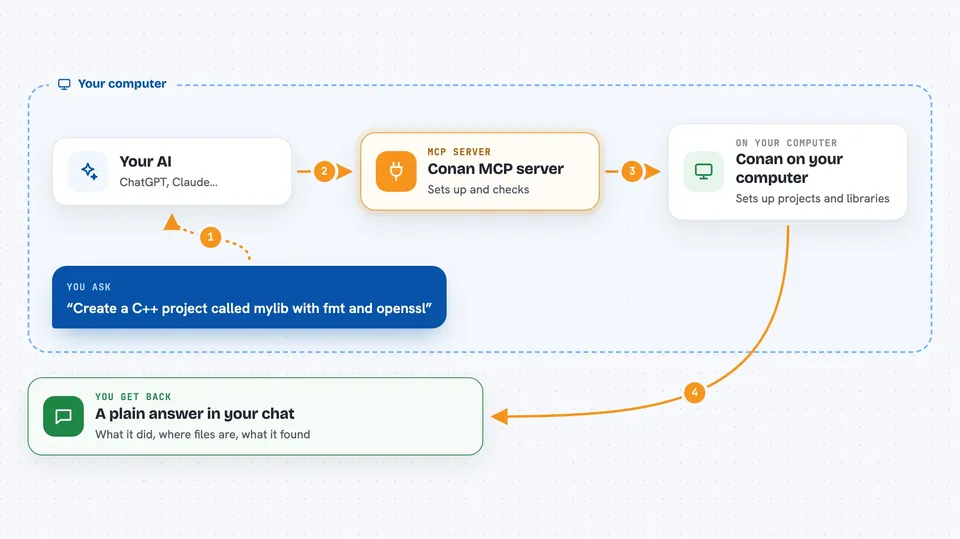
This is a helper that connects your AI assistant to Conan, a tool that C and C++ programmers use to manage the outside code their projects depend on. Once it is connected, you can ask your AI in plain words to create a project, pull in libraries, and check whether those libraries are safe to use and allowed in commercial software. It is handy for developers who work with C or C++ and want to skip a lot of typing and manual checking.
What is an MCP server? The 30-second version
On its own, your AI can only chat with you. An MCP server is a small helper program that gives your AI a new skill or a connection to another tool. This one connects your AI to Conan, the package manager for C and C++ projects. So when you ask your AI to set up a project or check a library, it can actually do that work through Conan instead of just describing it.
What this MCP server does
You ask your AI something like create a project with these libraries. Your AI passes that request to this helper. The helper talks to Conan on your computer, which creates the project files, downloads or finds the libraries, and reads their details. Then your AI tells you back what happened, in normal sentences in the chat.
 Click to zoom
What you can do with it
- Create a new C or C++ project from a template, with the libraries you want
- Install the dependencies a project needs
- List available versions of a library in your cache or in remote sources
- Show your Conan profiles, which describe your build settings
- Collect the license of every library your project depends on
- Scan your dependencies for known security vulnerabilities
Try asking your AI
- “Create a CMake library project called mylib with fmt and openssl as dependencies”
- “Install the dependencies in this project using conancenter”
- “Collect license information for the dependencies in this project”
- “Scan the dependencies in this project for known vulnerabilities”
What it gives back to you
You get answers in the chat: lists of library versions, a summary of the licenses your dependencies use, and a report of any known security issues found. When it creates or installs something, it tells you what it did and where the files are. For profiles, it shows you the settings Conan is using.
Before you start
What you need
- Python 3.10 or newer
- Conan installed on your computer
- uv installed (or you can use pip instead)
Good to know
It can create and overwrite files in a folder you point it at, so be careful about which folder you give it and whether you allow overwriting.
Install it with your AI
Add Conan MCP server to your AI, no technical skills needed
You don't install anything by hand. You copy one prompt, paste it into an AI that can work on your computer, and it checks, installs and connects the server for you, asking you when it needs something.
Sign in to get the install prompt
Members get a ready-made prompt that lets the Claude desktop app check Conan MCP server, install it and connect it for them, step by step. You don't need any technical skills: you copy, paste and answer a few questions. Your connected AI can also find and install any of the 4,609 MCP servers here for you.
Who it's for
C and C++ developers, and anyone who builds software in those languages and wants help managing dependencies, licenses and security checks.



