MCP server · Analytics
State of Web Vitals MCP server
Lets your AI look up Core Web Vitals numbers by CMS, CDN and framework from real Chrome data.
This is a free helper that connects your AI to a public dataset of website speed scores. The numbers come from real Chrome browsing data plus a large crawl of websites, grouped by things like which CMS or CDN a site uses. It is handy if you work on a website and want to compare platforms or check how common good scores are.
What is an MCP server? The 30-second version
On its own, your AI can only chat with you using what it already learned. An MCP server is a small helper program that gives your AI one extra skill or a link to a service. This one links your AI to The State of Web Vitals, a public collection of website speed numbers. So when you ask about Core Web Vitals by CMS or CDN, your AI can go fetch the real figures instead of guessing.
What this MCP server does
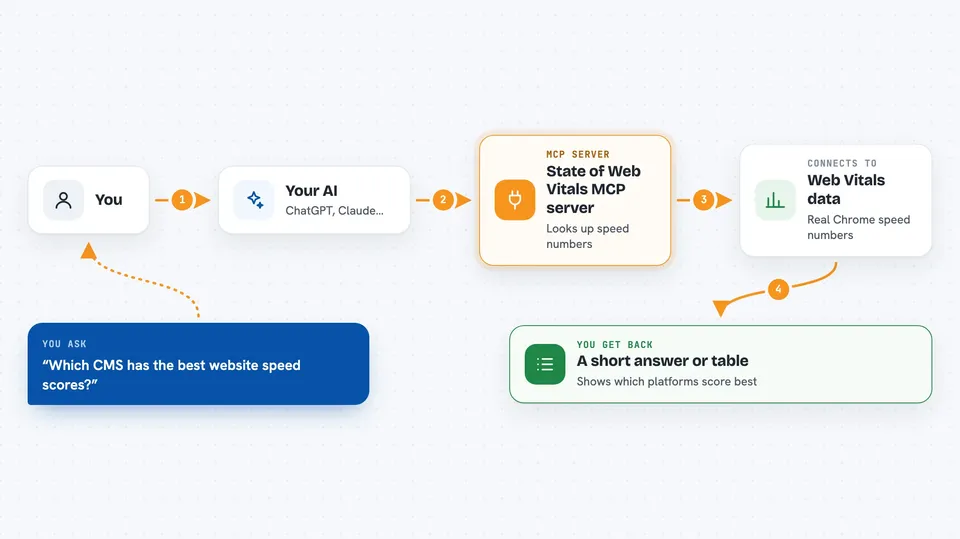
You ask your AI a question about website speed scores, like which CMS has the best pass rates. Your AI sends that request to this helper, which talks to the State of Web Vitals service. The service looks through its Chrome field data and crawl results, then sends back the numbers. Your AI turns those numbers into a short answer or a small table right in the chat. You can also ask for a distribution of one metric or for the list of available filters.
 Click to zoom
What you can do with it
- Compare Core Web Vitals pass rates across CMS platforms
- Rank CDNs or frameworks by a chosen metric
- Get the distribution of one metric, like LCP, across many sites
- Filter results to only include platforms with a minimum number of sites
- Discover which filters, groupings and metric names are available
- Pull aggregate numbers to cite in a report or slide
Try asking your AI
- “Which CMS platforms have the best Core Web Vitals pass rates, only counting platforms with at least 100 sites?”
- “Show me the LCP distribution across sites that use WordPress.”
- “Rank CDNs by good_all3 percentage.”
- “What filters and metric names can I use with this data?”
What it gives back to you
You get back numbers: aggregate scores, pass rates, rankings, or distribution buckets, depending on what you asked. Your AI usually shows these as a short list or a small table in the chat. It can also explain what the numbers mean in a sentence or two. Nothing on your computer or your own website is changed.
Before you start
Good to know
The numbers are aggregate research data, not live measurements of your own site, so do not treat them as a real-time check of your pages.
Install it with your AI
Add State of Web Vitals MCP server to your AI, no technical skills needed
You don't install anything by hand. You copy one prompt, paste it into an AI that can work on your computer, and it checks, installs and connects the server for you, asking you when it needs something.
Sign in to get the install prompt
Members get a ready-made prompt that lets the Claude desktop app check State of Web Vitals MCP server, install it and connect it for them, step by step. You don't need any technical skills: you copy, paste and answer a few questions. Your connected AI can also find and install any of the 4,361 MCP servers here for you.
Who it's for
Web developers, SEO specialists, performance consultants and anyone comparing CMS, CDN or framework choices for a site.