
MCP server · Security
Compliance AIops MCP server
by AIops-tools
Turn your AI agents' audit logs into tamper-evident evidence bundles mapped to HIPAA, PCI-DSS, SOC 2 and GDPR.
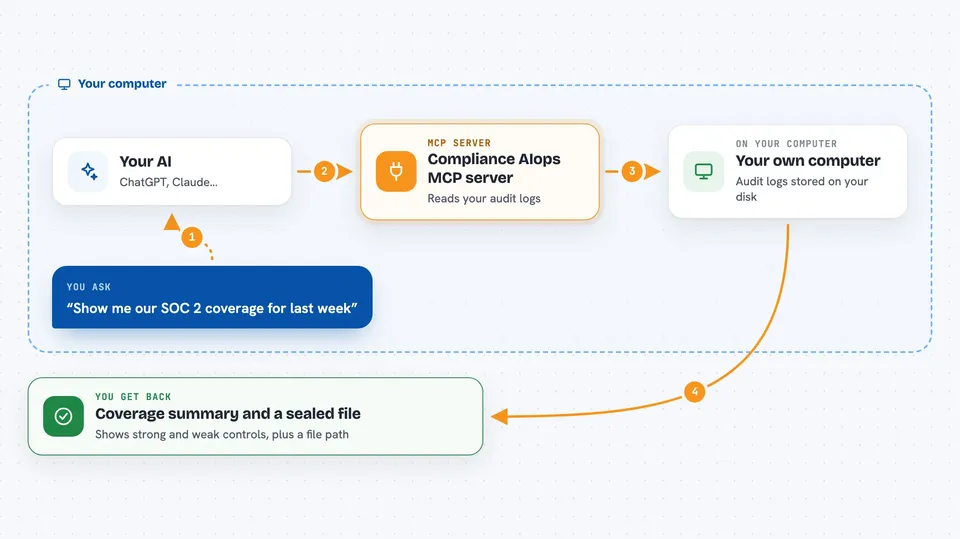
This is a small helper that reads the audit logs your AI operations tools already keep on your computer and turns them into tidy evidence bundles for auditors. It is handy if you use governed AI agents at work and someone asks you to show what they did, who approved it, and whether the records were changed. It runs entirely on your machine, with no internet connection and no accounts to sign up for.
What is an MCP server? The 30-second version
On its own, your AI can only chat. An MCP server is a small helper program that gives your AI a new skill or a connection to something useful. This one connects your AI to the audit trails sitting in your home folder, so the AI can read them and build compliance evidence when you ask. You do not need to know how it works inside; you just ask in plain words.
What this MCP server does
You ask your AI something like show me our SOC 2 coverage for last week. The AI passes that request to this helper. The helper opens the audit databases on your disk in read-only mode, counts and groups the events, and maps them to controls in a framework like HIPAA or SOC 2. Then it writes a sealed evidence bundle file and shows you a summary in the chat, including which controls are well covered and which are weak.
 Click to zoom
What you can do with it
- List the audit trails it can find on your computer
- Query audit events across tools by date, status, or risk level
- Show a timeline of activity by hour or day
- Report which controls in a framework are covered, weak, or missing
- Pull the evidence rows behind one specific control
- Show high-risk actions and who approved them
- Create a sealed evidence bundle and verify it later
Try asking your AI
- “Which audit trails can you see on this machine?”
- “Show me our SOC 2 coverage for the last 7 days.”
- “List any denied or failed operations from yesterday.”
- “Generate a sealed HIPAA evidence bundle for this week and verify it.”
What it gives back to you
You get back plain answers in the chat: lists of audit sources, counts of events, per-control coverage tables, and gap reports with short notes. When you ask for a bundle, it writes a JSON file (and can also give you Markdown, CSV, or OSCAL) under a folder in your home directory, and tells you the path. It also shows a chain head value, a short fingerprint you can write down elsewhere as an independent anchor.
Before you start
What you need
- Python installed on your computer (the install command uses uv or pipx)
- At least one governed AIops tool that has already written an audit.db file in your home folder
- Optionally, a master password if you want to sign bundles (set as an environment variable)
Good to know
It can only detect tampering, not prevent it, and it reads your audit databases, so treat the bundles and any signing password as sensitive.
Install it with your AI
Add Compliance AIops MCP server to your AI, no technical skills needed
You don't install anything by hand. You copy one prompt, paste it into an AI that can work on your computer, and it checks, installs and connects the server for you, asking you when it needs something.
Sign in to get the install prompt
Members get a ready-made prompt that lets the Claude desktop app check Compliance AIops MCP server, install it and connect it for them, step by step. You don't need any technical skills: you copy, paste and answer a few questions. Your connected AI can also find and install any of the 4,609 MCP servers here for you.
Who it's for
People in security, compliance, or IT operations who run governed AI agents and need to show auditors what those agents did.



