MCP server · Research · official
AIMarket MCP server
by alexar76 · official
Lets your AI fetch web pages, run web searches, verify answers, and look up paid capabilities on the AIMarket hub.

This is a small helper program that gives your AI a few extra skills: reading web pages, searching the web, double-checking answers, and browsing a marketplace of paid tools. It is made by the same team behind the Metis and ARGUS tools, and it is aimed at people who want their AI to reach outside the chat safely. You do not need to be technical to use it once someone sets it up for you.
What is an MCP server? The 30-second version
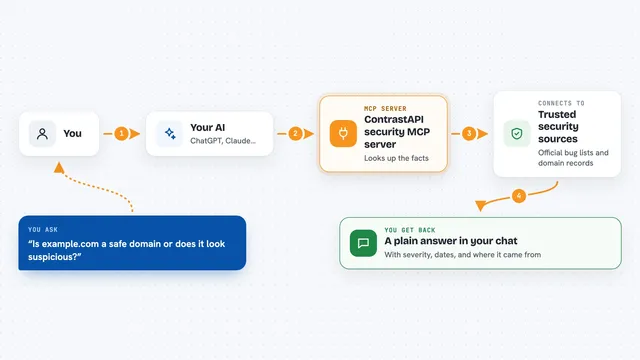
On its own, your AI can only chat with you using what it already learned. An MCP server is a small helper program you connect to your AI, and it gives the AI a new skill or a connection to an outside service. This one connects your AI to the web and to the AIMarket hub, so it can look up pages, run searches, check answers, and find paid tools when you ask. Think of it as adding a few new buttons to your AI's toolbar.
What this MCP server does
You ask your AI something in plain words, like to read a web page or search for a topic. The AI passes your request to this helper program. The helper then talks to the web or to the AIMarket hub, gathers what it needs, and cleans up the result before sending it back. Your AI shows you the answer in the chat, usually as text or a short summary. For the marketplace tools, it can also find paid capabilities and run one on a free trial, then hand you a receipt.
 Click to zoom
What you can do with it
- Fetch a web page and give you the main text
- Run a live web search and show the top results
- Ask Metis to verify an answer and return a confidence score
- Search the AIMarket hub for priced capabilities
- Run one marketplace capability on the free trial tier
- Get a signed receipt for each marketplace call
- Point the marketplace tools at your own hub if you have one
Try asking your AI
- “Fetch this page and summarize the main points: https://example.com/article”
- “Search the web for the latest news about electric cars and give me the top results”
- “Use Metis to verify this claim and tell me how confident it is”
- “Find a weather reading capability on the AIMarket hub and run it for device om-wx-01”
What it gives back to you
You get answers in the chat, usually as plain text. Web fetches come back as the main readable text of the page, and searches come back as a short list of top results. Metis verification returns an answer plus a confidence score and a yes or no on whether it passed. Marketplace calls return the result of the capability plus a signed receipt number, or a clear message when the free trial is used up.
Before you start
What you need
- An MCP client like Claude Desktop or Cursor
- Python and the uvx tool installed (or Docker if you self-host)
- Optional: an AIMarket Metis key if you want to use a private Metis endpoint
- Optional: an AIMarket hub URL if you want to use your own hub instead of the default
Good to know
The marketplace tools can spend money if you move past the free trial, and web fetches read pages from the internet, so only point it at sites you trust.
Install it with your AI
Add AIMarket MCP server to your AI, no technical skills needed
You don't install anything by hand. You copy one prompt, paste it into an AI that can work on your computer, and it checks, installs and connects the server for you, asking you when it needs something.
Sign in to get the install prompt
Members get a ready-made prompt that lets the Claude desktop app check AIMarket MCP server, install it and connect it for them, step by step. You don't need any technical skills: you copy, paste and answer a few questions. Your connected AI can also find and install any of the 4,361 MCP servers here for you.
Who it's for
Office workers and researchers who want their AI to read web pages, run searches, and check answers without leaving the chat.