
MCP server · Security
CTRLRun MCP server
by CTRLRun
Your AI's risky actions get checked against your rules first: some go through, some wait for you, some are blocked.
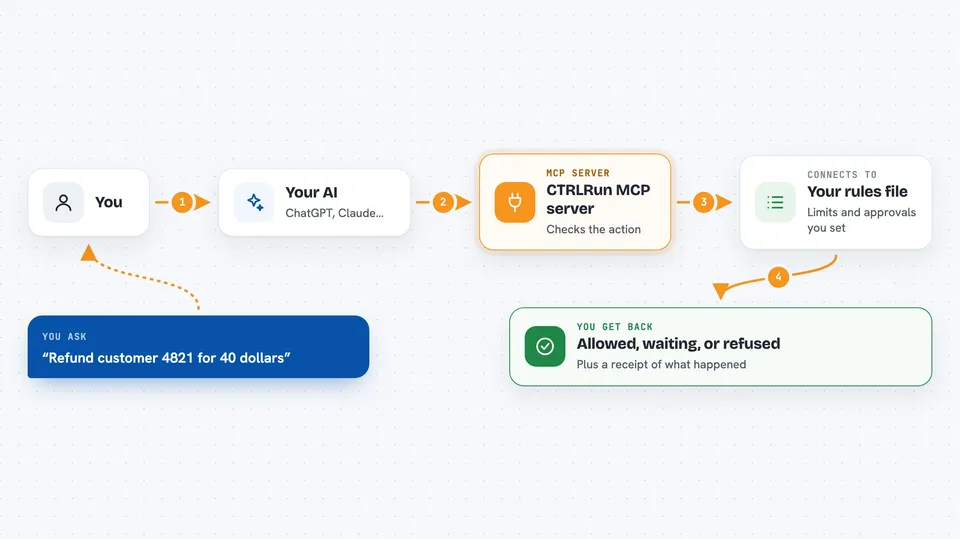
CTRLRun is a safety layer that sits between your AI and the actions it wants to take. Before a refund, a deletion or a deploy actually happens, CTRRun checks it against rules you wrote down. It is handy for anyone whose AI can do things that are hard to undo.
What is an MCP server? The 30-second version
On its own, your AI can only chat. An MCP server is a small helper program that gives your AI a new skill or a connection to something outside the chat. This one connects your AI to CTRRun, a safety check for actions. So when your AI wants to do something that matters, the request goes through CTRRun first, and CTRRun decides whether it may run, must wait for a person, or is refused.
What this MCP server does
You ask your AI to do something, like refund a customer. Your AI turns that into a tool call, and the call goes to CTRRun instead of straight to the service. CTRRun reads the details of the call, such as the amount, and compares them to your rules file. Small amounts may go through on their own, bigger ones wait for a human to approve, and anything not covered by your rules is refused. Every request, decision and result is written down as a receipt you can look at later.
 Click to zoom
What you can do with it
- Set limits on what your AI may do without asking, like refunds up to a certain amount
- Hold risky actions in a queue until a person approves them
- Block actions that fall outside your rules
- Stop the same action from running twice by accident
- Refuse a retry when the outcome of the first try is unknown
- Keep a written record of every request, decision and result
- Let one person or team pass limited authority to another
What it gives back to you
You get a clear answer for each action: allowed, waiting for approval, or refused. If it is waiting, you get a request id you can take to a human for a yes or no. You can also ask for the list of receipts, which shows what was requested, what was decided and what happened. Refusals are listed too, so nothing quietly disappears.
Before you start
What you need
- Python installed on your computer
- The ctrlrun package, installed with pip install ctrlrun
- A rules file (ctrlrun.yaml) that says what your AI may do
- For the gateway setup: pip install "ctrlrun[gateway]"
Good to know
It cannot promise an action happens exactly once against a service it does not control, it does not roll anything back, and it does not detect prompt injection, so treat it as a check on consequences, not a cure for a tricked AI.
Install it with your AI
Add CTRLRun MCP server to your AI, no technical skills needed
You don't install anything by hand. You copy one prompt, paste it into an AI that can work on your computer, and it checks, installs and connects the server for you, asking you when it needs something.
Sign in to get the install prompt
Members get a ready-made prompt that lets the Claude desktop app check CTRLRun MCP server, install it and connect it for them, step by step. You don't need any technical skills: you copy, paste and answer a few questions. Your connected AI can also find and install any of the 4,609 MCP servers here for you.
Who it's for
Teams whose AI agents can send, pay, refund, delete, deploy or change permissions, and anyone who wants a human in the loop for the risky ones.



