
MCP server · Analytics
SQL Server MCP server
by cvelasquez
Lets your AI look at many SQL Server databases at once, run queries and check indexes and plans.
This is a small helper that connects your AI assistant to Microsoft SQL Server databases. Instead of one database at a time, it keeps a list of all your servers in a single file, grouped by client or environment. It is handy for database administrators and consultants who look after many servers, not just one.
What is an MCP server? The 30-second version
On its own, your AI can only chat with you. An MCP server is a small helper program that gives your AI a new skill or a connection to another app. This one gives your AI a connection to your SQL Server databases, so it can look up tables, run queries and check how things are built. You ask in plain words, and the helper does the database work behind the scenes.
What this MCP server does
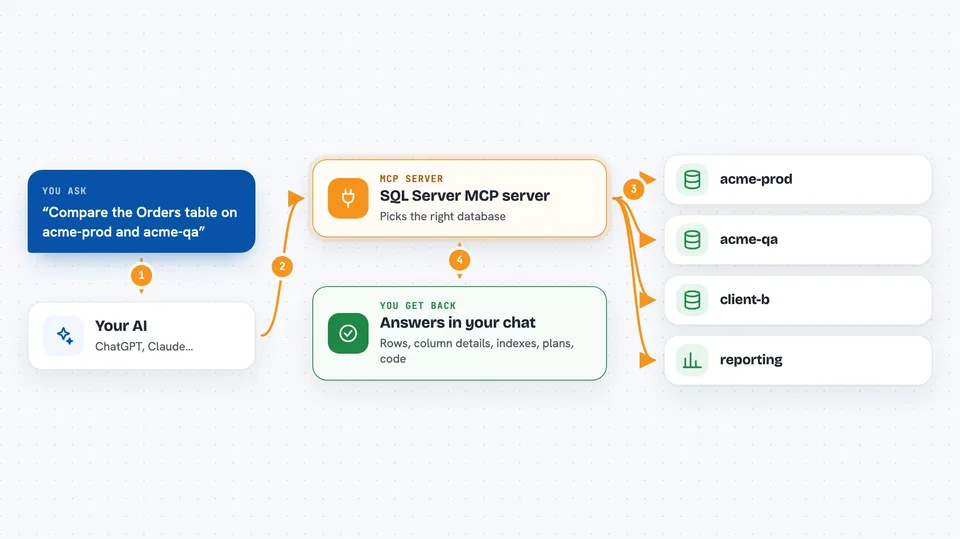
You keep a list of your database connections in one file, with a short name for each one. When you ask your AI something like how a table is built, the AI uses this helper to reach the right server. The helper runs the request, then hands the answer back to your AI. Your AI shows you the result in the chat, along with a note saying which connection it came from. You can also add or change a connection in the file and tell the AI to reload it, without restarting anything.
 Click to zoom
What you can do with it
- List all your SQL Server connections, grouped by client or environment
- Run a query against a named connection and see the rows
- Look up the columns, types and defaults of a table
- Check which indexes exist on a table and what they cover
- See the execution plan of a query without actually running it
- Read the source code of a stored procedure
- Reload your connections file after adding a new client
Try asking your AI
- “List all SQL Server connections”
- “Show me the schema of the Orders table on acme-prod”
- “Why is this stored procedure slow? Get its source and its execution plan”
- “Compare the Orders schema between acme-prod and acme-qa”
What it gives back to you
You get answers in the chat: lists of connections, tables of rows, column details, index lists, execution plans and procedure source code. Every answer starts with a small note saying which connection and server it came from, so you know it is the one you meant. If a query returns too many rows, the answer says so at the top and stops at a limit. Server messages like timing and read counts come back too, when the query asks for them.
Before you start
What you need
- Node.js installed on your computer (the free runtime that runs this helper)
- A SQL Server database you can reach, with a login and password
- The Claude desktop app or another AI tool that supports MCP servers
- A connections file listing your servers (the helper can create a starter one for you)
Good to know
The query tool runs whatever SQL your AI writes, so if a connection is not marked readOnly it can change or delete data; use a database login with read-only rights as your real protection.
Install it with your AI
Add SQL Server MCP server to your AI, no technical skills needed
You don't install anything by hand. You copy one prompt, paste it into an AI that can work on your computer, and it checks, installs and connects the server for you, asking you when it needs something.
Sign in to get the install prompt
Members get a ready-made prompt that lets the Claude desktop app check SQL Server MCP server, install it and connect it for them, step by step. You don't need any technical skills: you copy, paste and answer a few questions. Your connected AI can also find and install any of the 4,361 MCP servers here for you.
Who it's for
Database administrators and consultants who look after many SQL Server instances across different clients or environments.


