
MCP server · Analytics · official
DBConvert Streams MCP server
by slotix · official
Let your AI read your databases, files and S3 storage, and run read-only queries across all of them at once.
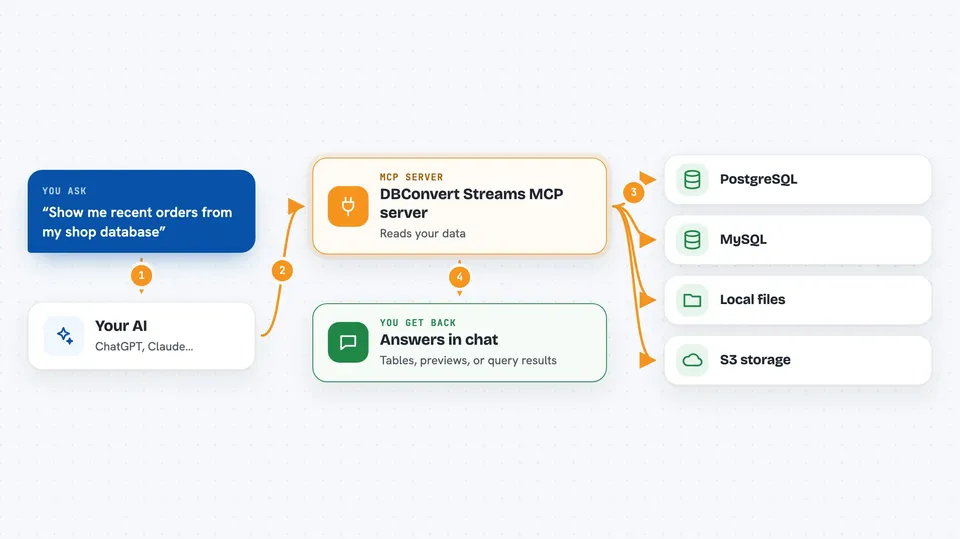
DBConvert Streams is a database workspace that also comes with a small helper for your AI assistant. Once connected, your AI can look at your live database tables, files and S3 storage and answer questions about them. It is handy for anyone who works with data but does not want to paste table definitions into a chat by hand.
What is an MCP server? The 30-second version
On its own, your AI can only chat with you. An MCP server is a small helper program that gives your AI a new skill or a connection to an app or service. This one connects your AI to DBConvert Streams, so it can look at your databases, files and S3 storage for you. You ask a question in plain words, and the AI uses this helper to go and look things up.
What this MCP server does
You ask your AI something about your data, like which tables exist or how many orders came in last month. The AI uses this helper to reach your database connections, your local files and your S3 storage. The helper reads the schemas and runs read-only queries, and can even join data from two different sources in one query. Then the AI explains the answer back to you in the chat. It only ever looks, it never changes your data.
 Click to zoom
What you can do with it
- List your database connections, databases, schemas, tables and views
- Describe the columns and keys of a table
- Preview rows from a table, view or file
- Run a read-only SELECT query and explain what it does
- Join data across PostgreSQL, MySQL, files and S3 in one query
- Compare schemas or data samples between two sources
- Check the status, stats, logs and errors of your data streams
Try asking your AI
- “What tables are in my shop database and what columns does the orders table have?”
- “Show me the 10 most recent rows from the customers table”
- “Join my orders.parquet file with the postgres customers table and show the top 5 by total”
- “Is my mysql-to-postgres stream running, and were there any recent errors?”
What it gives back to you
You get answers in plain words right in the chat. That can be a list of tables, a description of columns, a small preview of rows, or the results of a query as a table. The AI can also summarise what it found, like how many rows matched or whether a stream is healthy. Nothing in your data is changed, so everything you get back is read-only.
Before you start
What you need
- The DBConvert Streams extension file (dbconvert-streams-<version>.mcpb) from the Releases page, or Docker for the container version
- Connection strings for the databases or S3 storage you want to read, like postgres://user:password@host:5432/dbname
- An AI client that supports MCP, such as Claude, Cursor or VS Code Copilot
Good to know
It only reads, so it cannot change or delete your data, but it can see whatever is in the databases, files and S3 folders you connect, so only point it at sources you are comfortable sharing with your AI client.
Install it with your AI
Add DBConvert Streams MCP server to your AI, no technical skills needed
You don't install anything by hand. You copy one prompt, paste it into an AI that can work on your computer, and it checks, installs and connects the server for you, asking you when it needs something.
Sign in to get the install prompt
Members get a ready-made prompt that lets the Claude desktop app check DBConvert Streams MCP server, install it and connect it for them, step by step. You don't need any technical skills: you copy, paste and answer a few questions. Your connected AI can also find and install any of the 4,361 MCP servers here for you.
Who it's for
Anyone who works with databases or data files and wants to ask questions about them in plain words, like analysts, developers and data engineers.



