
MCP server · Analytics · official
Infino MCP server
by infino-ai · official
Lets your AI search your own files and data by meaning, exact words, or SQL.
This is a small helper that connects your AI assistant to Infino, a search engine for your own data. Once it is set up, you can ask your AI to find things inside your files, notes, or tables, and it will look them up for you. It is handy for anyone who keeps a lot of documents and wants to search them in plain language.
What is an MCP server? The 30-second version
On its own, your AI can only chat with you using what it already knows. An MCP server is a small helper program that gives your AI a new skill or a connection to something else. This one connects your AI to Infino, a search engine that sits on top of your own data. So when you ask a question, your AI can actually go and look things up in your files instead of guessing.
What this MCP server does
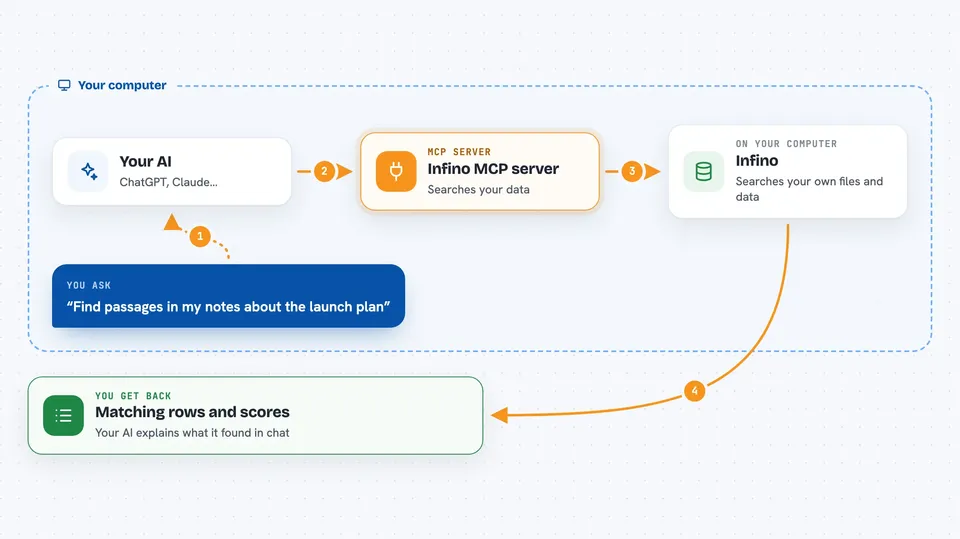
You ask your AI a question in normal words, like find notes about a project. Your AI passes that request to this helper program. The helper talks to Infino, which searches your data using keywords, meaning, or both together. Infino sends back the matching rows, and your AI shows them to you in the chat. You can also ask it to run a small database query if you need counts or totals.
 Click to zoom
What you can do with it
- Search your files by meaning, so close wording still finds the right passage
- Search for exact words, codes, or names with keyword search
- Combine both kinds of search in one go for better results
- Count how many rows match a word without pulling them all back
- Run a SQL query for totals, filters, or joins
- List the tables available in your data
- Add or change data through the same helper
Try asking your AI
- “Find passages in my notes about the launch plan”
- “Search my documents for the error code E4041”
- “How many rows mention refund in the support table”
- “Show me the tables I have in Infino”
What it gives back to you
You get back a list of matching rows, each with the text and a score so you can see how close the match is. For counts, you get a single number. For SQL, you get a small table of results. Your AI then explains what it found in the chat.
Before you start
What you need
- Node.js version 20 or newer
- An MCP-compatible app like Claude Desktop, Claude Code, Cursor, or VS Code
- Some data for Infino to search, either a folder on your computer or a storage bucket
- An Infino Cloud API key if you use the hosted version instead of local files
Good to know
It can add or change data in your tables, so check before letting it write.
Install it with your AI
Add Infino MCP server to your AI, no technical skills needed
You don't install anything by hand. You copy one prompt, paste it into an AI that can work on your computer, and it checks, installs and connects the server for you, asking you when it needs something.
Sign in to get the install prompt
Members get a ready-made prompt that lets the Claude desktop app check Infino MCP server, install it and connect it for them, step by step. You don't need any technical skills: you copy, paste and answer a few questions. Your connected AI can also find and install any of the 4,361 MCP servers here for you.
Who it's for
People who keep a lot of documents, notes, or tables and want to search them by asking their AI in plain language.


