
MCP server · Analytics · official
Couchbase MCP server
by Couchbase-Ecosystem · official
Lets your AI look inside your Couchbase database, run queries, and explain what it finds, in plain words.
This is a small helper program made by Couchbase itself. It connects your AI assistant to a Couchbase database, so you can ask questions about your data in normal language instead of writing code. It is handy if you work with a Couchbase cluster and want quick answers without opening a developer tool.
What is an MCP server? The 30-second version
On its own, your AI can only chat. An MCP server is a small helper program that gives your AI a new skill or a connection to an app or service. This one connects your AI to Couchbase, so it can look up your buckets and collections, read documents, and run queries for you. You just ask in everyday words, and the helper does the technical part behind the scenes.
What this MCP server does
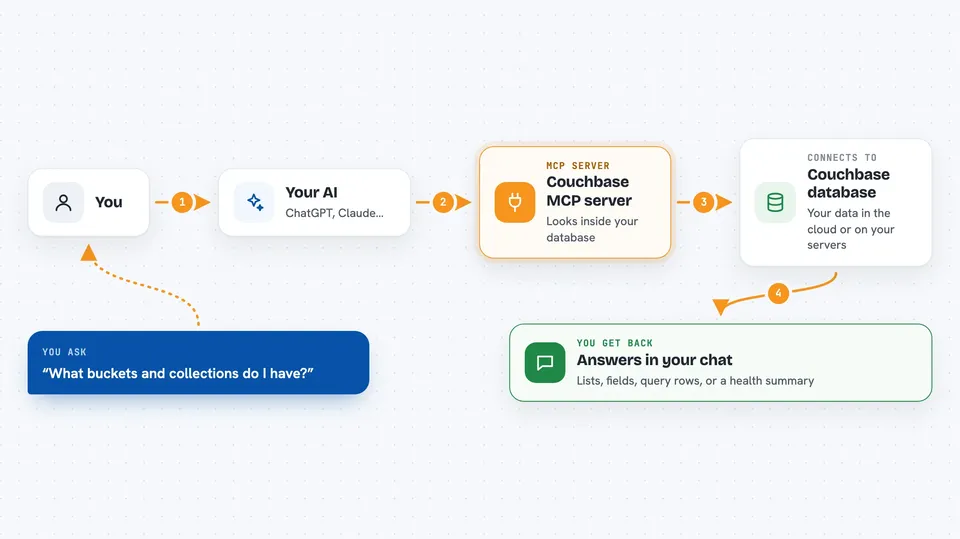
You ask your AI something about your Couchbase data, like which collections exist or what a document looks like. Your AI passes that request to this helper program. The helper talks to your Couchbase cluster, whether it runs in the cloud on Capella or on your own servers. It brings the answer back and your AI explains it to you in the chat. By default it only reads, so nothing in your database gets changed unless someone turns that protection off.
 Click to zoom
What you can do with it
- List the buckets, scopes, and collections in your cluster
- Show the structure of a collection so you know what fields it has
- Run a SQL++ query and get the results back
- Fetch a single document by its ID
- Find your slowest or most frequent queries
- Suggest indexes that could make a query faster
- Check whether the cluster is healthy and which services are running
Try asking your AI
- “What buckets and collections do I have in this cluster?”
- “Show me the 10 most recent documents in the users collection where status is active.”
- “What are the 5 slowest queries on this cluster in the last hour?”
- “Check whether this cluster is healthy and tell me which services are running.”
What it gives back to you
You get answers in the chat, not files to download. That can be a list of buckets or collections, the fields inside a document, the rows a query found, or a short summary of cluster health. For performance questions it gives you tables of query names, times, and sizes. If a change is allowed, it tells you what it changed.
Before you start
What you need
- A Couchbase cluster, either on Capella or self-managed, with a username and password
- An MCP client such as Claude Desktop, Cursor, Windsurf, VS Code, or JetBrains AI Assistant
- Python 3.10 or newer, or Docker if you prefer the container version
Good to know
It can change or delete data if someone turns off read-only mode, so leave that setting on unless you are sure you want the AI to make changes.
Install it with your AI
Add Couchbase MCP server to your AI, no technical skills needed
You don't install anything by hand. You copy one prompt, paste it into an AI that can work on your computer, and it checks, installs and connects the server for you, asking you when it needs something.
Sign in to get the install prompt
Members get a ready-made prompt that lets the Claude desktop app check Couchbase MCP server, install it and connect it for them, step by step. You don't need any technical skills: you copy, paste and answer a few questions. Your connected AI can also find and install any of the 4,361 MCP servers here for you.
Who it's for
Anyone who works with a Couchbase database and wants to ask questions about it in plain language, such as developers, data analysts, and support engineers.



