
MCP server · Analytics · official
Aiven MCP server
by Aiven-Open · official
Lets your AI look at and manage your Aiven databases and services, like PostgreSQL, Kafka and ClickHouse.
This is a helper that connects your AI assistant to Aiven, a cloud service where companies keep their databases and data tools. Once it is connected, you can ask your AI things like which services you have, what a database is doing, or to create a new topic in Kafka. It is handy for anyone who works with Aiven and wants to skip clicking around the Aiven website.
What is an MCP server? The 30-second version
On its own, your AI can only chat. An MCP server is a small helper program that gives your AI a new skill or a connection to an app or service. This one connects your AI to Aiven, so the AI can look things up in your Aiven account and do things there for you when you ask. You stay in the chat, and the helper does the running around.
What this MCP server does
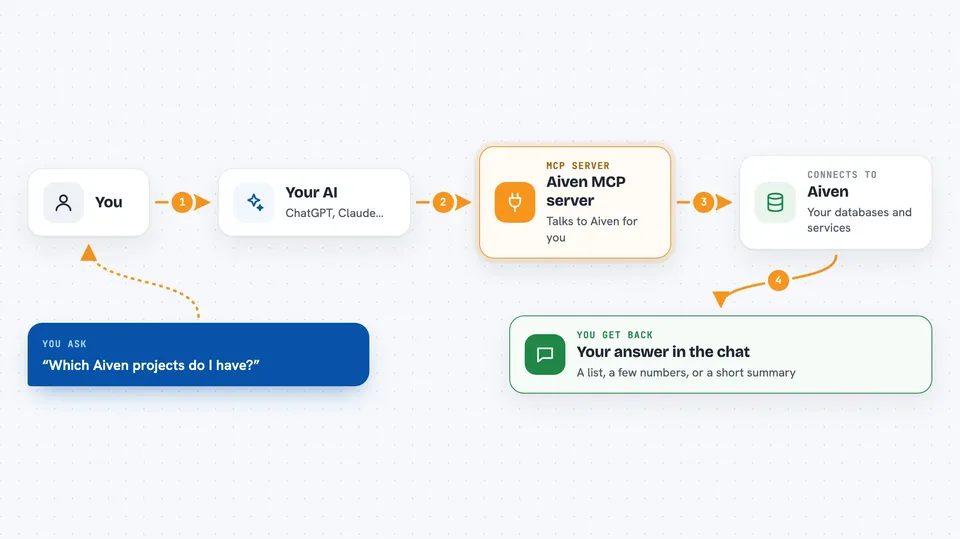
You ask your AI a question about your Aiven account, in normal words. The AI passes your request to this helper. The helper talks to Aiven using your Aiven login, and Aiven sends back the answer. The AI then shows you the result in the chat, like a list of services, some numbers, or a short summary. If you ask it to change something, the helper can also make that change in Aiven for you.
 Click to zoom
What you can do with it
- List your Aiven projects and the services inside them
- Check the details and health of a PostgreSQL, Kafka, ClickHouse or OpenSearch service
- Create a new Kafka topic or read messages from one
- Run a read-only SQL query on a PostgreSQL database
- Look up service logs, metrics and current queries
- Search the official Aiven documentation for an answer
- Create or update a service, like changing its plan or powering it off
Try asking your AI
- “Which Aiven projects do I have, and what services are in each one?”
- “Show me the last 20 messages in the orders topic on my Kafka service.”
- “Run a read-only query on my PostgreSQL service that counts rows in the customers table.”
- “Search the Aiven docs for how to set up a PgBouncer connection pool.”
What it gives back to you
You get answers in the chat, like a list of projects, a table of services, a few numbers from a query, or a short summary of what the AI found. If you asked it to change something, it tells you what it changed. For logs or messages, it shows the entries it read. Everything stays in the conversation so you can ask follow-up questions.
Before you start
What you need
- An Aiven account (the hosted version signs you in through your browser)
- For the local version: an Aiven API token, which you create on the Aiven website under your profile
- For the local version: Node.js 18 or newer installed on your computer
Good to know
This helper can create, change and delete Aiven services and data, and it can also read live passwords if you turn that on, so review what your AI is about to do before you say yes.
Install it with your AI
Add Aiven MCP server to your AI, no technical skills needed
You don't install anything by hand. You copy one prompt, paste it into an AI that can work on your computer, and it checks, installs and connects the server for you, asking you when it needs something.
Sign in to get the install prompt
Members get a ready-made prompt that lets the Claude desktop app check Aiven MCP server, install it and connect it for them, step by step. You don't need any technical skills: you copy, paste and answer a few questions. Your connected AI can also find and install any of the 4,361 MCP servers here for you.
Who it's for
People who already use Aiven for their databases and data tools and want to ask their AI about them instead of clicking through the Aiven website.



