MCP server · Social media
Agent 1st Ads MCP server
by Nolas-Shadow
Lets your AI create and check Meta and TikTok ad campaigns for you, in one request.
This is a helper that connects your AI assistant to your Meta (Facebook and Instagram) and TikTok advertising accounts. Once it is set up, you can ask your AI in plain words to start a campaign or check how one is doing, and it will do the clicking for you. It is handy if you run ads but do not want to learn the ad platforms' own complicated tools.
What is an MCP server? The 30-second version
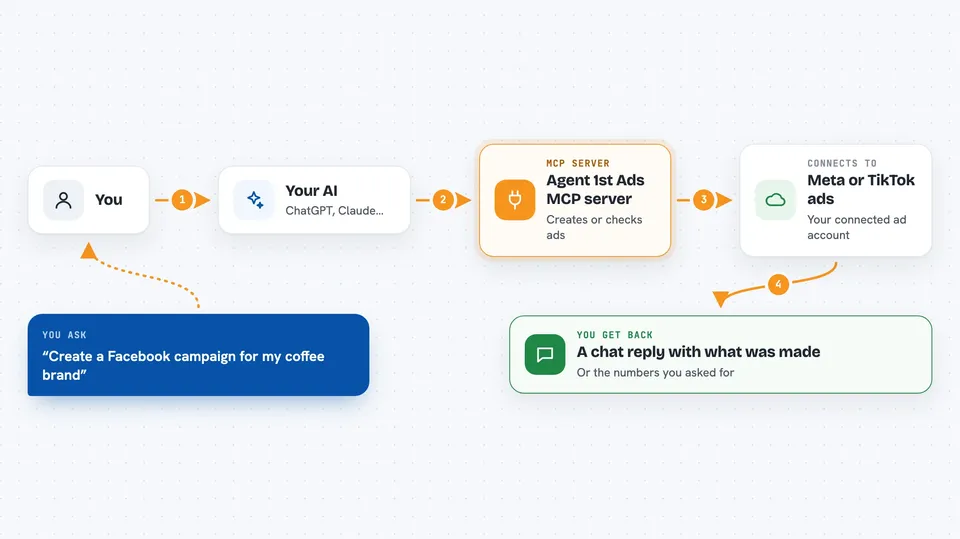
On its own, your AI can only chat. An MCP server is a small helper program that gives your AI a new skill or a connection to an app or service. This one connects your AI to Meta and TikTok ads, so it can look things up or make changes there when you ask. You stay in the chat; the helper does the talking to the ad platforms.
What this MCP server does
You tell your AI what you want, for example a new Facebook campaign with a certain budget. Your AI passes that request to this helper. The helper talks to Meta or TikTok using your connected ad account. It creates the campaign, ad set, or ad, or it pulls back the numbers you asked for. Then you get a short answer in the chat telling you what was made or what the results are.
 Click to zoom
What you can do with it
- Create a full Meta campaign with targeting, creative, budget and ad in one go
- Create a TikTok ad campaign
- Connect your Meta or TikTok ad account through a secure sign-in
- Check how a Meta campaign is performing
- Check how a TikTok campaign is performing
- Ask for campaign stats without opening the ad platform yourself
Try asking your AI
- “Create a Facebook campaign for my new coffee brand, budget 20 dollars a day, targeting people in London who like coffee”
- “Set up a TikTok campaign for my skincare product with a 50 dollar daily budget”
- “How is my Meta campaign doing this week?”
- “Show me the stats for my TikTok campaign from the last 7 days”
What it gives back to you
You get answers in the chat, not files. For a new campaign, it tells you what was created, like the campaign name and settings. For stats, it gives you the numbers it pulled from Meta or TikTok, such as spend, clicks, or impressions. Everything stays as a normal chat reply you can read and copy.
Before you start
What you need
- A Meta ads account or a TikTok ads account (or both)
- A paid subscription to Agent 1st Ads (plans start at 29 dollars a month)
- Permission to connect your ad account through their secure sign-in
Good to know
This helper can spend real money on ads and change live campaigns, so check the details before you say yes, and remember it is a paid service with monthly plans.
Install it with your AI
Add Agent 1st Ads MCP server to your AI, no technical skills needed
You don't install anything by hand. You copy one prompt, paste it into an AI that can work on your computer, and it checks, installs and connects the server for you, asking you when it needs something.
Sign in to get the install prompt
Members get a ready-made prompt that lets the Claude desktop app check Agent 1st Ads MCP server, install it and connect it for them, step by step. You don't need any technical skills: you copy, paste and answer a few questions. Your connected AI can also find and install any of the 4,361 MCP servers here for you.
Who it's for
Small business owners, marketers, and freelancers who run Facebook, Instagram, or TikTok ads and want to manage them by chatting instead of clicking through ad dashboards.