MCP server · Social media · official
Prepublish MCP server
by prepublish · official
Your AI can review a YouTube script before you film it and score the hook, structure and pacing.
Prepublish is a helper that lets your AI read a YouTube script you have written but not recorded yet. It gives you scores for the hook, the structure and the pacing, points out the parts where viewers may drift away, and checks for policy and reused-content issues. It is handy if you write videos and want a second opinion before you spend a day filming.
What is an MCP server? The 30-second version
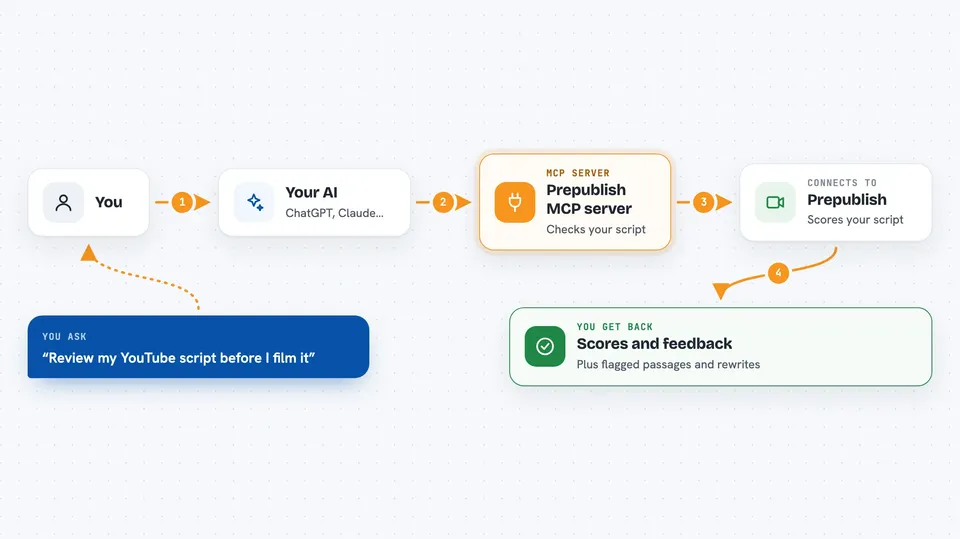
On its own, your AI can only chat with you. An MCP server is a small helper program that gives your AI a new skill or a connection to another service. This one connects your AI to Prepublish, a script-checking service, so when you ask about your draft, the AI can send it there and bring the results back into the chat. You do not install anything for the hosted version; you just add the address once.
What this MCP server does
You paste your script into the chat and ask your AI to review it. The AI sends the text to Prepublish using this helper. Prepublish reads the words, scores the hook, the structure and the pacing, and marks the passages most likely to lose viewers. It also checks for inauthentic content and YouTube policy areas, and can turn a word count into a runtime estimate. The AI then shows you the scores, the flagged passages and a suggested rewrite in the chat.
 Click to zoom
What you can do with it
- Score the hook, structure and pacing of a finished draft
- Find the passages most likely to lose viewers
- Get rewritten alternatives for your opening lines
- Check a script for reused or templated content risk
- See which YouTube policy areas your script touches
- Convert a word count into a runtime range
- Turn a target runtime into a word budget
Try asking your AI
- “Use prepublish to audit this script and tell me where viewers might drop off.”
- “Check the hook of this opening and give me a grade with rewritten options.”
- “Run a policy preflight on this script and list the YouTube pages it cites.”
- “Convert 1500 words into a runtime range with prepublish.”
What it gives back to you
You get scores and short written feedback in the chat, plus a list of the passages that carry the most attention risk. The hook check returns a grade and rewritten alternatives. The policy check returns the policy families your script touches, each with a link to YouTube's own page. The runtime tool returns three time estimates based on measured speaking rates.
Before you start
What you need
- An AI client that supports MCP servers, such as Claude Desktop, Claude Code, Cursor, VS Code, Windsurf or Codex CLI
- For the full audit only: an email address, because the full report is sent by email
- For clients that can only launch a command: Node.js 20 or newer
Good to know
The AI-backed checks are text-only and map relative attention risk in your draft; they are not a forecast of views, watch time or revenue, and the free tier has daily call limits.
Install it with your AI
Add Prepublish MCP server to your AI, no technical skills needed
You don't install anything by hand. You copy one prompt, paste it into an AI that can work on your computer, and it checks, installs and connects the server for you, asking you when it needs something.
Sign in to get the install prompt
Members get a ready-made prompt that lets the Claude desktop app check Prepublish MCP server, install it and connect it for them, step by step. You don't need any technical skills: you copy, paste and answer a few questions. Your connected AI can also find and install any of the 4,361 MCP servers here for you.
Who it's for
YouTube creators, scriptwriters, video editors and social media teams who want a check on a draft before they record.