MCP server · Analytics
Sports Data MCP server
Ask your AI to compare live odds across bookmakers and pull sports stats from many leagues.
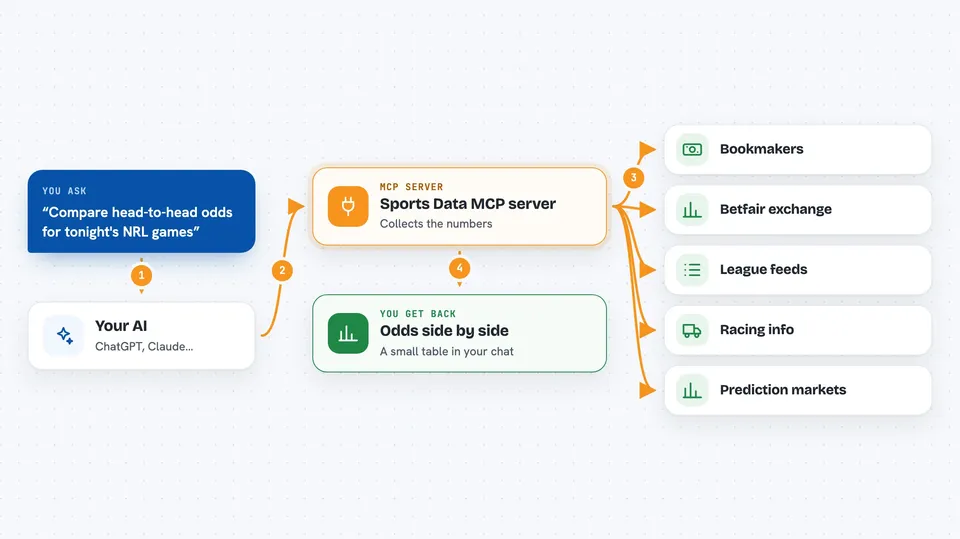
This is a helper that connects your AI to live sports data and betting odds from many bookmakers and leagues. It is handy if you follow sport closely or want to compare prices across different books without opening ten websites. You ask a question in plain words, and your AI goes and finds the numbers for you.
What is an MCP server? The 30-second version
On its own, your AI can only chat with you using what it already learned. An MCP server is a small helper program that gives your AI a new skill, here a connection to sports data and bookmaker odds. Once it is connected, your AI can look up fixtures, results, prices and stats and bring them back into the chat. You do not need to know how it works under the hood, you just ask.
What this MCP server does
You ask your AI something like which book has the best price on a game. Your AI uses this helper to reach out to the bookmaker sites and league feeds it has been set up with. The helper collects the numbers and hands them back to your AI. Your AI then lays them out for you, often as a small table, so you can see the differences at a glance. It can also pull fixtures, ladders, results and racing information the same way.
 Click to zoom
What you can do with it
- Compare odds for the same match across several bookmakers
- Check what the Betfair exchange implies versus a regular book
- Pull today's fixtures and results for a league
- Look up a team's ladder position and recent form
- Get racing fields, results and tote pool information
- See prediction market prices from Kalshi and Polymarket
- Fetch stats from leagues like the NBA, MLB, NFL and Premier League
Try asking your AI
- “Compare head-to-head odds across every book for tonight's NRL games”
- “Which AFL games have the biggest price disagreement between bookmakers?”
- “What does Betfair imply for the Panthers versus what Sportsbet is offering?”
- “Show me Pinnacle's line on every MLB game today”
What it gives back to you
You get back the numbers you asked for, usually as a short list or a small table right in the chat. For an odds question, you see each book's price side by side so the gap is obvious. For a stats or fixtures question, you get the matching games, teams and figures. It does not change anything on the bookmaker sites unless you have deliberately turned on the betting tools.
Before you start
What you need
- The uv tool installed (the README shows a one-line way to run it)
- Optionally a free DataGolf key or a Twitter/X token if you want those specific feeds
- Your own bookmaker login details only if you choose to enable the betting tools
Good to know
The betting tools can stake real money from your own account, so only turn those groups on if that is what you want, and be aware that only Sportsbet and TAB have been tested against a real account.
Install it with your AI
Add Sports Data MCP server to your AI, no technical skills needed
You don't install anything by hand. You copy one prompt, paste it into an AI that can work on your computer, and it checks, installs and connects the server for you, asking you when it needs something.
Sign in to get the install prompt
Members get a ready-made prompt that lets the Claude desktop app check Sports Data MCP server, install it and connect it for them, step by step. You don't need any technical skills: you copy, paste and answer a few questions. Your connected AI can also find and install any of the 4,066 MCP servers here for you.
Who it's for
People who follow or bet on sport, especially Australian markets, and anyone who wants quick stats and odds comparisons without visiting many sites.