MCP server · Analytics
DraftCall MCP server
Ask your AI to compare NFL fantasy players, check rankings, and plan byes using live data.
DraftCall is a free helper that gives your AI assistant real NFL fantasy football numbers for the 2026 season. You can ask it things like who to start between two players, or where a player ranks at their position. It is handy if you play fantasy football and want answers based on data instead of guesses.
What is an MCP server? The 30-second version
On its own, your AI can only chat with you using what it already learned. An MCP server is a small helper program that gives your AI a new skill or a connection to a service. This one connects your AI to DraftCall, an NFL fantasy football data service, so the AI can look up player stats, rankings and matchups for you. You just ask in normal words, and the AI uses this helper behind the scenes.
What this MCP server does
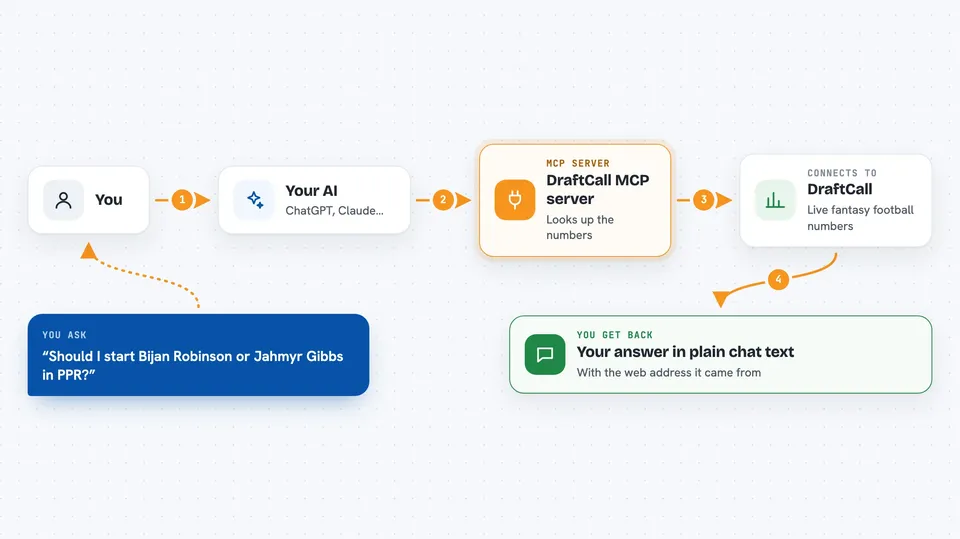
You ask your AI a fantasy football question, like whether to start one player over another. The AI sends that request to the DraftCall helper, which looks up the numbers on the DraftCall service. The helper sends back things like points per game, bye weeks and rankings in the scoring format you asked for. Your AI then explains the answer to you in the chat. Every result also includes the DraftCall web address the numbers came from, so you can check them yourself.
 Click to zoom
What you can do with it
- Compare two players head to head in PPR, half-PPR or standard scoring
- Get position rankings for QB, RB, WR, TE, FLEX, K or DEF
- Look up one player's profile, tier, efficiency and bye week
- Search for players by partial name, team or position
- See how steep the scoring dropoff is at each position for draft strategy
- Find which bye weeks your players share
- Check a player's weekly matchup and how generous the opponent has been to that position
- Check a stat you remember against the real number
Try asking your AI
- “Should I start Bijan Robinson or Jahmyr Gibbs in PPR?”
- “Show me the top 20 running backs in half-PPR.”
- “Which of my players share a bye week: CeeDee Lamb, Saquon Barkley, Josh Allen?”
- “Is 18.4 points per game right for Puka Nacua in PPR?”
What it gives back to you
You get answers in plain chat text: comparisons, rankings lists, player profiles, bye week clashes and matchup notes. Numbers come with the scoring format and the season they describe, so you know what you are looking at. Each result also carries the DraftCall web address it came from, so you can click through and see the source. Nothing is changed on your end, it is all read-only lookups.
Before you start
What you need
- An AI assistant that can connect to a remote MCP server, like Claude Desktop or Claude Code
- No account, no API key and no payment
Good to know
It is read-only and cannot change your league or roster, but it publishes no projections, ADP or injury status, so treat the numbers as past production and not a prediction.
Install it with your AI
Add DraftCall MCP server to your AI, no technical skills needed
You don't install anything by hand. You copy one prompt, paste it into an AI that can work on your computer, and it checks, installs and connects the server for you, asking you when it needs something.
Sign in to get the install prompt
Members get a ready-made prompt that lets the Claude desktop app check DraftCall MCP server, install it and connect it for them, step by step. You don't need any technical skills: you copy, paste and answer a few questions. Your connected AI can also find and install any of the 4,361 MCP servers here for you.
Who it's for
Fantasy football players who want quick, data-backed answers during drafts and the season, without digging through stats sites themselves.