
MCP server · Developer tools
POX MCP server
by davidlin2k
Lets your AI look at and manage a small software network running on your own computer.
This is a helper that connects your AI assistant to POX, a free tool people use to run and study software-defined networks. It is handy for students, teachers and anyone learning how computer networks move data around. You do not need to be a network engineer to try it, but you do need a POX setup running on your machine.
What is an MCP server? The 30-second version
On its own, your AI can only chat. An MCP server is a small helper program that gives your AI a new skill or a connection to another piece of software, and here that connection is to POX, a network controller. Once it is connected, your AI can ask POX what switches are running, look at how data is flowing, and make small changes for you. You just type a request in plain words and the helper does the talking to POX behind the scenes.
What this MCP server does
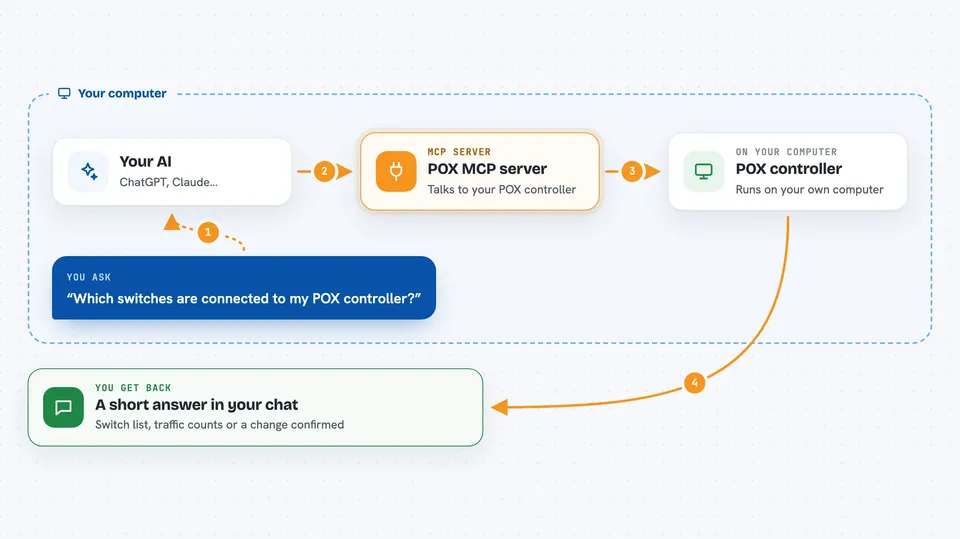
You ask your AI something about your network, like which switches are connected or how many packets have passed through. The AI uses this helper, and the helper talks to your local POX controller. POX replies with the current state of your switches, links and flow rules. The AI then turns that into a short answer in your chat. If you ask it to change something, like a flow table, it sends that change to POX and tells you it is done.
 Click to zoom
What you can do with it
- List all the switches your POX controller is managing
- Get details about a specific switch, like its features and status
- Check flow statistics to see how much traffic is moving
- Change flow tables to adjust how traffic is handled
- Save your own notes and observations into a network memo
- View a live picture of your network topology and host locations
- Ask for help writing a simple hub or learning switch setup
Try asking your AI
- “Which switches are connected to my POX controller right now?”
- “Show me the flow statistics for switch 1”
- “Add a note that the link between switch 1 and 2 is down”
- “Help me set up a simple learning switch on datapath 1”
What it gives back to you
You get short answers in the chat, like a list of switches with their connection status, or a table of flow entries with packet counts. When you add an insight, it confirms it was saved into the network memo. If you change a flow table, it tells you the update went through. You can also ask for a view of the topology and get a summary of switches, hosts and links.
Before you start
What you need
- A POX controller running on your computer (the free software this connects to)
- Python and the uv tool installed, since the server runs with uv
- The Claude desktop app or another AI app that supports MCP servers
- The address of your POX server, usually http://localhost:8000
Good to know
It can change how your network handles traffic, so be careful with flow table changes on a setup you care about.
Install it with your AI
Add POX MCP server to your AI, no technical skills needed
You don't install anything by hand. You copy one prompt, paste it into an AI that can work on your computer, and it checks, installs and connects the server for you, asking you when it needs something.
Sign in to get the install prompt
Members get a ready-made prompt that lets the Claude desktop app check POX MCP server, install it and connect it for them, step by step. You don't need any technical skills: you copy, paste and answer a few questions. Your connected AI can also find and install any of the 4,066 MCP servers here for you.
Who it's for
Students, teachers and researchers learning about software-defined networking, plus anyone prototyping small network setups at home or in a lab.


