MCP server · Health and learning
WHOOP MCP server
by davidmosiah
Let your AI read your WHOOP recovery, sleep, strain and HRV data so it can brief you on your day.
This is a small helper that connects your AI assistant to your WHOOP account. Once it is set up, you can ask your AI about your recovery, sleep and training load without opening the WHOOP app and copying numbers by hand. It is handy for anyone who uses ChatGPT, Claude or Cursor to plan training, rest or their workday around how their body is doing.
What is an MCP server? The 30-second version
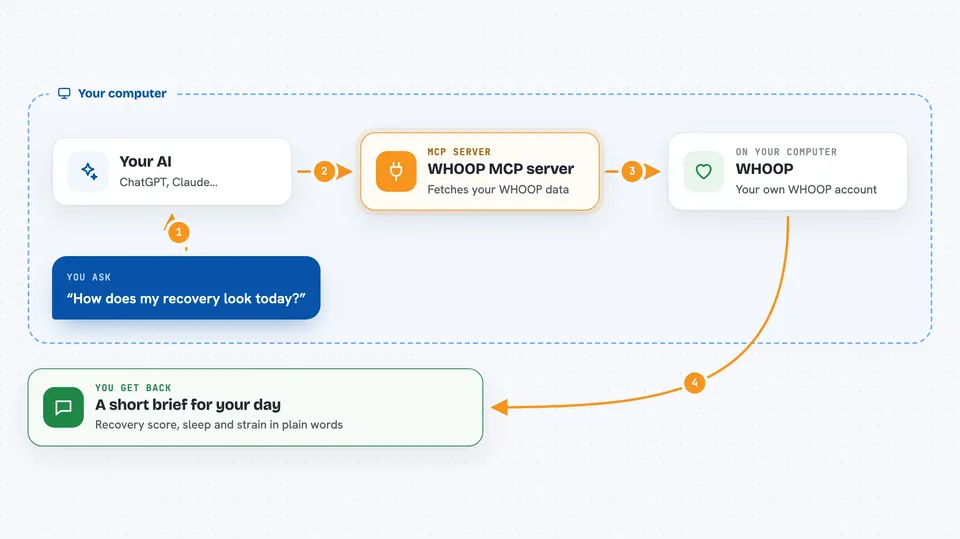
On its own, your AI can only chat with you. It cannot see your WHOOP data. An MCP server is a small helper program that gives your AI a new skill, in this case the ability to talk to WHOOP. You install it once, connect your WHOOP account, and after that your AI can look up your recovery, sleep and strain numbers whenever you ask.
What this MCP server does
You ask your AI something like how your recovery looks today. The AI passes that request to this helper program running on your computer. The helper talks to WHOOP using your own account login, fetches the numbers, and hands them back to the AI. The AI then turns those numbers into a short answer, a summary or a plan for you. Your login tokens stay on your machine, not on someone else's server.
 Click to zoom
What you can do with it
- Check your recovery score, HRV and resting heart rate for today
- See last night's sleep, including stages, efficiency and sleep debt
- Look at your day strain and recent workouts
- Get a weekly scorecard comparing this week to last week
- Ask for a short operating brief for the day based on your data
- Preview what the data looks like with made-up demo numbers before connecting
- Check whether your WHOOP connection is set up correctly
Try asking your AI
- “Use whoop_connection_status to check setup, then run whoop_daily_summary and give me a 5-line operating brief for today.”
- “Call whoop_weekly_summary and tell me my top bottleneck and a sleep and training plan for next week.”
- “What was my recovery score and HRV this morning, and how does it compare to my recent baseline?”
- “Show me my last three workouts with strain and heart rate zone minutes.”
What it gives back to you
You get answers in the chat: short briefs, scorecards, lists of recoveries, sleeps, cycles or workouts, and simple numbers like recovery score, HRV, resting heart rate and sleep hours. You can ask for a friendly written summary or for the raw structured data if you want to see every field. Nothing changes inside WHOOP itself. It only reads your data.
Before you start
What you need
- A WHOOP account and a WHOOP Developer app (you create one on the WHOOP developer site, it is free)
- The client id and secret from that developer app
- Node.js installed on your computer
- An MCP-compatible AI app such as Claude Desktop, Cursor or ChatGPT Desktop
Good to know
This is an unofficial project and it reads your private health data, so only connect it with your own WHOOP account and be careful about sharing any captured output.
Install it with your AI
Add WHOOP MCP server to your AI, no technical skills needed
You don't install anything by hand. You copy one prompt, paste it into an AI that can work on your computer, and it checks, installs and connects the server for you, asking you when it needs something.
Sign in to get the install prompt
Members get a ready-made prompt that lets the Claude desktop app check WHOOP MCP server, install it and connect it for them, step by step. You don't need any technical skills: you copy, paste and answer a few questions. Your connected AI can also find and install any of the 4,609 MCP servers here for you.
Who it's for
People who train, care about sleep and recovery, and already use an AI assistant to plan their day or workouts.