MCP server · Analytics
Kilter Board MCP server
by wmmg101
Lets your AI read and analyse your own Kilter Board climbing logbook.

This is a small helper that connects your AI assistant to your Kilter Board logbook. Once it is set up, you can just ask questions about your climbing in plain words and get real answers from your own data. It is handy if you train on a Kilter Board and want to see how you are doing without scrolling through the app.
What is an MCP server? The 30-second version
On its own, your AI can only chat with you. An MCP server is a small helper program that gives it a new skill or a connection to an app. This one connects your AI to your Kilter Board logbook. So when you ask about your sessions or projects, the AI can actually look them up instead of guessing.
What this MCP server does
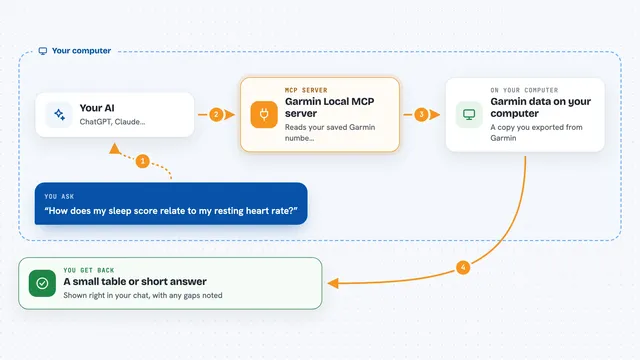
You ask your AI a question about your climbing, like how your last session went. The AI passes that question to this helper. The helper logs in to Kilter with your account, reads your logbook, and works out the answer. Then it sends the result back and the AI explains it to you in the chat. It only reads; it never changes anything in your Kilter account.
 Click to zoom
What you can do with it
- See how your latest climbing session went
- List your sends and projects at a chosen wall angle
- Show your grade pyramid with flash rates
- Find your hardest sends
- Compare your climbing at different wall angles
- Track your progress month by month
Try asking your AI
- “Show my latest Kilter session.”
- “What are my current projects at 30 degrees?”
- “Compare my climbing at 20 and 40 degrees.”
- “Show my grade pyramid at 30 degrees.”
What it gives back to you
You get answers in the chat, based on your own logbook. That can be a list of climbs, a summary of totals and hardest sends, a grade pyramid, or a month-by-month trend. It can also group entries by day so you see each session separately. Everything is read-only, so nothing in your account changes.
Before you start
What you need
- Your Kilter Board username and password
- The uv tool installed (uvx comes with it)
- An MCP client like Kiro, Claude Desktop, Cursor or similar
Good to know
It is read-only, but it needs your Kilter password, so keep that in your environment or a secret manager rather than in a file you might share.
Install it with your AI
Add Kilter Board MCP server to your AI, no technical skills needed
You don't install anything by hand. You copy one prompt, paste it into an AI that can work on your computer, and it checks, installs and connects the server for you, asking you when it needs something.
Sign in to get the install prompt
Members get a ready-made prompt that lets the Claude desktop app check Kilter Board MCP server, install it and connect it for them, step by step. You don't need any technical skills: you copy, paste and answer a few questions. Your connected AI can also find and install any of the 4,361 MCP servers here for you.
Who it's for
Kilter Board climbers who train regularly and want quick, honest answers about their own logbook.