MCP server · Health and learning
Google Health MCP server
by partymola
Lets your AI read your Google Health data, like heart rate, sleep, steps and weight, and spot trends.
This is a helper that connects your AI assistant to your own Google Health data. Once it is set up, you can just ask your AI things like how your sleep has been this month or how many steps you averaged last week. It is handy for anyone who wears a Fitbit, Pixel Watch or similar device and wants to make sense of their numbers without clicking around in apps.
What is an MCP server? The 30-second version
On its own, your AI can only chat with you. An MCP server is a small helper program that gives your AI a new skill or a connection to an app or service. This one connects your AI to Google Health, so it can look up your heart rate, sleep, steps, weight and more. You ask a question in plain words, and the helper goes and gets the answer from your data.
What this MCP server does
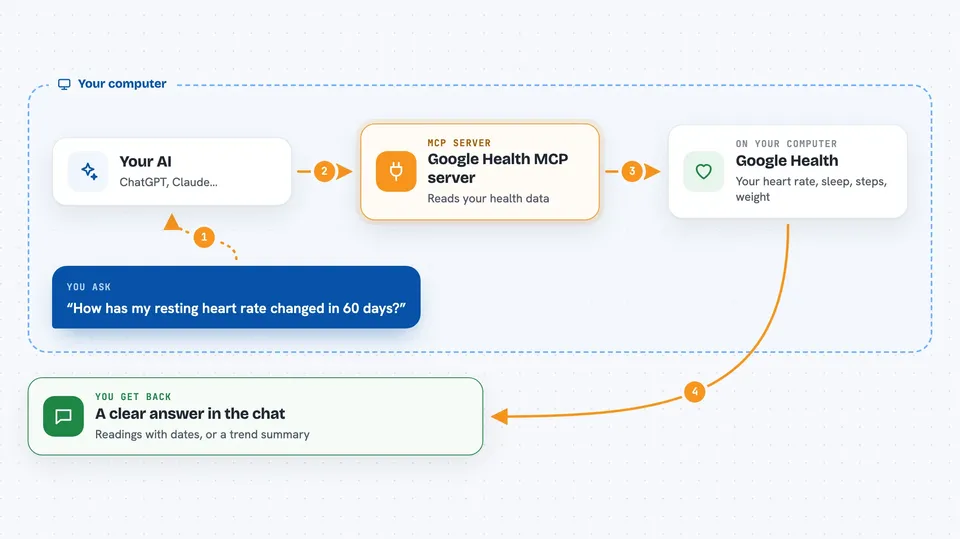
You ask your AI a question about your health data, like how your resting heart rate changed over the last two months. The AI passes that request to this helper. The helper reads from a copy of your Google Health data that it keeps on your own computer, so answers come back fast and work even without internet. If you ask for something new or very recent, it can also fetch fresh data from Google. Then you get a clear answer, a list of readings or a trend summary right in the chat.
 Click to zoom
What you can do with it
- Check your resting heart rate over any period
- See your daily steps, calories, distance and floors
- Review your sleep duration and sleep stages
- Track your weight and body fat over time
- Look at workouts, including duration, heart rate and calories
- Compare this month to last month with trend summaries
- Check your blood oxygen, HRV and breathing rate at night
Try asking your AI
- “How has my resting heart rate changed over the last 60 days?”
- “Show me my average sleep duration each week for the past three months.”
- “Compare my step count this month with last month.”
- “What were my workouts last week, and how long was each one?”
What it gives back to you
You get answers in plain words, plus lists of readings with dates and numbers when that helps. For trends, it gives you averages and comparisons between two periods, like this month versus last. Some tools can also return more detail, such as sleep stages or an ECG waveform, but only when you ask for it, so the chat stays readable.
Before you start
What you need
- A Google account with health data in it
- Python 3.13 or newer installed on your computer
- A Google Cloud project with the Google Health API turned on (the setup walks you through it, and no payment is needed)
- About 15 minutes to follow the setup steps once
Good to know
This reads your private health data, so treat the setup files and the local database as sensitive, and only connect it to an AI app you trust.
Install it with your AI
Add Google Health MCP server to your AI, no technical skills needed
You don't install anything by hand. You copy one prompt, paste it into an AI that can work on your computer, and it checks, installs and connects the server for you, asking you when it needs something.
Sign in to get the install prompt
Members get a ready-made prompt that lets the Claude desktop app check Google Health MCP server, install it and connect it for them, step by step. You don't need any technical skills: you copy, paste and answer a few questions. Your connected AI can also find and install any of the 4,361 MCP servers here for you.
Who it's for
Anyone who tracks their health with a Google-linked device and wants to ask their AI questions about sleep, activity, heart rate and weight.