
MCP server · Gaming
GameBrain MCP server
by ddsky
Let your AI search and discover video games across every platform using the GameBrain game database.
This is a small helper that connects your AI assistant to GameBrain, a service that keeps information about video games. Once it is set up, you can just ask your AI about games and it will look them up for you. It is handy if you write about games, shop for them, or just want quick answers without opening a browser.
What is an MCP server? The 30-second version
On its own, your AI can only chat with you using what it already learned. An MCP server is a small helper program that gives your AI one extra skill or connection. This one connects your AI to GameBrain, a video game database. So when you ask about a game, your AI can actually look it up there instead of guessing.
What this MCP server does
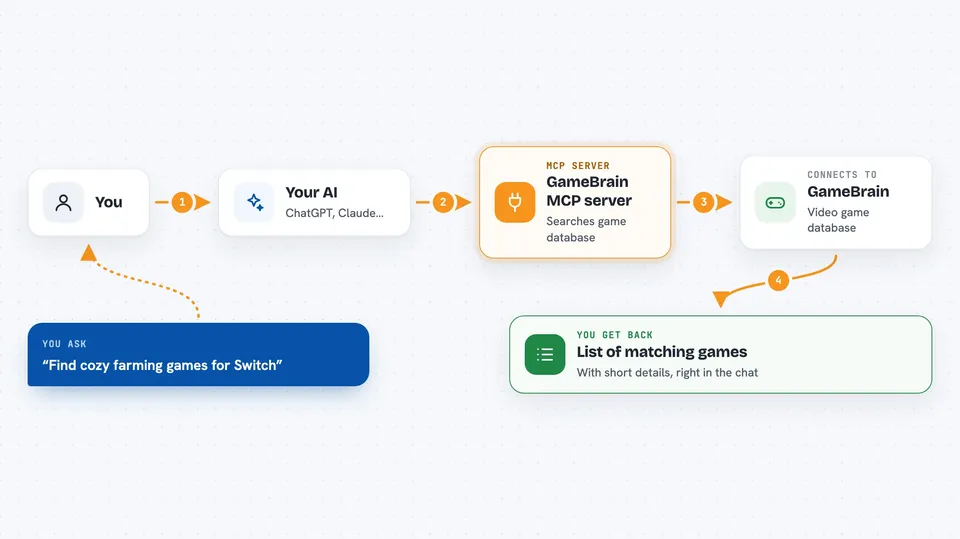
You ask your AI a question about video games in normal words. Your AI passes that question to this helper. The helper talks to GameBrain over the internet and searches its game database. GameBrain sends back matching games and details. Your AI then turns that into a plain answer for you in the chat.
 Click to zoom
What you can do with it
- Search for video games by name or keyword
- Discover games across different platforms
- Look up details about a specific game
- Find games similar to one you already like
- Get quick answers about games without leaving the chat
Try asking your AI
- “Find me some cozy farming games for the Nintendo Switch”
- “What games are similar to Hollow Knight?”
- “Search for recent racing games on PlayStation”
- “Tell me about the game Stardew Valley”
What it gives back to you
You get back a list of matching games with short details, right inside the chat. Your AI may summarize them, compare them, or pick the best few for you. It can also answer a direct question about one game. Everything shows up as normal text you can read and copy.
Before you start
What you need
- A free GameBrain API key (a kind of password for apps; you get it from the GameBrain website)
- The Claude desktop app or another app that supports MCP servers
- Node.js installed on your computer (the setup uses a tool called npx)
Good to know
Keep your API key private, since anyone who has it can use your GameBrain account.
Install it with your AI
Add GameBrain MCP server to your AI, no technical skills needed
You don't install anything by hand. You copy one prompt, paste it into an AI that can work on your computer, and it checks, installs and connects the server for you, asking you when it needs something.
Sign in to get the install prompt
Members get a ready-made prompt that lets the Claude desktop app check GameBrain MCP server, install it and connect it for them, step by step. You don't need any technical skills: you copy, paste and answer a few questions. Your connected AI can also find and install any of the 4,361 MCP servers here for you.
Who it's for
Great for gamers, game writers, reviewers, and anyone who often looks up or compares video games.





