MCP server · Productivity
Voila MCP server
Lets your AI search Voila groceries, check discounts, view delivery slots, and adjust your cart.
This is a helper that connects your AI assistant to your Voila grocery account. It lets the AI look up products, see what is on sale, check delivery times, and change quantities in your cart. It is handy if you shop at Voila often and want to plan your order by chatting instead of clicking.
What is an MCP server? The 30-second version
On its own, your AI can only chat. An MCP server is a small helper program that gives your AI a new skill or a connection to an app or service. This one connects your AI to Voila, so it can look things up and make small changes for you when you ask. You stay in control because it never places an order or checks out.
What this MCP server does
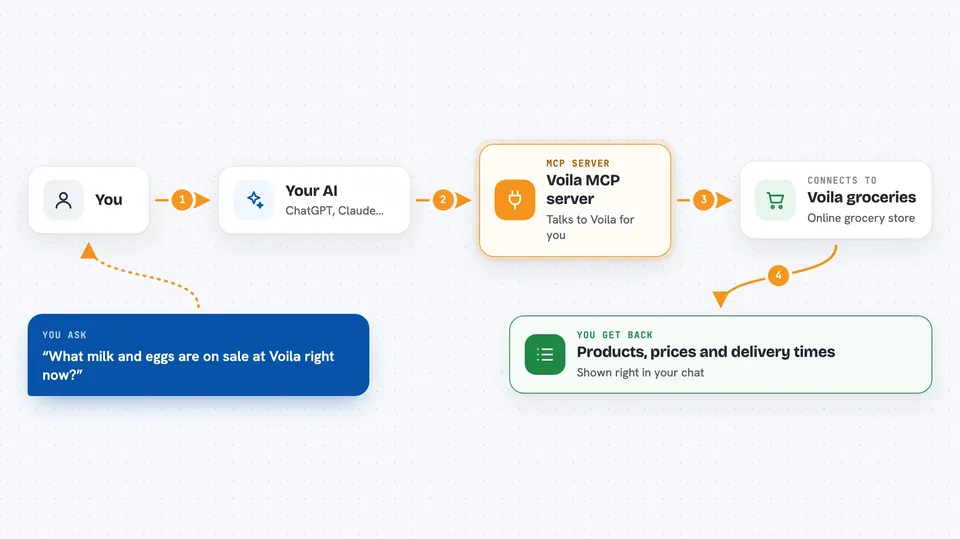
You ask your AI something like what milk is on sale at Voila. The AI sends that request to this helper. The helper talks to Voila using your saved login session. Then it brings back a list of products, prices, or delivery times, and shows them to you in the chat. If you ask it to add something to your cart, it changes the quantity and tells you if the item is limited or the price changed.
 Click to zoom
What you can do with it
- Search for products at Voila
- Check which items are discounted
- List available delivery slots
- Read your current cart and totals
- Add or remove item quantities in your cart
- Look at your past completed orders
- See item details from a past order
Try asking your AI
- “What milk and eggs are on sale at Voila right now?”
- “Show me the delivery slots for tomorrow afternoon.”
- “Add two more of the oat milk to my cart.”
- “What did I order from Voila last month?”
What it gives back to you
You get back lists of products with prices, discount information, delivery time options, or a summary of your cart. For past orders, it can show item names and totals. When you change your cart, it confirms what was added or removed and warns you if something is limited or the price changed.
Before you start
What you need
- A Voila grocery account
- A saved login session file created with the Voila CLI
- Node.js installed on your computer
Good to know
This helper can change your cart and reserve delivery slots, so double-check before you confirm. It cannot place an order or check out, but it does read your personal order history and cart.
Install it with your AI
Add Voila MCP server to your AI, no technical skills needed
You don't install anything by hand. You copy one prompt, paste it into an AI that can work on your computer, and it checks, installs and connects the server for you, asking you when it needs something.
Sign in to get the install prompt
Members get a ready-made prompt that lets the Claude desktop app check Voila MCP server, install it and connect it for them, step by step. You don't need any technical skills: you copy, paste and answer a few questions. Your connected AI can also find and install any of the 4,361 MCP servers here for you.
Who it's for
People who shop at Voila regularly and want to manage their grocery list and cart by talking to their AI assistant.