MCP server · Productivity
Yandex Merchants MCP server
by A1-x-Tech
Change prices, discounts and product visibility in Yandex Merchants by just asking your AI.
This is a helper that connects your AI assistant to your Yandex Merchants partner account. Once it is set up, you can change prices, add discounts and hide or bring back products in plain words, without editing and re-uploading your whole product file. It is handy for anyone who runs a shop on Yandex and wants quick, small fixes without opening the admin panel.
What is an MCP server? The 30-second version
On its own, your AI can only chat with you. An MCP server is a small helper program that gives your AI a new skill or a connection to an app or service. This one connects your AI to Yandex Merchants, so the AI can look up your product feeds and make changes there for you when you ask. You stay in the chat, and the helper does the talking to Yandex behind the scenes.
What this MCP server does
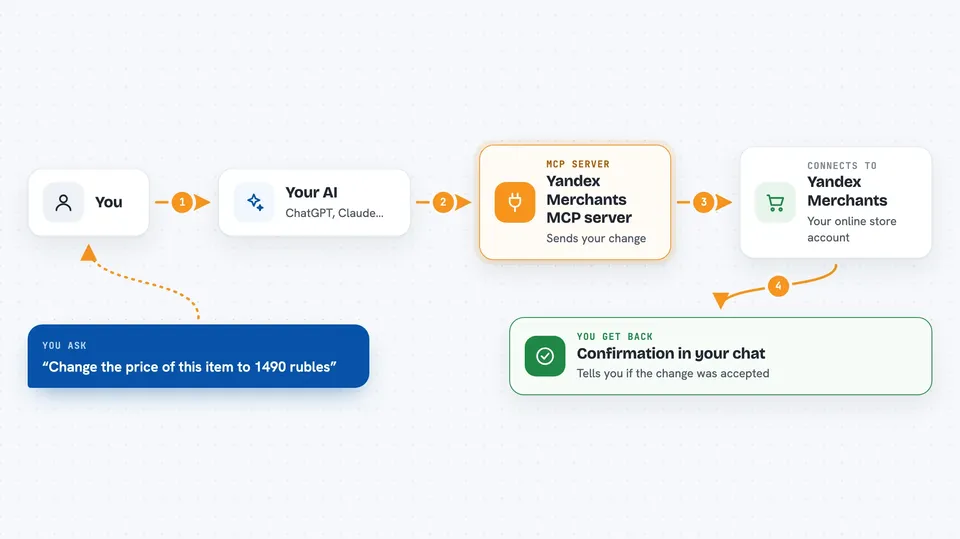
You ask your AI something like "change the price of this item". The AI passes your request to this helper, which runs on your own computer. The helper then sends the change to Yandex Merchants for the feed and item you named. Yandex replies, and the helper checks that the reply says the change was accepted. Then your AI tells you in the chat what happened.
 Click to zoom
What you can do with it
- Check that your Yandex Merchants account is connected
- List your product feeds and their feed IDs
- Change the price of a single item
- Update prices for up to 2,000 items in one go
- Set a discount with a new price and a crossed-out old price
- Hide one item or up to 500 items at once
- Bring hidden items back into view
Try asking your AI
- “Check the connection to Yandex Merchants and show my feeds”
- “In feed 1069, set the price of SKU-123 to 1490 rubles instead of 1990. Show me the change first.”
- “Hide these 12 items because they are out of stock”
- “Bring back all the items I hid last week”
What it gives back to you
You get answers in the chat, not files. For example, it can show a list of your feeds with their IDs and addresses, or confirm that a price change was accepted. It can also show you a planned change before it happens, if you ask it to. It cannot show you current prices or which items are hidden, because the Yandex API does not share that.
Before you start
What you need
- Node.js 20 or newer on your computer
- A YML product feed already uploaded to Yandex Merchants
- The Yandex login that uploaded that feed
- An AI app that can run local MCP servers, such as Claude Desktop, Cursor, VS Code or Codex
Good to know
Several actions really change your live listings, so ask your AI to show the feed ID, item ID and new values before it sends anything, and remember there is no undo if the connection drops.
Install it with your AI
Add Yandex Merchants MCP server to your AI, no technical skills needed
You don't install anything by hand. You copy one prompt, paste it into an AI that can work on your computer, and it checks, installs and connects the server for you, asking you when it needs something.
Sign in to get the install prompt
Members get a ready-made prompt that lets the Claude desktop app check Yandex Merchants MCP server, install it and connect it for them, step by step. You don't need any technical skills: you copy, paste and answer a few questions. Your connected AI can also find and install any of the 4,361 MCP servers here for you.
Who it's for
Shop owners and e-commerce staff who manage a Yandex Merchants catalog and want quick price or visibility changes without touching the admin panel.