MCP server · Productivity
Yandex KIT MCP server
by ztemerbekov
Lets your AI check and update your Yandex KIT store: orders, products, prices, promos, and webhooks.
This is a helper for people who run a Yandex KIT online store. It lets your AI assistant look at your shop and make changes for you, just by asking in normal words. Handy if you manage products, orders, or promotions and want less clicking around.
What is an MCP server? The 30-second version
On its own, your AI can only chat with you. An MCP server is a small helper program that gives your AI a new skill, here a connection to your Yandex KIT store. Once connected, the AI can look things up in your shop or make changes there when you ask. You do not need to understand how it works under the hood.
What this MCP server does
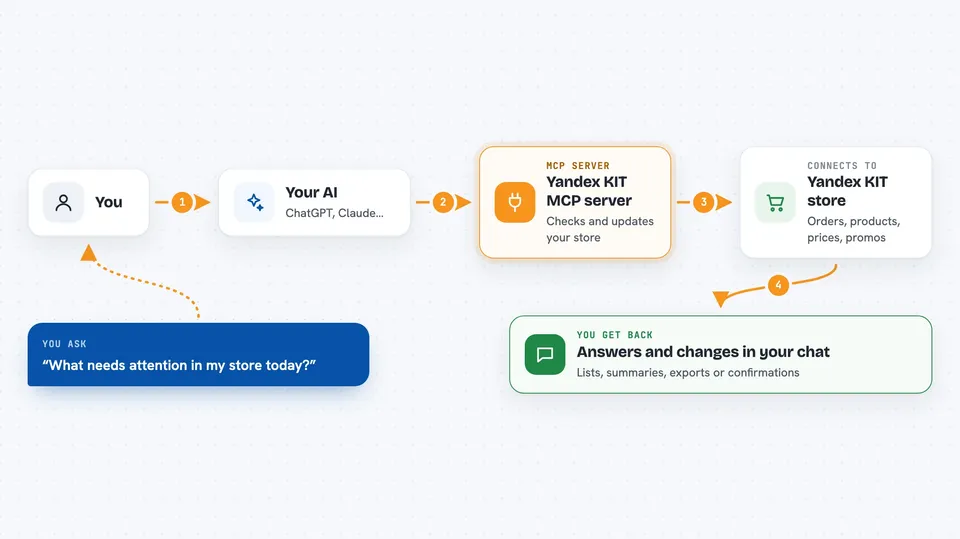
You type a request in plain language, like asking what needs attention in your store. Your AI passes it to this helper, which talks to your Yandex KIT store. The helper checks orders, products, prices, promos, or webhooks and brings the answer back. If you ask for a change, like raising prices or creating a promo code, it makes that change and tells you what it did. It only changes things when you give a clear instruction.
 Click to zoom
What you can do with it
- Check what needs attention in your store today
- Find product cards with missing photos or details
- Raise or set prices and stock for chosen products
- Export orders or customers to a CSV file
- Create, extend, or turn off promo codes and discounts
- Attach documents, photos, or videos to product cards
- Check whether your store is ready to open
Try asking your AI
- “What needs attention in my store right now? Check orders and the catalog.”
- “Raise the price of all products by 20 percent.”
- “Create a promo code SEPT10 for 10 percent off all items from 1 to 30 September, and activate it.”
- “Export last week's orders to CSV with date, amount, and status.”
What it gives back to you
You get answers in the chat: lists of orders or products, summaries of what needs attention, CSV exports, or confirmation of changes it made. For example, it might say that prices of all 12 products were raised and checked. If it could not check something fully, it tells you that too.
Before you start
What you need
- A Yandex KIT store account
- An access token for your store (a kind of password the setup asks you for)
- An AI app that supports skills or MCP, like Claude, Cursor, or Codex
Good to know
It can change prices, stock, promos, and customer notes in your live store, so only give clear instructions and check the result it reports.
Install it with your AI
Add Yandex KIT MCP server to your AI, no technical skills needed
You don't install anything by hand. You copy one prompt, paste it into an AI that can work on your computer, and it checks, installs and connects the server for you, asking you when it needs something.
Sign in to get the install prompt
Members get a ready-made prompt that lets the Claude desktop app check Yandex KIT MCP server, install it and connect it for them, step by step. You don't need any technical skills: you copy, paste and answer a few questions. Your connected AI can also find and install any of the 4,361 MCP servers here for you.
Who it's for
Store owners and shop managers who run a Yandex KIT store and want to handle catalog, orders, and promos by chatting with an AI.