
MCP server · Research
AIFeed MCP server
by denyn1
Lets your AI check a website's signed permission rules and pull lean, token-friendly page content.
AIFeed is a system that lets website owners sign a small file saying what AI tools are allowed to do with their content. This MCP server is the helper that lets your AI read those signed rules and fetch the pages in a lighter, cheaper format. It is handy if you use AI to research or gather content from websites and want to stay within what each site actually permits.
What is an MCP server? The 30-second version
On its own, your AI can only chat with you. An MCP server is a small helper program that gives your AI a new skill or a connection to a service. This one connects your AI to the AIFeed system, so it can check a website's signed permission file and pull its pages in a compact format. You just ask in normal words, and the helper does the checking and fetching behind the scenes.
What this MCP server does
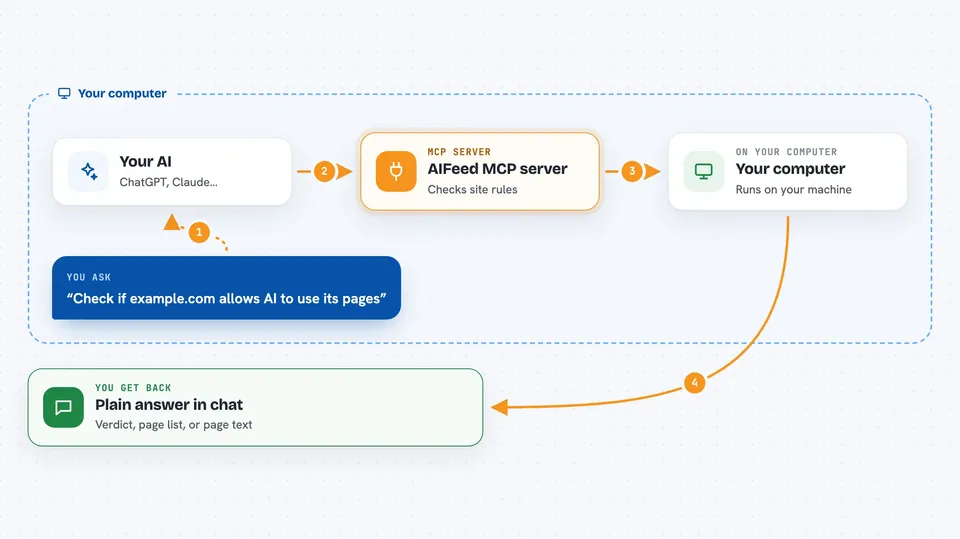
You ask your AI to look at a website or gather some pages. The AI uses this helper, which first finds the site's AIFeed permission file and checks that its signature is real and tied to that domain. If the site allows the use you asked for, the helper fetches the pages in a lean Markdown format instead of heavy web pages. It can also check whether a file download is genuine and rank a list of pages by how recently they changed, so unchanged pages cost nothing. You get back the content or a short answer in the chat.
 Click to zoom
What you can do with it
- Verify that a website's AI permission file is signed and genuine
- Fetch a page in a light Markdown format instead of full web HTML
- Check whether a downloaded file matches its signed record
- See which pages on a site have changed since you last looked
- Rank a list of site entries by how recently they were updated
- Confirm what a site allows AI tools to do with its content
Try asking your AI
- “Check if example.com has a signed AIFeed permission file and tell me what it allows”
- “Fetch the main pages of example.com in the lean AIFeed format”
- “Which pages on example.com have changed since yesterday?”
- “Verify that this downloaded file from example.com is the genuine one”
What it gives back to you
You get back plain answers and content in the chat. That can be a short verdict like verified or not verified, a list of pages with their update status, or the actual page text in a compact Markdown form. If you asked about a file, you get a yes or no on whether it matches its signed record.
Before you start
What you need
- The Claude desktop app or another AI app that supports MCP servers
- Node.js 20 or newer installed on your computer
- The AIFeed MCP server package installed (the README points to it under packages/)
Good to know
It reads public website files and content, so only point it at sites you are allowed to access, and treat a verified result as a check of the signature, not a guarantee about the site itself.
Install it with your AI
Add AIFeed MCP server to your AI, no technical skills needed
You don't install anything by hand. You copy one prompt, paste it into an AI that can work on your computer, and it checks, installs and connects the server for you, asking you when it needs something.
Sign in to get the install prompt
Members get a ready-made prompt that lets the Claude desktop app check AIFeed MCP server, install it and connect it for them, step by step. You don't need any technical skills: you copy, paste and answer a few questions. Your connected AI can also find and install any of the 4,609 MCP servers here for you.
Who it's for
People who use AI to research or gather web content and want to respect each site's stated rules, such as writers, analysts, and researchers.


