
MCP server · Productivity
MCP File Tools
Let your AI read and edit old text files that use non-standard encodings, without garbling the letters.
MCP File Tools is a small helper that lets your AI assistant open and change text files that are not saved in the usual modern format. It is handy if you work with older files full of Cyrillic, Chinese, Japanese or other non-English text that often shows up as question marks or strange symbols. If your files come from old programs and the letters look broken, this is for you.
What is an MCP server? The 30-second version
On its own, your AI can only chat with you. An MCP server is a small helper program that gives your AI a new skill or a connection to something on your computer. This one connects your AI to the files on your machine, with a special talent for old text encodings. So when you ask about a file, the AI can actually open it, read it correctly, and change it for you.
What this MCP server does
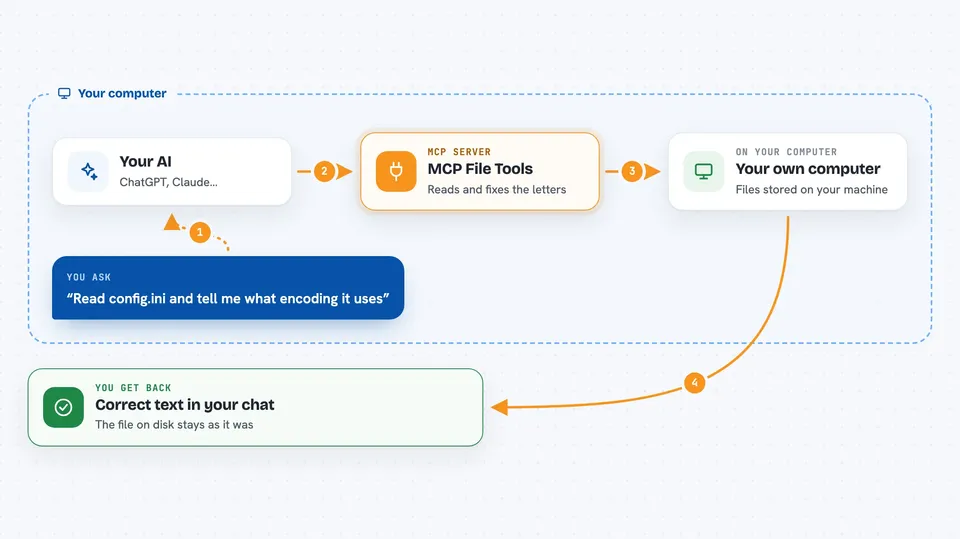
You ask your AI to read or change a file. The AI passes your request to this helper. The helper looks at the raw bytes of the file, figures out which encoding it uses, and translates the text into something the AI understands. When the AI writes something back, the helper saves it in the same original encoding, keeping any special markers and line breaks intact. You get the correct text in your chat, and the file on disk stays compatible with whatever old program uses it.
 Click to zoom
What you can do with it
- Read old text files and see the correct letters instead of question marks
- Change text inside a file while keeping its original encoding
- Find out which encoding a file uses, with a confidence score
- Search inside many files at once, even if they use different encodings
- Convert a file from one encoding to another
- Check or change the line endings (Windows-style or Unix-style)
- Detect, add or remove a hidden marker at the start of a file (BOM)
Try asking your AI
- “Read config.ini and tell me what encoding it uses”
- “Change the title in settings.txt to Настройки”
- “Find all .pas files in this folder and show me their encodings”
- “Convert this file from CP1251 to UTF-8”
What it gives back to you
You get the text of the file in your chat, already translated into readable characters. If you asked for a change, the AI shows you what it changed and confirms the file was saved. For encoding checks, you get the name of the encoding, a confidence score, and whether there is a BOM. For searches, you get a list of matching files and the lines that matched.
Before you start
What you need
- The Claude desktop app or Claude Code
- Node.js 18 or newer (for the plugin install)
- The folders you want the AI to access, listed when you set it up
Good to know
This helper can change, move or delete files in the folders you allow, so be careful with what you ask it to do and keep backups of important files.
Install it with your AI
Add MCP File Tools to your AI, no technical skills needed
You don't install anything by hand. You copy one prompt, paste it into an AI that can work on your computer, and it checks, installs and connects the server for you, asking you when it needs something.
Sign in to get the install prompt
Members get a ready-made prompt that lets the Claude desktop app check MCP File Tools, install it and connect it for them, step by step. You don't need any technical skills: you copy, paste and answer a few questions. Your connected AI can also find and install any of the 4,609 MCP servers here for you.
Who it's for
Anyone who works with older text files from legacy software, especially developers and support staff dealing with Cyrillic, Chinese, Japanese or other non-English content.




