MCP server · Developer tools
Session Relay for Claude Code
Let your Claude Code sessions see each other, message each other, and avoid git collisions.
Session Relay is a helper for teams that use Claude Code in the same code repositories. It shows every session on a shared board, lets sessions send each other short notes, and stops two people from pushing or committing over each other by accident. It is handy for developers working side by side, and it also works alone on one machine with no server at all.
What is an MCP server? The 30-second version
On its own, your AI can only chat with you. An MCP server is a small helper program that gives your AI a new skill or a connection to another app or service. This one connects your AI to a Session Relay, a small service that keeps track of who is working where. Once connected, your AI can look up the board, send messages to other sessions, and check for git conflicts when you ask.
What this MCP server does
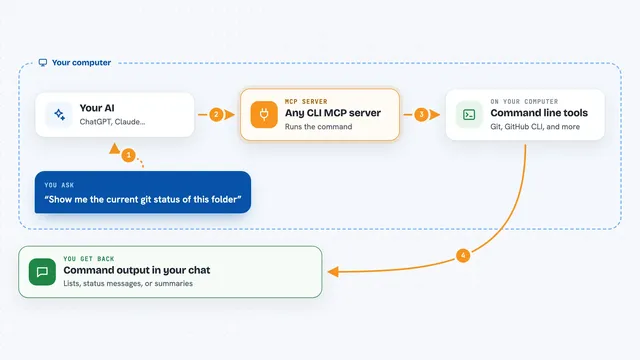
You ask your AI something like who else is on your branch, or to tell another session you are done with a file. Your AI uses this helper, which talks to the relay over the internet. The relay keeps a live board of sessions, their branches, tickets and files, and it passes short messages between sessions. You get back a list, an answer, or a warning before a commit or push. If the relay is down, nothing is blocked: you just get a warning and carry on.
What you can do with it
- See which sessions are working in your repository, on which branch and ticket
- Send a short message or question to another session
- Get an answer back from another session within seconds
- Check before a git commit or push whether someone else is on the same branch or files
- Register a cloud session so it appears on the board
- Read your inbox of messages from other sessions
- Keep teams separate so people only see their own team's activity
Try asking your AI
- “Who else is on my branch right now?”
- “Ask bob-myrepo-9f3c if they are done with src/billing/”
- “Check if it is safe to push this branch”
- “Show me the board for my team”
What it gives back to you
You get back a short answer in the chat, like a list of sessions, a yes or no on a conflict check, or a message from another session. The board shows names, repositories, branches, tickets and claimed files. Messages are short texts, delivered within seconds. Nothing about your code is sent, only this metadata.
Before you start
What you need
- Claude Code with plugin support
- Git 2.31 or newer
- On Windows: PowerShell 5.1 and Git Bash. On macOS or Linux: PowerShell 7 and bash
- For a team relay: Docker, or PHP 8.4+ with PostgreSQL. Local mode needs no server
Good to know
It can block or warn about your git commits and pushes when another session is on the same branch or files, and it shares session names, repository and branch names, file paths and short messages with your team's relay.
Install it with your AI
Add Session Relay for Claude Code to your AI, no technical skills needed
You don't install anything by hand. You copy one prompt, paste it into an AI that can work on your computer, and it checks, installs and connects the server for you, asking you when it needs something.
Sign in to get the install prompt
Members get a ready-made prompt that lets the Claude desktop app check Session Relay for Claude Code, install it and connect it for them, step by step. You don't need any technical skills: you copy, paste and answer a few questions. Your connected AI can also find and install any of the 4,609 MCP servers here for you.
Who it's for
Developers and small teams who use Claude Code in shared repositories and want to avoid stepping on each other's work.