
MCP server · Finance and crypto
Mercury Multi-Org MCP server
by dkaleganov
Ask your AI about balances, transactions, cards and invoices across several Mercury banking organizations at once.
This is a small helper that connects your AI assistant to Mercury, the online business banking service. It is unofficial and made by a community developer, not by Mercury. It is handy if you run more than one Mercury organization and want to ask questions about all of them in one chat.
What is an MCP server? The 30-second version
On its own, your AI can only chat. An MCP server is a small helper program that gives your AI a new skill, in this case a connection to Mercury banking. Once it is connected, the AI can look up your balances, transactions, cards and invoices for you when you ask. This particular helper is built for people who have several Mercury organizations, so it can talk to all of them in the same conversation.
What this MCP server does
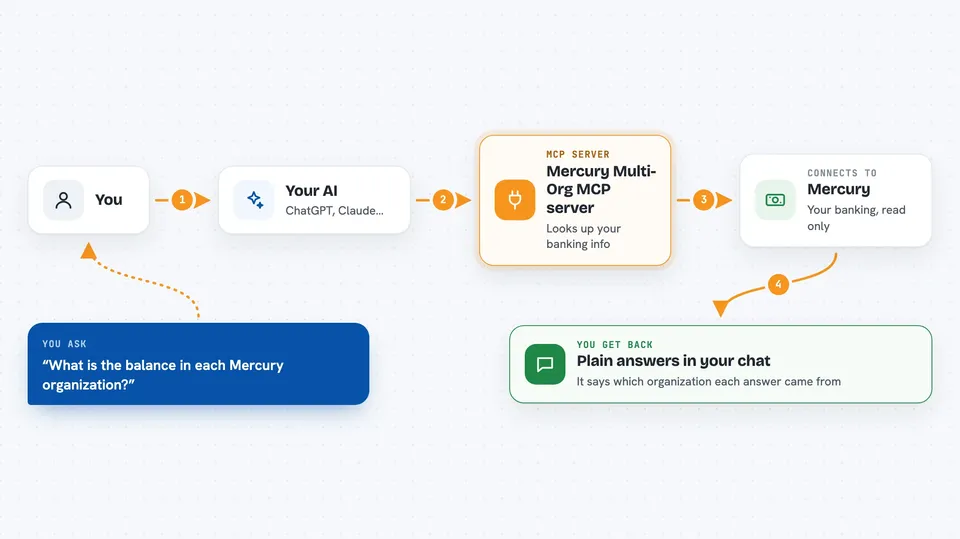
You ask your AI a question in plain words, like how much is in a certain account. The AI passes that request to this helper program. The helper then talks to Mercury using a read-only key you set up, and Mercury sends back the information. The helper tidies the answer and hands it to the AI, which explains it to you in the chat. It can only look things up, never move money or change anything.
 Click to zoom
What you can do with it
- Check balances across several Mercury organizations
- List recent transactions for an account
- Look up cards and their status
- Review invoices and their amounts
- See treasury activity
- Run a pre-filing check on 1099 totals
- Download a statement or invoice PDF (only if switched on)
Try asking your AI
- “What is the current balance in each of my Mercury organizations?”
- “Show me the last 20 transactions for the main checking account.”
- “Which cards are active right now?”
- “Give me a summary of unpaid invoices this month.”
What it gives back to you
You get back plain answers in the chat: lists of transactions, balances, card details, invoice summaries or totals. Numbers and dates come through as normal text you can read. If you have switched on the document option, it can also hand you a statement or invoice PDF. It always tells you which organization the answer came from.
Before you start
What you need
- A Mercury account with at least one organization
- A read-only Mercury API token for each organization (you create it inside Mercury under Settings, then Tokens)
- Python 3.11 or newer and the uv tool installed
- An MCP client that supports local helper programs, such as the Claude desktop app or Claude Code
Good to know
It can only read, never move money, but if you switch on the document option the PDFs it returns are unredacted and contain full account numbers and addresses, so treat every result as private.
Install it with your AI
Add Mercury Multi-Org MCP server to your AI, no technical skills needed
You don't install anything by hand. You copy one prompt, paste it into an AI that can work on your computer, and it checks, installs and connects the server for you, asking you when it needs something.
Sign in to get the install prompt
Members get a ready-made prompt that lets the Claude desktop app check Mercury Multi-Org MCP server, install it and connect it for them, step by step. You don't need any technical skills: you copy, paste and answer a few questions. Your connected AI can also find and install any of the 4,361 MCP servers here for you.
Who it's for
Small business owners, bookkeepers and finance staff who manage more than one Mercury organization and want quick answers without clicking through each dashboard.




