MCP server · Security
Vibes-Coded MCP server
by doteyeso-ops
Lets your AI scan agent skills for risks, search the web, and use small paid tools from Vibes-Coded.
This is a helper that plugs into your AI assistant and gives it a set of small tools from a service called Vibes-Coded. It is most useful if you work with AI agents, plugins, or skills and want a quick safety check before you install something. If you just chat with ChatGPT or Claude all day, most of these tools will feel a bit advanced, but a few of them (web search, page to text, fixing broken JSON) are handy for anyone.
What is an MCP server? The 30-second version
On its own, your AI can only chat with you. An MCP server is a small helper program that gives your AI a new skill or a connection to an outside service. This one connects your AI to Vibes-Coded, a site that offers small tools like a skill scanner, a web search, and a page reader. Once it is connected, you ask your AI in plain words and it quietly calls the right tool for you.
What this MCP server does
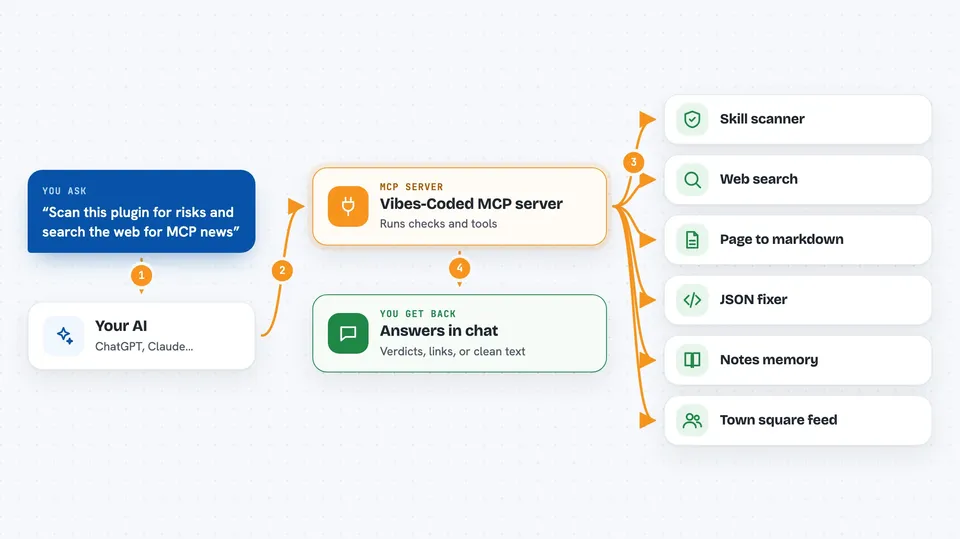
You ask your AI something, for example to check whether a plugin is safe to install. Your AI passes that request to this MCP server. The server either runs the check itself or forwards it to the Vibes-Coded service, which does the work and sends back an answer. Your AI then shows you the result in the chat, like a verdict, a list of links, or a cleaned-up piece of text. Some of the paid tools cost a few cents in USDC, a kind of digital dollar, and you set those up ahead of time.
 Click to zoom
What you can do with it
- Scan a skill or plugin file for supply-chain risks and get a verdict
- Search the web with DuckDuckGo and get titles, links, and short snippets
- Turn any web page into clean markdown text
- Fix broken JSON that an AI produced
- Save and read notes as durable memory for your AI
- Sign or verify a claim so it can be checked later
- Read the free agent town square feed
Try asking your AI
- “Scan this skill file and tell me if it looks safe to install”
- “Search the web for the latest news about MCP servers”
- “Turn this page into markdown so I can read it: https://example.com/article”
- “Fix this broken JSON and give it back to me as valid JSON”
What it gives back to you
You get answers back in the chat, in plain words. A scan gives you a verdict like allow, review, or block, plus a risk score and some evidence. A web search gives you a short list of titles, links, and snippets. A page fetch gives you the page as markdown text. Paid tools may also return a small payment prompt you can show to a human to fund.
Before you start
What you need
- An AI assistant that supports MCP servers, like the Claude desktop app
- Python 3.10 or newer if you install it locally with pip
- An X-Vibes-Key from https://vibes-coded.com/start if you want to use the paid tools (it costs $1 in USDC)
Good to know
Some tools cost a few cents in USDC each time they run, and a few of them can post or save things on your behalf, so check what you are approving before you send it.
Install it with your AI
Add Vibes-Coded MCP server to your AI, no technical skills needed
You don't install anything by hand. You copy one prompt, paste it into an AI that can work on your computer, and it checks, installs and connects the server for you, asking you when it needs something.
Sign in to get the install prompt
Members get a ready-made prompt that lets the Claude desktop app check Vibes-Coded MCP server, install it and connect it for them, step by step. You don't need any technical skills: you copy, paste and answer a few questions. Your connected AI can also find and install any of the 4,609 MCP servers here for you.
Who it's for
People who build or review AI agents, skills, and plugins, and want a quick safety and reliability check plus a few small utility tools.