MCP server · Privacy · official
Proofpane MCP server
by Proofpane · official
Give your AI a local gate that checks, redacts and records every tool call it makes.
Proofpane is a helper program that sits between your AI assistant and the tools it wants to use. It checks each action against rules you set, hides secrets before the AI sees them, and writes everything down in a log that cannot be quietly changed. It is handy for teams who need to show later what their AI did and why.
What is an MCP server? The 30-second version
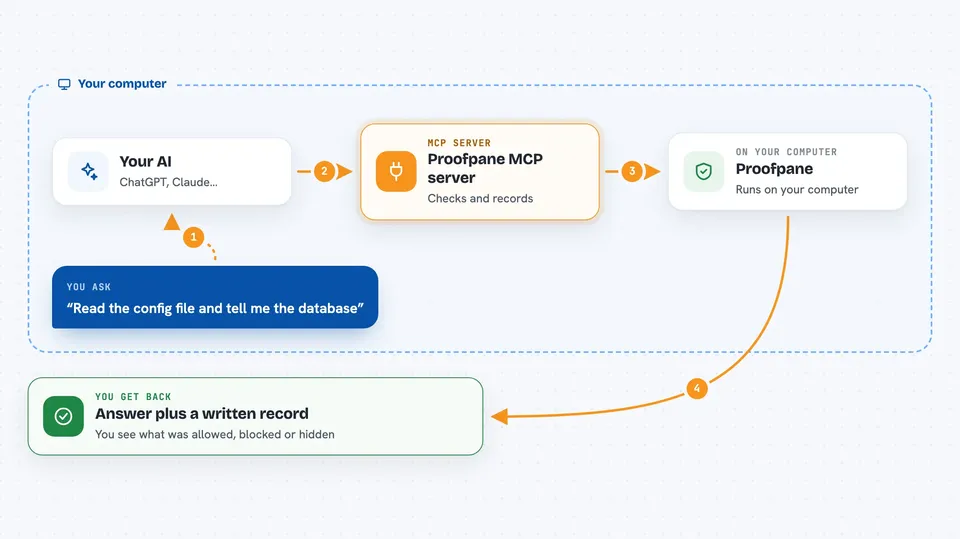
On its own, your AI can only chat. An MCP server is a small helper program that gives your AI a new skill or a connection to something else. This one is a gate that runs on your own computer: when your AI wants to read a file, run a command or search your notes, the request goes through Proofpane first. Proofpane decides yes, no, hide the secret, or wait for a human, and then writes the decision into a tamper-evident log.
What this MCP server does
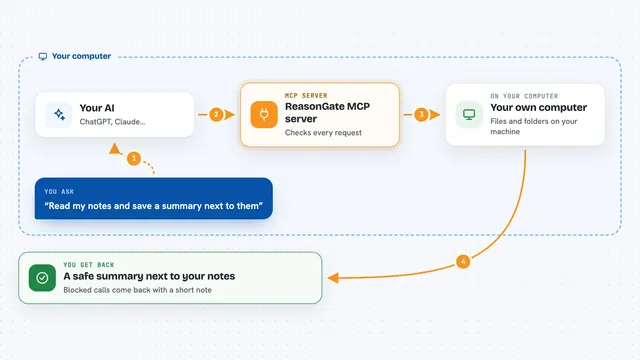
You ask your AI to do something, like read a file or run a command. Your AI sends that request to the Proofpane helper running on your machine instead of doing it directly. Proofpane checks its local rules, masks anything that looks like a secret, and either lets the action through, blocks it, or pauses it for a person to approve. Then it records the whole thing in a hash-chained log, so the record cannot be edited later without it being obvious. You get the result back in your chat, plus a written trail of what happened.
 Click to zoom
What you can do with it
- Run shell commands and file reads through a policy gate
- Mask secrets in files before your AI ever sees them
- Block or pause risky actions for human approval
- Search your own documents and past sessions from the chat
- List and load reusable skills your AI can follow
- Scan which of your AI tools are governed and which are not
- Preview what usage data would sync before anything is sent
Try asking your AI
- “Read the config file in this folder and tell me what database it points to”
- “Search my compliance documents for our data retention policy”
- “Run the tests in this project and summarise the failures”
- “Look through my past sessions for anything I asked about the billing migration”
What it gives back to you
You get normal chat answers: file contents, command output, search results, or a short summary of what the AI found. Alongside that, Proofpane keeps a record of each action it allowed, blocked or redacted. If you connect it to a Proofpane organisation, you can also export that record as a signed evidence pack an auditor can check offline.
Before you start
What you need
- The Proofpane daemon, downloaded from proofpane.com/install
- An MCP client such as Claude Desktop, Cursor or Codex
- A Proofpane organisation and pairing code, only if you want cloud audit, approvals and policy sync
Good to know
It can run commands and change or delete files on your computer, so set your rules carefully before letting your AI use it freely.
Install it with your AI
Add Proofpane MCP server to your AI, no technical skills needed
You don't install anything by hand. You copy one prompt, paste it into an AI that can work on your computer, and it checks, installs and connects the server for you, asking you when it needs something.
Sign in to get the install prompt
Members get a ready-made prompt that lets the Claude desktop app check Proofpane MCP server, install it and connect it for them, step by step. You don't need any technical skills: you copy, paste and answer a few questions. Your connected AI can also find and install any of the 4,609 MCP servers here for you.
Who it's for
Teams and IT or compliance people who need to control and document what their AI assistants are allowed to do.