MCP server · Analytics
System Monitor MCP server
by dragogargo
Ask your AI about your computer's CPU, memory, disk, network and running programs, and let it close a stuck one.
This is a small helper that lets your AI look at your own computer: how busy the processor is, how much memory is free, how full your disk is, and which programs are running. It is handy if your machine feels slow and you want a plain answer about what is going on. You do not need to be technical to use it, you just ask in normal words.
What is an MCP server? The 30-second version
On its own, your AI can only chat. It cannot see your computer. An MCP server is a small helper program that gives your AI one new skill. This helper connects your AI to the machine you are sitting at, so it can check things like memory and running programs for you when you ask.
What this MCP server does
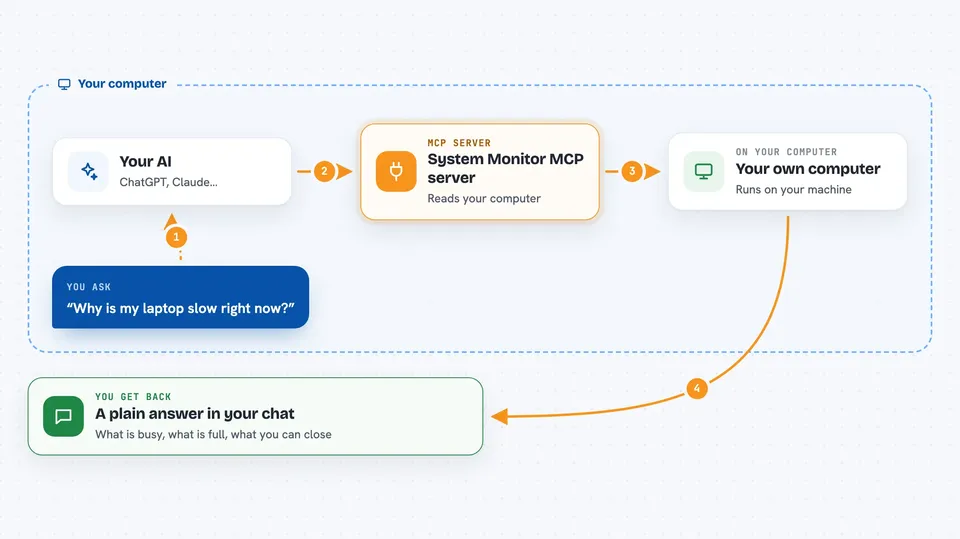
You ask your AI a question in plain words, for example why your laptop feels slow. Your AI passes that request to this helper program running on your computer. The helper reads the real numbers from your machine, like processor use, memory, disk space and the list of running programs. It sends those numbers back to your AI, which explains them to you in the chat. If you ask it to, it can also close a program for you.
 Click to zoom
What you can do with it
- Check how busy your processor and memory are right now
- Find the programs eating the most memory or processor time
- See how full each disk and drive is
- Look at your network connections, addresses and traffic
- List which ports are open and which program owns them
- Check your battery level and how much time is left
- Close a program that is stuck or hogging resources
Try asking your AI
- “Why is my laptop slow right now?”
- “What is using the most memory?”
- “Is anything wrong with my system?”
- “Find all Chrome processes and close the biggest one”
What it gives back to you
You get answers written in normal language, not raw numbers. For example, a short list of the top programs by memory, a summary of disk space, or a plain sentence saying your battery is at 40 percent with two hours left. When it closes a program, it tells you whether that worked. Everything shows up right in the chat, like a normal reply.
Before you start
What you need
- Python installed on your computer
- The Claude desktop app or Claude Code, set up to use this helper
Good to know
It can close programs on your computer, so be careful when you ask it to kill something, and avoid closing a program you do not recognize.
Install it with your AI
Add System Monitor MCP server to your AI, no technical skills needed
You don't install anything by hand. You copy one prompt, paste it into an AI that can work on your computer, and it checks, installs and connects the server for you, asking you when it needs something.
Sign in to get the install prompt
Members get a ready-made prompt that lets the Claude desktop app check System Monitor MCP server, install it and connect it for them, step by step. You don't need any technical skills: you copy, paste and answer a few questions. Your connected AI can also find and install any of the 4,361 MCP servers here for you.
Who it's for
Anyone whose computer feels slow and wants a simple explanation, plus people who like to keep an eye on their machine without learning technical tools.