
MCP server · Security
OWASP ZAP MCP server
by dtkmn
Let your AI run guided web security scans with OWASP ZAP and bring back findings and reports.
This is a helper that connects your AI assistant to OWASP ZAP, a well-known free tool for checking websites for security problems. You run it on your own computer with Docker, and then your AI can start scans, collect findings, and make reports for you. It is handy for people who test websites or look after their security, and who would rather ask in plain words than click through a scanner's menus.
What is an MCP server? The 30-second version
On its own, your AI can only chat. An MCP server is a small helper program that gives your AI a new skill or a connection to another tool. This one connects your AI to OWASP ZAP, a web security scanner, so the AI can ask ZAP to crawl a site, run scans, and gather results. You still decide what gets scanned, and the helper keeps things under your control with keys and limits.
What this MCP server does
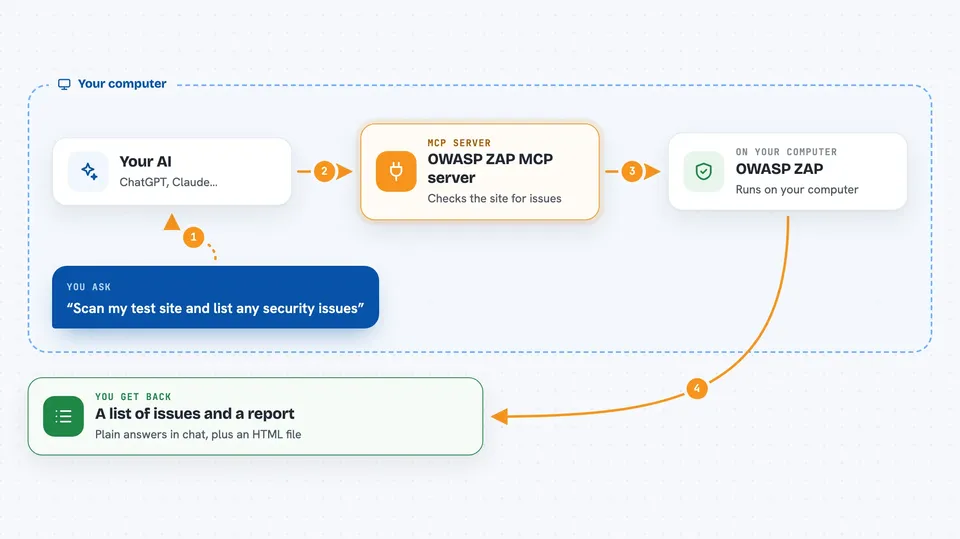
You ask your AI to scan a website you are allowed to test. The AI passes that request to this helper, which talks to ZAP running alongside it. ZAP crawls the site and looks for common security issues, then sends the findings back. The helper hands your AI a summary and can also build a report file you can read in the chat. Everything runs on your own machine, not on someone else's service.
 Click to zoom
What you can do with it
- Crawl a website to map out its pages
- Run a passive scan that only looks, without attacking
- Run an active scan that probes for weaknesses
- Show a summary of the findings
- Generate an HTML report of the results
- Import an API description so the scanner knows your endpoints
- Keep a history of past scans
Try asking your AI
- “Crawl http://juice-shop:3000 and show me a findings summary when it finishes”
- “Run a passive scan on my test site and list the issues you find”
- “Generate an HTML report from the last scan and read it back to me”
- “Import this API description and scan the endpoints it lists”
What it gives back to you
You get back plain answers in the chat: lists of pages found, a summary of issues with their severity, and counts of what was checked. It can also produce a report file, usually HTML, which your AI can read back to you. If something goes wrong, like a connection or scan error, you will see that instead of results.
Before you start
What you need
- Docker 20.10 or newer and Docker Compose v2
- An MCP client that supports Streamable HTTP and custom headers, such as Cursor or Codex
- A website you are allowed to scan
Good to know
Only scan websites you own or have clear permission to test, because active scans send real requests and can look like an attack to the site owner.
Install it with your AI
Add OWASP ZAP MCP server to your AI, no technical skills needed
You don't install anything by hand. You copy one prompt, paste it into an AI that can work on your computer, and it checks, installs and connects the server for you, asking you when it needs something.
Sign in to get the install prompt
Members get a ready-made prompt that lets the Claude desktop app check OWASP ZAP MCP server, install it and connect it for them, step by step. You don't need any technical skills: you copy, paste and answer a few questions. Your connected AI can also find and install any of the 4,609 MCP servers here for you.
Who it's for
People who test or look after website security, such as testers, developers, and small security teams, who want to run scans by asking their AI instead of clicking through a scanner.



