
MCP server · Developer tools
Tirith MCP server
by eabz
Lets several AI coding agents work on the same project without stepping on each other's files.
Tirith is a small helper program that keeps several AI coding agents from tripping over each other while they work on the same code project. When one agent is editing a file, the others are told to wait or pick something else. It is handy if you run more than one AI assistant on the same folder at the same time.
What is an MCP server? The 30-second version
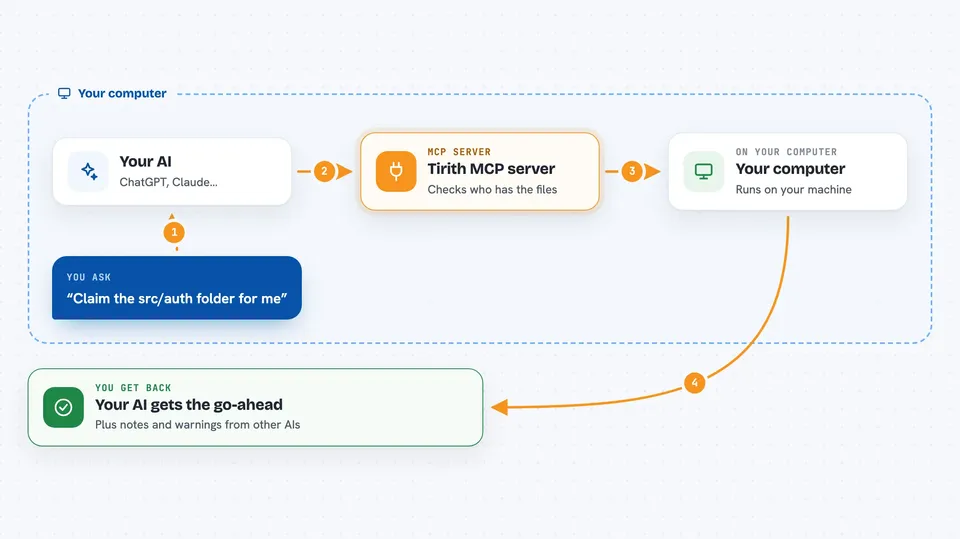
On its own, your AI can only chat with you. An MCP server is a small helper program that gives your AI a new skill or a connection to something else. This one connects your AI to Tirith, a little coordinator that runs on your own computer. Through it, your AI can claim files before editing, pick up tasks, and leave notes for the other agents.
What this MCP server does
You ask your AI to work on part of your project. Before touching anything, the AI asks Tirith to claim the files it wants to edit. If another agent already has those files, Tirith says no and tells your AI who has them and for how long. If the files are free, your AI gets the go-ahead plus any notes, warnings, or decisions other agents left about those files. When it is done, it lets the files go so someone else can use them.
 Click to zoom
What you can do with it
- Claim files or folders before editing so two agents do not change the same thing
- See which agent is working on which files right now
- Pick up the next open task from a shared task board
- Publish the shape of an interface so both sides build it the same way
- Leave a short note for whoever edits a file next
- Record a decision so it does not get argued about twice
- Send a short message to another agent
Try asking your AI
- “Claim the src/auth folder and tell me if anyone else is in there”
- “What tasks are open on the board right now?”
- “Leave a note for whoever edits src/auth next: session tokens are opaque, compare them, never parse them”
- “Publish a contract for the login response shape before we build it”
What it gives back to you
You get plain answers in the chat: whether your claim was granted or refused, who holds the files if it was refused, and when their turn ends. When you claim something, you also get back any notes, change notices, and decisions other agents left about those paths. The task board comes back as a list of tasks with their status and owner.
Before you start
What you need
- The Tirith program installed on your computer (the install script or cargo does this)
- An AI coding tool that can talk to MCP servers, such as Claude Code, Cursor, or Codex
- A project folder on your computer for Tirith to keep its notes in
Good to know
It can refuse or block your AI's work when another agent holds the files, and it writes a .tirith folder into your project, so check what gets committed.
Install it with your AI
Add Tirith MCP server to your AI, no technical skills needed
You don't install anything by hand. You copy one prompt, paste it into an AI that can work on your computer, and it checks, installs and connects the server for you, asking you when it needs something.
Sign in to get the install prompt
Members get a ready-made prompt that lets the Claude desktop app check Tirith MCP server, install it and connect it for them, step by step. You don't need any technical skills: you copy, paste and answer a few questions. Your connected AI can also find and install any of the 4,609 MCP servers here for you.
Who it's for
People who run several AI coding agents on the same project at once and want them to stop overwriting each other's work.



