MCP server · Research · official
echoloc MCP server
by echoloc-ai · official
Lets your AI look up which companies are adopting, replacing or evaluating software tools, using public hiring data.
This is a helper that connects your AI assistant to a company-intelligence service called echoloc. Once connected, you can ask your AI questions about companies and the software tools they use, and it will look up the answers for you. It is handy for sales, recruiting, market research and anyone who needs to know what tools a company is moving toward or away from.
What is an MCP server? The 30-second version
On its own, your AI can only chat with you using what it already knows. An MCP server is a small helper program that gives your AI a new skill or a connection to an outside service. This one connects your AI to echoloc, a dataset of company technology information. So when you ask about a company or a tool, your AI can go look it up in echoloc and bring the answer back to you.
What this MCP server does
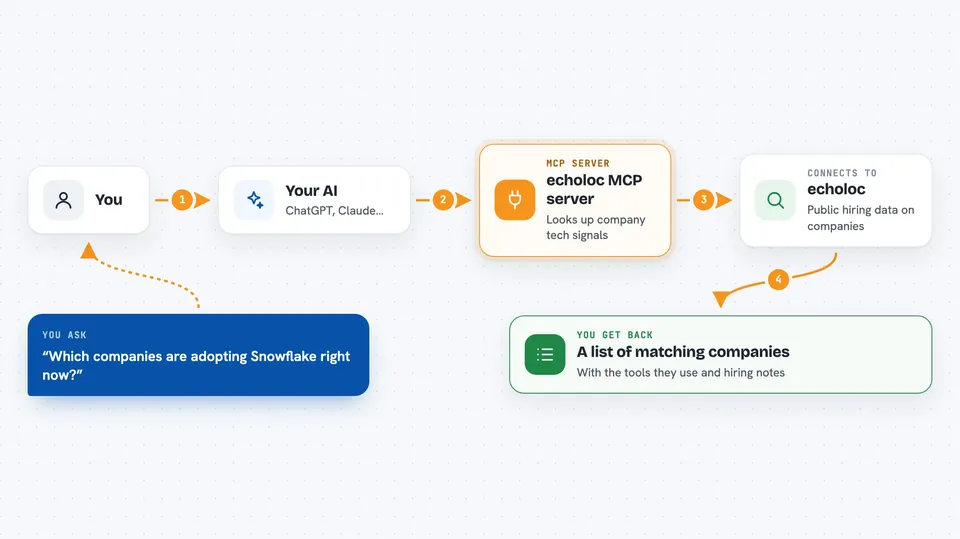
You ask your AI a question in plain words, like which companies are adopting a certain tool. Your AI sends that question to this helper, which talks to the echoloc service. echoloc searches its data, built from millions of public job posts, and finds matching companies. The helper sends the results back, and your AI shows them to you in the chat as a list or a short profile.
 Click to zoom
What you can do with it
- Find companies that use a specific technology
- See which companies are adopting, replacing or evaluating a tool
- Look up a company's full profile from its website address
- Check a company's hiring activity and departments
- Browse the full list of tracked technologies
- Compare companies by how much they use a given tool
Try asking your AI
- “Which financial-services companies are adopting Snowflake right now?”
- “Pull the tech stack and hiring signals for walgreens.com.”
- “Which companies are actively replacing VMware?”
- “Show me companies that use both Kubernetes and Terraform.”
What it gives back to you
You get back lists of companies, short company profiles, and technology counts. A profile can include basic company facts, hiring numbers, and the tools it uses with notes on whether it is adopting, replacing or evaluating them. Your AI shows this in the chat as text, often as a list or a small table.
Before you start
What you need
- A free echoloc account and API key (a kind of password for apps; you get 100 free requests a month)
- An MCP client that supports remote servers, such as Claude Code or Cursor
- For Claude Desktop and other local-only clients, the small bridge script from the project page
Good to know
Each tool call uses one of your monthly request credits, and the free plan only includes 100 per month.
Install it with your AI
Add echoloc MCP server to your AI, no technical skills needed
You don't install anything by hand. You copy one prompt, paste it into an AI that can work on your computer, and it checks, installs and connects the server for you, asking you when it needs something.
Sign in to get the install prompt
Members get a ready-made prompt that lets the Claude desktop app check echoloc MCP server, install it and connect it for them, step by step. You don't need any technical skills: you copy, paste and answer a few questions. Your connected AI can also find and install any of the 4,361 MCP servers here for you.
Who it's for
Sales teams, recruiters, market researchers and analysts who need to know what software tools companies are using or moving toward.