MCP server · Research
Open Data MCP server
by OpenDataMCP
Lets your AI answer questions using public open data sets, like train info from Switzerland.

Open Data MCP is a small helper that connects your AI assistant to public open data, the kind governments and public bodies share for free. It is handy if you want your AI to answer questions based on real public information instead of guessing. Right now it works with the Claude desktop app, and the team is adding more data sources over time.
What is an MCP server? The 30-second version
On its own, your AI can only chat with you using what it already learned. An MCP server is a small helper program that gives your AI a new skill or a connection to an outside source. This one, Open Data MCP, connects your AI to public open data sets, so when you ask a question, the AI can go look things up there and bring you back an answer. You set it up once, and after that it just works quietly in the background.
What this MCP server does
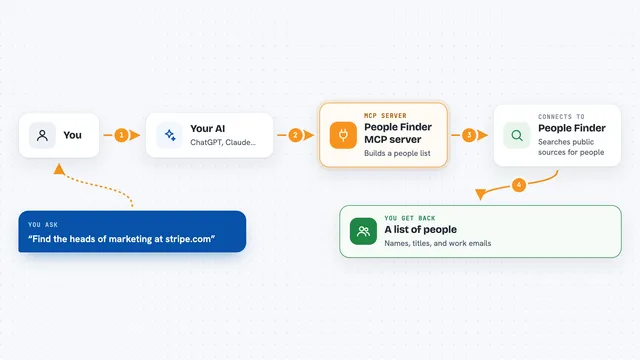
You ask your AI a question that needs public data, like whether trains are disrupted on a certain line. Your AI uses this helper to reach the right open data source. The helper asks that source for the information and hands it back to your AI. Your AI then reads it and answers you in plain words in the chat. You do not have to visit any data website yourself.
 Click to zoom
What you can do with it
- Ask about train disruptions on the Swiss SBB network
- Get answers based on public data instead of the AI guessing
- Set up a data source with a single command
- Remove a data source you no longer want
- List which data sources are available
- Look up details about a specific data source before adding it
Try asking your AI
- “Are there any disruptions on the SBB train network right now?”
- “Which SBB lines are affected today?”
- “List the open data sources I can add to Claude.”
- “Tell me more about the ch_sbb data source before I set it up.”
What it gives back to you
You get a written answer in the chat, based on the public data the helper fetched for you. It can include lists, short summaries, or specific details like which lines are affected. It does not hand you files or charts, just plain answers in the conversation.
Before you start
What you need
- The Claude desktop app installed on your computer
- The uv tool installed (a small program that runs the helper; the README shows how)
- A restart of Claude after setup so the new skill appears
Good to know
It only reads public open data, but you should still respect each data provider's license, and the project's own license must be mentioned in commercial use.
Install it with your AI
Add Open Data MCP server to your AI, no technical skills needed
You don't install anything by hand. You copy one prompt, paste it into an AI that can work on your computer, and it checks, installs and connects the server for you, asking you when it needs something.
Sign in to get the install prompt
Members get a ready-made prompt that lets the Claude desktop app check Open Data MCP server, install it and connect it for them, step by step. You don't need any technical skills: you copy, paste and answer a few questions. Your connected AI can also find and install any of the 4,361 MCP servers here for you.
Who it's for
Anyone who wants their AI to answer questions using public open data, especially people curious about government and public transport data.