MCP server · Research
GTM Signals Aggregator MCP server
by mambalabsdev
Your AI can score a company on hiring and tech signals and tell you if it is worth reaching out to.
This is a small helper that lets your AI look at a company's public signals and give it a single score. You give it a company website address, and it checks things like whether the company is hiring go-to-market roles and what tools they use. It is handy if you work in sales, marketing, or recruiting and you want a quick read on whether a company is worth your time.
What is an MCP server? The 30-second version
On its own, your AI can only chat with you. An MCP server is a small helper program that gives your AI a new skill or a connection to an outside service. This one connects your AI to a service called Apify, which runs the actual analysis on the company you name. Once it is set up, you just ask your AI about a company and it uses this helper to go find the answer for you.
What this MCP server does
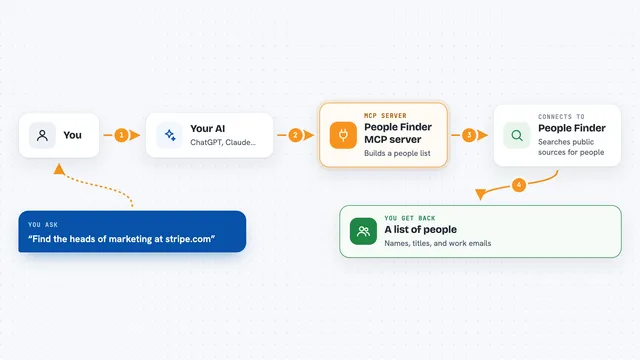
You ask your AI something like whether a company is a good target. Your AI passes the company's web address to this helper. The helper sends that address to an Apify service that looks at public hiring pages and tech clues. The service puts everything into one score and a short recommendation. Your AI then tells you the result in plain words in your chat.
What you can do with it
- Score any company on hiring and tech signals
- Get a recommended action like prioritize or skip
- See how many go-to-market roles a company is hiring for
- Spot which CRM or sales tools a company uses
- Ask for a plain-English explanation of the score
- Add funding, events, or workplace signals to the mix
Try asking your AI
- “Give me the overall GTM signal score for stripe.com.”
- “How strong a GTM target is openai.com? Aggregate their signals.”
- “Score figma.com on hiring and tech stack, and explain why.”
- “Pull the composite GTM signal for datadoghq.com with a summary.”
What it gives back to you
You get back a short row of information about the company. It includes a score from 0 to 100, a label like strong or weak, and a recommended action. If you asked for it, you also get a short plain-English summary explaining the score. Your AI shows all of this right in the chat.
Before you start
What you need
- Node.js 18 or newer on your computer
- A free Apify account
- An Apify API token (a kind of password for apps; Apify gives you one on their site)
Good to know
Each extra signal source you ask for runs a separate job on your Apify account, which uses up your Apify credits, so keep an eye on cost.
Install it with your AI
Add GTM Signals Aggregator MCP server to your AI, no technical skills needed
You don't install anything by hand. You copy one prompt, paste it into an AI that can work on your computer, and it checks, installs and connects the server for you, asking you when it needs something.
Sign in to get the install prompt
Members get a ready-made prompt that lets the Claude desktop app check GTM Signals Aggregator MCP server, install it and connect it for them, step by step. You don't need any technical skills: you copy, paste and answer a few questions. Your connected AI can also find and install any of the 4,361 MCP servers here for you.
Who it's for
Salespeople, marketers, and recruiters who want a quick read on whether a company is worth reaching out to.