
MCP server · Developer tools
Swift Patterns MCP server
by efremidze
Lets your AI look up trusted Swift and SwiftUI patterns and code examples while you work.
This is a helper that connects your AI assistant to a library of Swift and SwiftUI best practices. It gathers articles and examples from well known iOS writers like Swift by Sundell, SwiftLee, Nil Coalescing and Point-Free. It is handy if you build iPhone or Mac apps and want answers with real examples instead of guesses.
What is an MCP server? The 30-second version
On its own, your AI can only chat with what it already learned. An MCP server is a small helper program that gives your AI a new skill or a connection to a service. This one connects your AI to a collection of Swift and SwiftUI patterns and examples. So when you ask a question about iOS code, the AI can look things up in that collection and answer with real material.
What this MCP server does
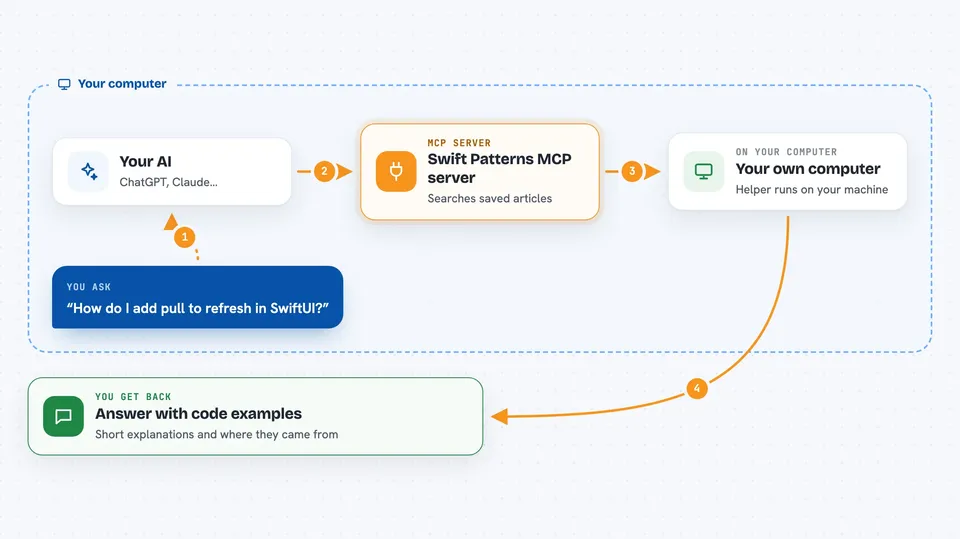
You ask your AI a question about Swift or SwiftUI, like how to do pull-to-refresh. The AI passes your question to this helper program running on your computer. The helper searches its collected articles and code examples from the sources you have turned on. It picks the most relevant ones and sends them back. Your AI then writes an answer for you using those patterns and examples.
 Click to zoom
What you can do with it
- Look up SwiftUI patterns by topic, like animations or navigation
- Find code examples from specific writers such as Sundell
- Compare approaches, for example MVVM versus TCA
- Recall patterns you searched for in earlier sessions
- Refresh its content automatically from the source feeds
- Filter results by quality so weaker matches stay out
What it gives back to you
You get answers in the chat written by your AI, backed by the patterns and code examples it found. Results usually come as short explanations with code snippets and the name of the source they came from. If it found nothing useful, it will tell you that too. The helper also remembers past searches, so later questions can reuse what it found before.
Before you start
What you need
- Node.js version 18 or newer
- An AI assistant that supports MCP, like Claude Desktop, Cursor, Windsurf, VS Code with Copilot, or Claude Code
Good to know
The optional Patreon part needs your Patreon login details and a small web address on your own machine, so only set that up if you really want premium content.
Install it with your AI
Add Swift Patterns MCP server to your AI, no technical skills needed
You don't install anything by hand. You copy one prompt, paste it into an AI that can work on your computer, and it checks, installs and connects the server for you, asking you when it needs something.
Sign in to get the install prompt
Members get a ready-made prompt that lets the Claude desktop app check Swift Patterns MCP server, install it and connect it for them, step by step. You don't need any technical skills: you copy, paste and answer a few questions. Your connected AI can also find and install any of the 4,609 MCP servers here for you.
Who it's for
iOS and Mac developers who write Swift and SwiftUI and want their AI to answer with trusted, real-world patterns.




