MCP server · Notes
Agent Breadcrumbs MCP server
by ejcho623
Let your AI save notes about finished work into a shared log you control.
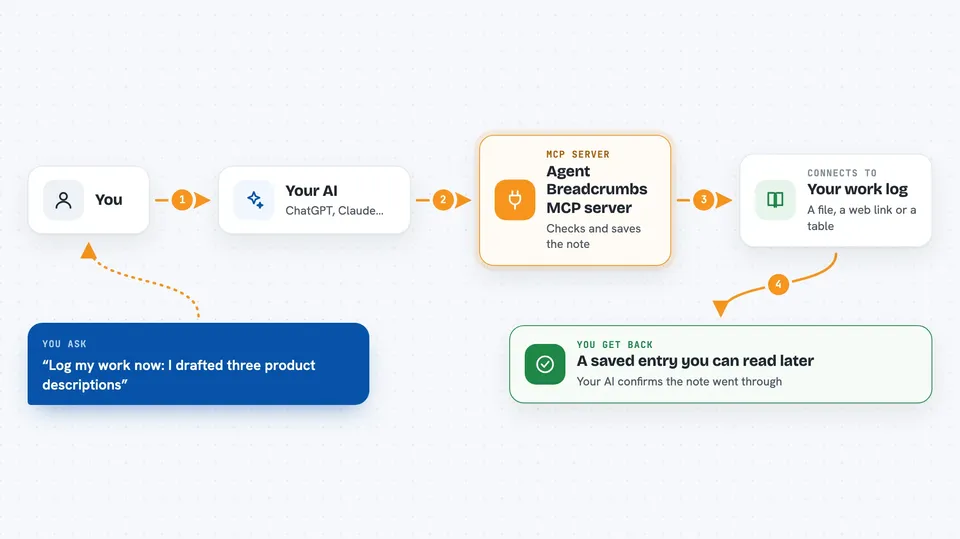
This is a small connector that adds one thing to your AI assistant: the ability to jot down what got done. It works quietly behind whatever AI app you already use, such as ChatGPT-style assistants, Claude, Cursor or similar. It's handy if several people or several AIs all touch the same projects and nobody remembers where things stand.
What is an MCP server? The 30-second version
On its own, your AI can only talk inside the little window you have open. An MCP server is just a small helper program running next to it that hands your AI extra abilities. Here, that helper connects your AI to a work log kept outside the conversation. So instead of repeating yourself, you tell the AI 'record this' and the note lands somewhere permanent you chose.
What this MCP server does
Once installed, the helper exposes a single action named log_work. When something worth remembering happens during a session, your AI calls that action and sends along the details. The helper takes those details, checks them against the shape you defined ahead of time, and writes them out either to a simple text file, to a website address you gave it, or into a database table. Later you (or anyone else reading the same place) can scroll through everything that was recorded. Nothing gets sent anywhere until someone asks the AI to log something.
 Click to zoom
What you can do with it
- Record a summary whenever your AI finishes a piece of work
- Keep logs from several different AI helpers in one consistent format
- Decide upfront which pieces of information must always come along
- Send entries straight into a team inbox via a web link
- Store entries in a database table for later searching
- Look at saved entries in a small viewing screen included in the project
Try asking your AI
- “Log my work now: I drafted three product descriptions and reviewed last week's feedback thread.”
- “Please record that we shipped version two of the onboarding email sequence today.”
- “Note that Alice answered twelve customer tickets between nine and noon.”
- “Write down the decisions from our planning meeting so far.”
What it gives back to you
What comes back depends on how much detail you asked for. Usually the AI confirms the entry went through, sometimes echoing part of what was stored so you know it landed correctly. For richer setups, the reply includes identifiers or counts pulled from the storage location. Either way, checking whether your request worked means looking at the confirmation message rather than digging around elsewhere.
Install it with your AI
Add Agent Breadcrumbs MCP server to your AI, no technical skills needed
You don't install anything by hand. You copy one prompt, paste it into an AI that can work on your computer, and it checks, installs and connects the server for you, asking you when it needs something.
Sign in to get the install prompt
Members get a ready-made prompt that lets the Claude desktop app check Agent Breadcrumbs MCP server, install it and connect it for them, step by step. You don't need any technical skills: you copy, paste and answer a few questions. Your connected AI can also find and install any of the 4,609 MCP servers here for you.
Who it's for
Teams whose members rely on more than one AI assistant and want a tidy written trace of what actually happened day to day.