MCP server · Developer tools · official
Edge Delta MCP server
by edgedelta · official
Lets your AI read Edge Delta logs, anomalies and pipelines, and safely test or deploy pipeline changes for you.
This is a helper that connects your AI assistant to Edge Delta, the tool your team uses to watch logs, metrics and events. Once it is set up, you can ask your AI questions about what is happening in Edge Delta and it can look things up for you. It is handy if you work with logs or pipelines but do not want to click through dashboards all day.
What is an MCP server? The 30-second version
On its own, your AI can only chat with you. An MCP server is a small helper program that gives your AI a new skill or a connection to an app or service. This one connects your AI to Edge Delta, so it can look up anomalies, search logs, read pipeline settings and even test pipeline changes when you ask. You do not need to know how it works inside; you just talk to your AI like usual.
What this MCP server does
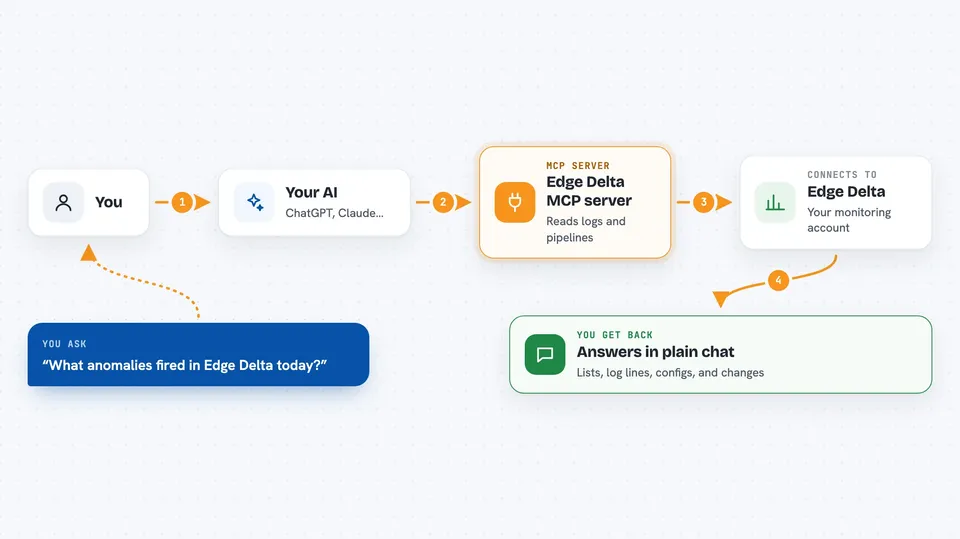
You ask your AI something about Edge Delta, for example which anomalies fired today or what a pipeline looks like. Your AI passes that request to this helper. The helper talks to Edge Delta using your account details. Edge Delta sends back the data, and your AI turns it into a normal answer in the chat. For pipeline changes, the helper follows a careful loop: check the config, save it, then deploy, with a way to roll back.
 Click to zoom
What you can do with it
- Look up anomalies and events in Edge Delta
- Search and read logs and patterns
- Read pipeline configurations and their version history
- Validate a pipeline config before saving it
- Save and deploy a pipeline change, or roll it back
- Sample live before and after data from a running pipeline
- Dry-run a processor against sample logs without touching live traffic
Try asking your AI
- “What anomalies fired in Edge Delta in the last 24 hours?”
- “Show me the current config for the payments pipeline.”
- “Search the logs for errors from the checkout service this morning.”
- “Test this OTTL statement against a few sample log lines and show me the result.”
What it gives back to you
You get answers in plain chat: lists of anomalies, log lines, pipeline names, config text or version history. For pipeline work, it can show you whether a config is valid, what changed between versions, and before/after samples from a live capture. If it saves or deploys something, it tells you what it did so you can confirm or roll back.
Before you start
What you need
- An Edge Delta account
- An Edge Delta API token (a kind of password for apps; you create it in Edge Delta)
- Your Edge Delta organisation ID
- Docker installed and running on your computer
Good to know
It can save and deploy changes to your live Edge Delta pipelines, so read what your AI is about to do before you say yes, and use the rollback option if something looks wrong.
Install it with your AI
Add Edge Delta MCP server to your AI, no technical skills needed
You don't install anything by hand. You copy one prompt, paste it into an AI that can work on your computer, and it checks, installs and connects the server for you, asking you when it needs something.
Sign in to get the install prompt
Members get a ready-made prompt that lets the Claude desktop app check Edge Delta MCP server, install it and connect it for them, step by step. You don't need any technical skills: you copy, paste and answer a few questions. Your connected AI can also find and install any of the 4,361 MCP servers here for you.
Who it's for
Engineers and operations people who already use Edge Delta and want to ask questions or make pipeline changes without leaving their AI chat.