
MCP server · Security
MCP Audit Gateway
by elang2
Keep a tamper-proof record of every tool call your AI makes, so you can check what it really did.
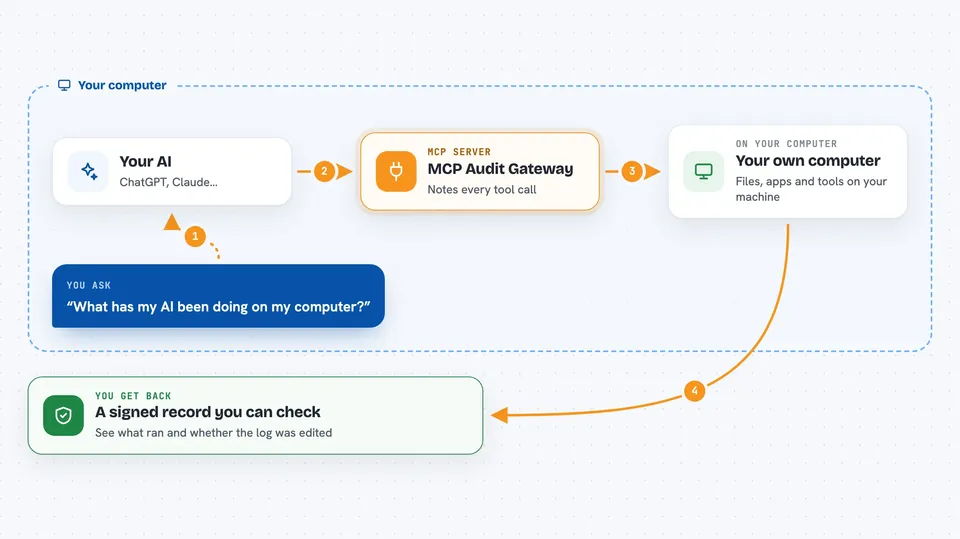
This is a small helper that sits between your AI assistant and the other tools it uses, and writes down every action in a signed log. If you ever wonder what your AI actually did, or you need to prove it later, this gives you a record you can check. It is handy for anyone who lets an AI assistant touch real files, code, or accounts and wants a paper trail.
What is an MCP server? The 30-second version
On its own, your AI can only chat with you. An MCP server is a small helper program that gives your AI a new skill or a connection to an app, like GitHub or your files. This particular helper does not add a new skill. It sits quietly in the middle between your AI and the other helpers, and writes down every action in a signed log. So your AI keeps working exactly as before, but now there is a record of what it did.
What this MCP server does
You set it up once by putting a short prefix in front of the command that starts your existing MCP server. From then on, whenever your AI asks another tool to do something, that request passes through this helper first. The helper lets the request go through unchanged and notes down the tool name, the arguments, how long it took, and whether it worked. Each note is signed and linked to the previous one, so if anyone edits or removes a line, the check fails. You can watch the log live or verify the whole chain later.
 Click to zoom
What you can do with it
- See a live stream of every tool call your AI makes
- Check that the log has not been edited or shortened
- Look up what arguments were passed to a specific tool call
- See which calls succeeded and which failed
- Add access rules and rate limits for a team setup
- Send the audit data to your monitoring tools
- Wrap any existing MCP server without changing how it works
What it gives back to you
You get a list of tool calls with the time, the tool name, how long it took, and whether it worked. Each line has a short code you can use to look it up. When you run the verify command, you get a simple report: how many records were checked, how many were valid, and whether anything looks off. In the full gateway mode you also get access decisions and traces sent to your monitoring tools.
Before you start
What you need
- Node.js 18 or newer
- An existing MCP server you want to watch (for example the GitHub or filesystem one)
- The config file where your AI app lists its MCP servers
Good to know
It records the arguments of tool calls, which can include private text, file paths, or other sensitive details, so treat the audit log file itself as private.
Install it with your AI
Add MCP Audit Gateway to your AI, no technical skills needed
You don't install anything by hand. You copy one prompt, paste it into an AI that can work on your computer, and it checks, installs and connects the server for you, asking you when it needs something.
Sign in to get the install prompt
Members get a ready-made prompt that lets the Claude desktop app check MCP Audit Gateway, install it and connect it for them, step by step. You don't need any technical skills: you copy, paste and answer a few questions. Your connected AI can also find and install any of the 4,609 MCP servers here for you.
Who it's for
Anyone who lets an AI assistant take real actions on their files, code, or accounts and wants a record they can check later, especially small teams and people in security or compliance roles.



