
MCP server · Security
Umbra MCP server
by elberacasa
Your AI can scan code it wrote, check a file before saving it, and get a trust score from 0 to 100.
Umbra is a checker for code that an AI wrote for you. It looks for common security mistakes and gives the whole project a trust score out of 100, with the exact file and line for each problem. It is handy if you use ChatGPT, Claude, Cursor or similar tools to build things and you want a second opinion before you ship.
What is an MCP server? The 30-second version
On its own, your AI can only chat with you. An MCP server is a small helper program that gives your AI a new skill or a connection to another tool. This one connects your AI to Umbra, a code checker that runs on your own computer. Once it is connected, your AI can ask Umbra to scan a project, check a file before saving it, or hand back the current trust score.
What this MCP server does
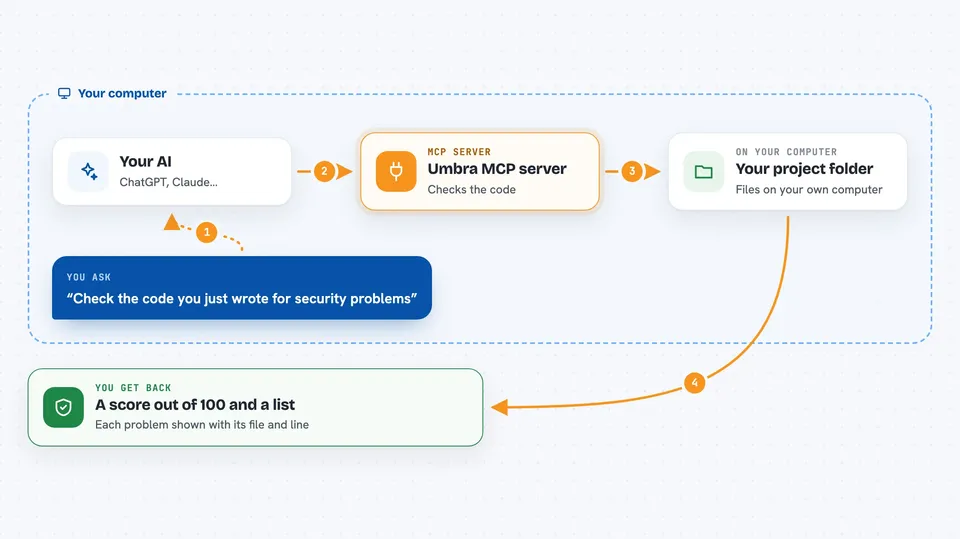
You ask your AI to check the code it just wrote. The AI passes the project folder or the file content to this helper. The helper runs Umbra's rules over it, looking for things like hardcoded passwords, missing login checks, and unsafe database queries. It sends the findings and a score back to your AI, which explains them to you in the chat. You can then decide what to fix.
 Click to zoom
What you can do with it
- Scan a whole project folder and get a trust score out of 100
- Check a single file's content before your AI saves it
- Get a list of findings with the exact file and line for each one
- See which findings are high confidence and which are just hunches
- Ask for the current score of a project you already scanned
- Spot hardcoded secrets like API keys and passwords left in the code
- Catch missing login checks on web routes
Try asking your AI
- “Scan this project with Umbra and tell me the trust score”
- “Before you save that file, check it with Umbra and tell me if anything is wrong”
- “What is the current Umbra score for this repo?”
- “Show me the top findings from the last Umbra scan, with file and line”
What it gives back to you
You get back a score from 0 to 100, a short verdict, and a list of findings. Each finding names the problem, the file and line where it was found, and how confident Umbra is. Your AI reads this and explains it in the chat, so you see both the number and the reasons behind it.
Before you start
What you need
- Node.js 18 or newer installed on your computer
- An AI tool that can use MCP servers, like Claude Code or Cursor
- Docker if you want the deeper checks that actually build and run the project
Good to know
The guard can block your AI from saving a file when it finds a serious problem, and the deeper checks run your project inside Docker, so only point it at code you are comfortable running.
Install it with your AI
Add Umbra MCP server to your AI, no technical skills needed
You don't install anything by hand. You copy one prompt, paste it into an AI that can work on your computer, and it checks, installs and connects the server for you, asking you when it needs something.
Sign in to get the install prompt
Members get a ready-made prompt that lets the Claude desktop app check Umbra MCP server, install it and connect it for them, step by step. You don't need any technical skills: you copy, paste and answer a few questions. Your connected AI can also find and install any of the 4,609 MCP servers here for you.
Who it's for
People who build software with AI coding tools and want a quick safety check before they share or ship it.




